-
Notifications
You must be signed in to change notification settings - Fork 0
yathvi/OperatingSystemAndDataCenter
Folders and files
| Name | Name | Last commit message | Last commit date | |
|---|---|---|---|---|
Repository files navigation
Once there was a King of the Universe (or King of Kings), he had zero and one ...

As time passed alphabets, words and languages got created ...

Do you know there is a language called Toki Pona (The Language of Good)
	Which has 120 words, or headwords.
	Check	https://en.wikipedia.org/wiki/List_of_dictionaries_by_number_of_words

For now, Lets define a New Language which has 7 Words:
	1.	OPERATING SYSTEM
	2.	NETWORK
	3.	DATA CENTER
	4.	DATA (DATA put into context is INFORMATION)
	5.	STATIC
	6.	DYNAMIC
	7.	LOAD(computing) or LOAD BALANCING(computing)

The King is coming back soon ...

Ellipsis (...)	-->	there's something left unsaid


As I told earlier in one of my LinkedIn post
	The whole Software Industry is running on INTERNET, Wired or Wireless.

Do you think
	Most of the Software Engineers or Almost all Software Engineers are doing Copy - Paste work?

We know
		-	The Binary Language is two-symbol system : 0 and 1
		-	Most of the INTERNET or All of the INTERNET is running on Binary 0 and 1
		-	The INTERNET has STATIC DATA/INFORMATION, DYNAMIC DATA/INFORMATION stored in DATA CENTERS or any other Device
			-	STATIC can become DYNAMIC for SOME_TIME or LONG_TIME
			- 	DYNAMIC can become STATIC for SOME_TIME or LONG_TIME
		-	Most of the time or All of the time, The INTERNET is running on LOAD BALANCING


IMPORTANT NOTE:		While viewing this Document on any editor, disable/remove Soft Wrap or Word Wrap or Hard Wrap
					Please spend some time setting Any Text Editor you are using so that Diagrams and Text appear in the right format.
					So, It will be easy to Read or Glance faster.

					1.	I created this Document on 'BBEdit'
						1.	BBEdit -> Preferences -> Editor Defaults -> Spaces per tab: 4
						2.	BBEdit -> Preferences -> Sidebar -> Automatically show sidebar: Always
							Open all Files in BBEdit and use Multi-File Search, since few of the words are inter-related between this documents.

							The application contains multi-file text searching capabilities including support for Perl-compatible regular expressions.

							Search -> Multi-File Search -> Find All

							Search in:

								My Files & Folders
								Saved Search Sets
								Frontmost Project
								Open Editing Windows
								Open Text Documents
								Recent Folders
								Results Browsers
								Paths Files

					2.	While using 'Sublime Text'
						Go To 'View' ->	uncheck 'Word Wrap'

					3.	While using 'IntelliJ IDEA', once you open text file
						Go To 'Right bottom corner' and click 'EditorConfig' -> 'Open Current File'
						Set 'indent_size = 4'

					4.	If you want to view the contents in Browser (https://github.com/)
						Then Select or Click on any .txt file
						Edit file --> Edit in place
						Indent mode --> Tabs
						Indent size --> 4
						Line wrap mode --> No wrap


 ================================================
||	<==> OPERATING SYSTEMS & DATA CENTERS <==>	||
 ================================================
					||
					||
				   -  -
				   \  /
					\/
 ------------------------------------------------------------------------------------
||	OPERATING SYSTEM ==interacts_with==> NETWORK ==interacts_with==> DATA CENTER	||
 ------------------------------------------------------------------------------------

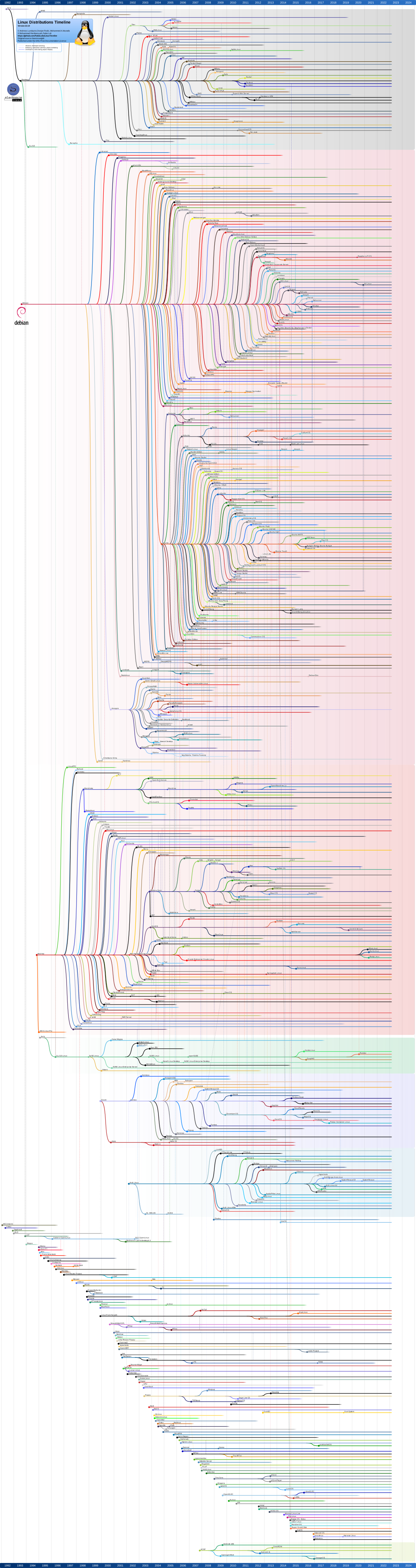
You can see LINUX and ANDROID in below Image:
https://upload.wikimedia.org/wikipedia/commons/1/1b/Linux_Distribution_Timeline.svg
https://en.wikipedia.org/wiki/List_of_Linux_distributions

You can see UNIX and MAC OS in below Image:
https://en.wikipedia.org/wiki/File:Unix_history-simple.svg
https://en.wikipedia.org/wiki/Operating_system

You can see WINDOWS in below Image:
https://eylenburg.github.io/os_familytree.htm
	NOTE: I got this image from a random Youtube video, Provided Youtube Video URL in the bottom of the page. (The 50 Most Popular Linux & Terminal Commands - Full Course for Beginners)


The whole Software Industry is running on Internet, Wired or Wireless.

=============
<=> Wired <=>
=============

	https://www.submarinecablemap.com

================
<=> Wireless <=>
================

	https://www.starlink.com
		RESIDENTIAL								Connect at home
		ROAM									Connect on the go
		BOATS									Connect on the water
		CONNECTIVITY WHERE YOU LEAST EXPECT IT	Streaming, video calls, online gaming, remote working and more are now possible in even the most remote locations thanks to the world’s most advanced internet system.

	Starlink
		Starlink is a satellite internet constellation operated by American aerospace company SpaceX,
		providing coverage to over 70 countries. It also aims for global mobile phone service after 2023.

		SpaceX started launching Starlink satellites in 2019. As of early January 2024,
		it consists of over 5,289 mass-produced small satellites in low Earth orbit (LEO) that communicate with designated ground transceivers.

 ====================================================================
||	JUST WANT TO MAKE SURE FROM LINE 140 TO 806; WE ARE ASSUMING.	||
 ====================================================================
  ------- ========================== -------
<| Start |	For now let's assume	| Start |>
  ------- ========================== -------


						OPERATING SYSTEM (Laptop/Desktop/Phone/AnyDevice)
								|
								|
				 -------------------------------
				|		|						|
				|		|						|
			 NETWORK NETWORK	.	.	.	 NETWORK (Wired or Wireless)			-->	Load balancing (computing)	https://en.wikipedia.org/wiki/Load_balancing_(computing)
				|		|						|
				|		|						|
				 -------------------------------
								|
								|
							DATA CENTER (One or More) (Designed to Store, Process, Manage, and distribute DATA/INFORMATION and applications for businesses, organizations, and individuals)


OPERATING SYSTEM ==interacts_with==> NETWORK ==interacts_with==> DATA CENTER

All the Global Internet Users/Software Engineers use OPERATING SYSTEM(Laptop/Desktop/Phone/AnyDevice) to interact with DATA/INFORMATION which is stored in DATA CENTER or any other Device via NETWORK.


OPERATING SYSTEM 	--> Laptop/Desktop/Phone/AnyDevice

NETWORK 			--> Wired (Also Known as Guided media)
						or
						Wireless (Also Known as Unguided media)

DATA CENTER 		--> Designed to Store, Process, Manage, and distribute DATA/INFORMATION and applications for businesses, organizations, and individuals


DATA				-->	can be a number, symbol, character, word, codes, graphs, etc.
INFORMATION			-->	DATA put into context


OPERATING SYSTEM	-->	has something like STATIC , DYNAMIC
NETWORK				-->	has something like STATIC , DYNAMIC
DATA CENTER			-->	has something like STATIC , DYNAMIC


STATIC				--> Not Changing for a long time or Not changing for some time
DYNAMIC				--> Changing frequently


OPERATING SYSTEM	-->
						1.	STATIC
							May be Files (Text Files, Audio Files, Video Files) saved/stored in Laptop/Desktop/Phone/AnyDevice
							Static Components: These are components in a laptop that do not typically change or move during operation.
							Examples include the laptop's chassis, keyboard, touchpad, and certain structural components.
						2.	DYNAMIC
							Dynamic Components: These are components that are more variable or actively involved in the operation of the laptop.
							Examples include the CPU (Central Processing Unit), GPU (Graphics Processing Unit), RAM (Random Access Memory), storage drives (HDDs or SSDs), fans,
							and other components that are involved in processing data, storing data, or facilitating the laptop's operation.

						More details in:	Static vs. Dynamic Operating
											https://chat.openai.com/share/73d83de9-67c3-4025-afe5-d56739d8f20d

NETWORK				-->
						1.	STATIC
							In the context of computer networking, "static" typically refers to configurations or settings that remain fixed and unchanged unless manually modified by an administrator.
							For example: Static IP address, Static routing, Static DNS
						2.	DYNAMIC
							In contrast, "dynamic" refers to configurations or settings that are automatically assigned or updated by the network infrastructure itself without manual intervention.
							Some examples include: Dynamic IP address, Dynamic routing, Dynamic DNS

						More details in:	Dynamic vs Static Networking
											https://chat.openai.com/share/f6138f24-97d4-4208-a01e-edfe3afee940

DATA CENTER			-->
						1.	STATIC (DATA/INFORMATION stored in DATA CENTER):
							-	like photos, videos, movies, Soft copy of books across world, wikipedia, Audio files, video files, text files, Websites, database, Artifactories ...
						2.	DYNAMIC (DATA CENTER has something like Servers which will process this DATA/INFORMATION):
							-	like Processors(CPU, GPU), Cloud, Server, Software, Applications or Apps, Mobile Apps, Programming Language, Operating Systems, Networks, Web Applications ...

						More details in:	Data Center Components Overview
											https://chat.openai.com/share/8b7d5c0b-287e-4533-8ff0-3ec6f68371c5


LOAD(computing) 			Most of the time or All of the time, The INTERNET is running on LOAD BALANCING, So lets include everything.
or 					-->		ChatGPT listed 100+ (https://chat.openai.com/share/4e461046-dbef-48e7-86ef-45bcca6a320b)
LOAD BALANCING				Listing few here.
(computing)					Network Load Balancing, Server Load Balancing, Application Load Balancing, Database Load Balancing, Content Delivery Network (CDN) Load Balancing
							DNS Load Balancing, Firewall Load Balancing, Storage Load Balancing, Virtual Machine Load Balancing, API Gateway Load Balancing
							Container Orchestration Load Balancing, Real-Time Communication Load Balancing, Hybrid Cloud Load Balancing, Multi-Tier Application Load Balancing


==========================
<==> OPERATING SYSTEM <==>
==========================

1.	Number of alphabets in English = 26, Most of them are English-based programming Languages
	Non-English-based programming languages : https://en.wikipedia.org/wiki/Non-English-based_programming_languages
	Udemy Course: Cryptography and Hashing Fundamentals in Python and Java (15+ Hours) Explains encryption/decryption using 26 ENGLISH ALPHABETS.

	As of February 2024 'most of them are' or 'almost everything widely used' is English-based programming Languages
	Supporting
	localization (l10n) / internationalization (i18n) / globalization (g11n) / native language support (NLS)
	Adaptation to language, etc. -->
		-	Language localization : translating a product into different languages or adapting a product to a country or region
		-	Internationalization and localization : the adaptation of computer software for non-native environments, especially other nations and cultures
		-	Video game localization : preparation of video games for other locales
		-	Dub localization : the adaptation of a movie or television series for another audience

	A Typeface (or Font Family) is a design of letters, numbers and other symbols, to be used in printing or for electronic display.
	There are thousands of different Typefaces (or Font Family) in existence, with new ones being developed constantly.
	https://en.wikipedia.org/wiki/List_of_typefaces

	In Conclusion:
	Since most of them are English Based, lets assume all below points are for English.

2.	There are 8 to 9+ Million Mobile Apps, 1 to 2 billion Websites(STATIC) or Web Applications(DYNAMIC), 5000 to 10000+ Data Centers
3.	There are 1000 to 10000+ programming languages.

	Syntax (programming languages)	https://en.wikipedia.org/wiki/Syntax_(programming_languages)
	Computer language syntax is generally distinguished into three levels: Words, Phrases, Context

		1.	Words – the lexical level, determining how characters form tokens;
		2.	Phrases – the grammar level, narrowly speaking, determining how tokens form phrases;
		3.	Context – determining what objects or variables names refer to, if types are valid, etc.

	Ideally if you learn one Programming Language, it should be easy to get the rest, since most of them are English based (26 alphabets)
	Its even easy if Microservices
		(Services can be implemented using different programming languages, databases, hardware and software environments, depending on what fits best.
		 https://en.wikipedia.org/wiki/Microservices)
	are used compared to Monolithic system.

	Of the more than 7,000 existing languages, only a few hundred are recognized as being in use for Web pages on the World Wide Web.
	(https://en.wikipedia.org/wiki/Languages_used_on_the_Internet)

4.	Currently, the OS family tree includes between around 1,120 different operating systems (including some renamings)(https://eylenburg.github.io/os_familytree.htm)
5.	For now lets assume there are 10+ Operating System that are widely used across World.
	And this Operating systems are written in 10 or 20 + programming languages.
6.	All this programming languages we run either in
	Laptop/Desktop/Mobile/Some_Other_Device using one of the Operating System Windows/macOS/Linux/iOS/Android/Unix/Any_Other
	Since some Operating Systems are written in C, C++, Assembly; your programming language(any one) will always interact with Operating Systems code.

=================
<==> NETWORK <==>
=================

7.	Technically Speaking all the User Interfaces like Mobile Apps, Web Applications should work most of the time or all the time.
	Unless there is some Glitch (Network Glitch or any Other Glitch)
8.	Speed of Wired communication media (Also Known as Guided media) is optimized over period of time.
 	Wired
 		Twisted pair, Coaxial cable, Optical fiber, ....
9.	I am not sure whether Speed of Wireless communication media (Also Known as Unguided media) keeps changing over Time. (If we Exclude Transmission medium)
	Wireless
		Speed of light, Speed of Sound , Speed of electromagnetic radiation (organized by frequency or wavelength), Radio ...


=====================
<==> DATA CENTER <==>
=====================
Internet's DATA/INFORMATION is stored in DATA CENTERS
Software Companies might have its own DATA CENTERS or might be using external DATA CENTERS to store DATA/INFORMATION.


10.	Lets assume that All this Mobile Apps and Web Applications can be divided in to 2 parts

	1.	PROGRAMS/ANY_OTHER_WORD_THAT_CORRECTLY_DESCRIBE_THE_MEANING --> Lets include Operating Systems, Programming Languages, Network, Data Centers, All Hardware devices,
		Everything that is required to run User Interfaces like Mobile Apps, Websites including Internet, Electricity ....

		ANY_OTHER_WORD_THAT_CORRECTLY_DESCRIBE_THE_MEANING --> May be TECHNOLOGY/SOFTWARE TECHNOLOGY/HARDWARE TECHNOLOGY (EXCLUDE DATA/INFORMATION FROM THIS WORDS)

	2.	DATA/INFORMATION --> What ever Humans can understand and utilise in some significant way
		In a nutshell, DATA can be a number, symbol, character, word, codes, graphs, etc. On the other hand, INFORMATION is DATA put into context.
		INFORMATION is utilised by humans in some significant way (such as to make decisions, forecasts etc.
		A basic example of INFORMATION would be a computer. A computer uses programming scripts, formulas, or software applications to turn data into INFORMATION.

11.	Once you learn PROGRAMS/ANY_OTHER_WORD_THAT_CORRECTLY_DESCRIBE_THE_MEANING
	You can join any Software Company to learn DATA/INFORMATION
	Like
		- Bank related Companies to learn Bank Technology.
		- Space related Companies to learn Space Technology.
		- Game related Companies to learn Game Technology.
		- Biology related Companies to learn Biology. (Includes Human Biology)


================================================
<==> Software Industry / Software Engineers <==>
================================================
Everyone who works to run the Internet

12.	Once we set this context from above points 1 to 11 then:

	Do you think Most of the Software Engineers are doing Copy - Paste work?
	Using few Efficient Algorithms which are part of Operating System Code or Programming Language Libraries or Programming Language Frameworks or Toolkit or Any Other.

	Engineers who maintain OPERATING SYSTEM or NETWORK or DATA CENTER or PROGRAMMING LANGUAGE
	keep adding/updating New Changes, New Enhancements, Security fixes and lot of other things ... ;

	rest will be using those.

	Since Most of the PROGRAMMING LANGUAGES, OPERATING SYSTEM are built using English language(26 characters)
	and considering the second point(2. There are 8 to 9+ Million Mobile Apps, 1 to 2 billion Websites(STATIC) or Web Applications(DYNAMIC), 5000 to 10000+ Data Centers)
	Do you think Most of the Software Engineers are doing Copy - Paste work.
	I am not Sure.


13.	Most of the Software Engineers or Almost all Software Engineers
	-	Work on Laptop/Desktop/Phone/AnyDevice which has OPERATING SYSTEM.
	-	Deploy there Applications (Web Applications, Mobile Application, or Any Other) in to DATA CENTER.
	-	If there is any issue in the Application which is deployed in DATA CENTER,
		they will try to replicate DATA CENTER configuration in there local device (Laptop/Desktop/Phone/AnyDevice which has OPERATING SYSTEM)
		and then fix the issue by debugging in there local device (Laptop/Desktop/Phone/AnyDevice which has OPERATING SYSTEM).
		Once fixed, they apply/deploy the Application changes to DATA CENTER.
	-	Also if there is any issue in the NETWORK which is in between OPERATING SYSTEM and DATA CENTER.
		They will debug, find a fix and apply/deploy the changes to avoid downtime/interruption.

14.	While working on Cloud,
	Either in Client Specific DATA CENTERS
	or
	External Providers like AWS, GCP, Azure

	Most of the Software Engineers or Almost all Software Engineers
	connect using SSH (Secure Shell) or UI (User Interface)
	from there Laptop/Desktop/Phone/AnyDevice which has OPERATING SYTEM

	List of clouds
	--------------
	https://en.wikipedia.org/wiki/Cloud_computing#List_of_clouds
		Amazon Web Services
		Google Cloud
		Microsoft Azure
		OpenStack
		IBM Cloud
		Oracle Cloud
		Adobe Creative Cloud


15.	So Most of the Software Engineers or Almost all Software Engineers
	have Most of there work experience or Almost all of there work experience
	using Laptop/Desktop/Phone/AnyDevice which has OPERATING SYSTEM connecting to DATA CENTERS.


16.	If you connect your Laptop/Desktop/Phone/AnyDevice (Operating System) to Internet,
	Most of the time you see the DATA/INFORMATION coming from any of the Data Centers unless its Cached somewhere in between.

	When you work in any team of a Software Company
	Most of the time you see the DATA/INFORMATION coming from any of the Data Centers unless its Cached somewhere in between.


	I was part of DevOps team.
		Application code is stored in github/gitlab which is in Data Center.
		Continuous Integration tool like Jenkins is installed/deployed/saved/stored in Data Center, which in-turn connects/interacts to github/gitlab to fetch Application Code; build and store/save Artifacts in to Data Center.
		Continuous Delivery tool like Ansible is installed/deployed/saved/stored in Data Center, which in-turn connects/interacts to deploy/install/save/store Applications in to Data Center.
		Applications connect_to/interacts with Database to read/write data. Database is in Data Center.


17.	If you don't connect your Laptop/Desktop/Phone/AnyDevice (Operating System) to Internet/any external network,
	then you see the DATA/INFORMATION stored in your local device (Laptop/Desktop/Phone/AnyDevice which has Operating System).

18.	Most of the devices has something called Bootstrap (for Laptop/Desktop) or Firmware (for Phone); when you switch on the device,
	it will load the part of the operating system know as KERNEL (SYSTEM PROGRAM) to RAM/MEMORY to provide user interface
	where APPLICATION PROGRAMS are loaded and runs as PROCESSES (One or More PROCESSES)
	Each PROCESS might have One or More THREADS).


Note: 	1.	I would like to mention 'Integrated development environment'(IDE) like IntelliJ IDEA (https://en.wikipedia.org/wiki/IntelliJ_IDEA)
			which is a software application that supports multiple Programming Languages.
			For example, Flycheck is a modern on-the-fly syntax checking extension for GNU Emacs 24 with support for 39 languages.
			Another example is JDoodle, an online cloud-based IDE that supports over 76 languages.

			RAM						2 GB RAM minimum; 8 GB RAM recommended
			Disk space				3.5 GB required; a solid-state drive with at least 5 GB of free space is recommended

		2.	Packet Tracer

			https://en.wikipedia.org/wiki/Packet_Tracer

		3.	Wireshark

			https://en.wikipedia.org/wiki/Wireshark

		4.	BBEdit

			https://en.wikipedia.org/wiki/BBEdit

				1.	It has native support for many programming languages and custom modules can be created by users to support any language.

				2.	The application contains multi-file text searching capabilities including support for Perl-compatible regular expressions.

					Search -> Multi-File Search -> Find All

					Search in:

						 My Files & Folders
						 Saved Search Sets
						 Frontmost Project
						 Open Editing Windows
						 Open Text Documents
						 Recent Folders
						 Results Browsers
						 Paths Files


		5.	Notepad++

			https://en.wikipedia.org/wiki/Notepad%2B%2B


				OS	  		  OS			OS	.	.	.	.	.	OS (Laptop/Desktop/Phone/AnyDevice)
				|			  |				|						|
				|			  |				|						|
				|			  |				|						|
				 ------------- ------------- -----------------------
				|			  |				|						|
				|			  |				|						|
			Processor	  Processor		Processor	.	.	.	Processor 						-->	Load (computing)	https://en.wikipedia.org/wiki/Load_(computing)
				|			  |				|						|
				|			  |				|						|
			 	 ------------- ------------- -----------------------
				|			  |				|						|
				|			  |				|						|
			 Network	   Network		 Network	.	.	.	 Network (Wired or Wireless) 	-->	Load balancing (computing)	https://en.wikipedia.org/wiki/Load_balancing_(computing)
				|			  |				|						|
				|			  |				|						|
			 	 ------------- ------------- -----------------------
			 	|			  |				|						|
			 	|			  |				|						|
		   Data Center   Data Center   Data Center	.	.	.  Data Center (Designed to Store, Process, Manage, and distribute DATA/INFORMATION and applications for businesses, organizations, and individuals)
				|			  |				|						|
				|			  |				|						|
				 ------------- ------------- -----------------------
				|			  |				|						|
				|			  |				|						|
			Processor	  Processor		Processor	.	.	.	Processor 						-->	Load (computing)	https://en.wikipedia.org/wiki/Load_(computing)


Lets take any Search Engine like Google Search Engine to relate above diagram.
All the INTERNET Users across Globe use Laptop/Desktop/Phone/AnyDevice to interact with DATA/INFORMATION stored in DATA CENTERS.
And we know there are lot of different Laptop/Desktop/Phone/AnyDevice across Globe running different OPERATING SYSTEMS.
And we know The whole Software Industry is running on INTERNET, Wired or Wireless.
All USERS across world get the DATA/INFORMATION they are looking for through LOAD BALANCING.
INTERNET acting as a HOMOGENEOUS NETWORKING STANDARD, running across HETEROGENEOUS HARDWARE(https://en.wikipedia.org/wiki/Internet)


----------------------------
OS and Programming Languages
----------------------------
	More in the link https://chat.openai.com/share/2e4df6f2-c4cb-4e55-a622-f0d5969567e7
	These are general associations, and many operating systems support multiple programming languages.
	1.	Windows:
			Programming Languages: C, C++, C#, Assembly
	2.	macOS:
			Programming Languages: Objective-C, Swift, C, C++
	3.	Linux:
			Programming Languages: C, C++, Assembly
	4.	iOS (Apple mobile devices):
			Programming Languages: Swift, Objective-C
	5.	Android:
			Programming Languages: Java, Kotlin
	6.	Unix:
			Programming Languages: C, Assembly
	7.	Solaris:
			Programming Languages: C
	8.	FreeBSD:
			Programming Languages: C, C++


Recently I completed below courses in Udemy.

=====================================================================================================================================================
Udemy Courses (Playback Speed 0.5x to 2x)
1.	Adding SUBTITLES(which ever language it support) of each video as PDF/Word document in "Resource section" will help to glance faster.
		1.	Udemy Course: BIG-IP Local Traffic Manager(LTM) V13 Training (20+ Hours) ==> 73 PDFs attached in Resources section, easy to download and glance.
		2.	Neso Academy, Computer Networks (Completed 130 Videos) https://www.youtube.com/watch?v=VwN91x5i25g&list=PLBlnK6fEyqRgMCUAG0XRw78UA8qnv6jEx
			You can find Video's PPT/PDF in URL https://www.nesoacademy.org/cs/06-computer-networks ==> PPTs tab
	Note: If you open Udemy course in Laptop browser (My laptop is Mac and Safari browser), there is a "Transcript" option; easy to copy complete subtitle of a Video.

2. 	Since the Max Playback speed in Udemy/Youtube/Any_Other video is till 2x:
	In my iPhone While watching Udemy/Youtube/Any_Other video, or while browsing in Safari, I took screenshots (2600+) which is saved in Photos.
	Easy to glance quick by Zoom_In/Zoom_Out in PHOTOS
	Photos -> Albums -> Screenshots -> Zoom_In/Zoom_Out by Timeline (Year/Month/Day/Time)

3.	Glancing a book is even faster, not sure (May be in LIBRARY):
	What is it called when you flip through a book quickly?
	RIFFLE : turn over something, especially the pages of a book, quickly and casually. "he riffled through the pages"

2&3.MAY BE TAKING ONLY REQUIRED PHOTOS (FROM DIFFERENT BOOKS IN LIBRARY) AND SCREENSHOTS, THEN ZOOM_IN/ZOOM_OUT BY TIMELINE (YEAR/MONTH/DAY/TIME) IN PHOTOS
	off-course it includes frequent update (add/delete/reorder photos),
	While taking SCREENSHOTS from browser you can mark,
	Or edit photos later to mark important things.

	Is there any English word to define this?

4.	There are 11000+ courses included in Udemy Personal Plan from catalog of 210,000+ courses, I think most of them are English-based programming Languages.
	Supporting audio and subtitles of different languages (localization).
	When you search in google it shows number of programming language across globe is less than are around 10000.
	---------------------------------------
	Non-English-based programming languages
	---------------------------------------
	https://en.wikipedia.org/wiki/Non-English-based_programming_languages

	I have completed Udemy Course: Cryptography and Hashing Fundamentals in Python and Java (15+ Hours)
	Explained encryption/decryption using 26 ENGLISH ALPHABETS

5.	All this programming languages we run either in
	Laptop/Desktop/Mobile/Some_Other_Device using one of the Operating System Windows/macOS/Linux/iOS/Android/Unix/Any_Other
	Since some Operating Systems are written in C, C++, Assembly; your programming language(any one) will always interact with Operating Systems code.
=====================================================================================================================================================

1.	Containers Under the Hood (11+ Hours)
		https://labs.iximiuz.com/dashboard

		As mentioned in Section 1 (4. Course Setup) The VM is ~19GB in size.
		Which you need to download to your local system (Laptop/Desktop/Some_Other_Device) and install.

		================
		Instead of that,
		================
		1.	I spinned up debian, ubuntu, fedora, centos and more (Operating System Docker Images) light weight docker images in my Mac system.
		2.	You can also spinup (Operating System) in one of the cloud.
				https://en.wikipedia.org/wiki/Cloud_computing#List_of_clouds
					Amazon Web Services
					Google Cloud
					Microsoft Azure
					OpenStack
					IBM Cloud
					Oracle Cloud
					Adobe Creative Cloud
		3.	Try to use Online Playground / Sandbox
			I worked on https://labs.iximiuz.com/dashboard which is really cool :)


		Section 1 - Introduction

			2. Our Journey

			When you take a process and associate that process with these 3 mechanisms (Namespaces, Cgroup, Overlay Filesystems)
			What you get is a container.
			And once we understand that, we will see how container technologies such as Docker and Kubernetes do exactly that.
			That is, they leverage these same mechanisms behind the scenes to make it easier for us to create,
			manage and orchestrate containers at scale.
			So when we go to Docker and Kubernetes, we will make sure to look behind the scenes to understand how
			those technologies work and illustrate how they leverage these mechanisms behind the scenes.
			For example, when you control the amount of CPU or memory available to a Docker container,
			we will go behind the scenes and see how Cgroups are the mechanism that make it happen.

			3.	What is Containerization?

			Containerization of Software is an approach to Isolating and Bundling an application with all
			the dependencies and only those dependencies together, including any Libraries, Data
			and Configuration Files.


			4. Course Setup

			Download VirtualBox: https://www.virtualbox.org/wiki/Downloads

			Download the zip file that has the Ubuntu Virtual Machine using link below:
			https://www.dropbox.com/s/mwkzd29ubcy5m9i/Containers_Course_VM.zip?dl=0

			Unzip the file - You will see the "Containers_Course.ova" file - Make sure you enough space on your machine.
			The VM is ~19GB in size.
			IMPORT the “Containers_Course.ova” FILE INTO VirtualBox

			Helpful links:
			VirtualBox SETUP:
			https://www.nakivo.com/blog/use-virtualbox-quick-overview/

			IMPORTING OVA FILE INTO VirtualBox:
			https://www.alphr.com/ova-virtualbox/

			Log in using User: vinnar Pwd: CuH2022!
			Note: You may see a security warning that you can safely ignore. This is more of a warning that even the Linux community has chosen to ignore.

			everglades.archive.gz
			dockerkubefiles.zip

		Section 2 - Namespaces
		Section 3 - Overlay Filesystems
		Section 4 - Cgroups
		Section 5 - Docker
		Section 6 - Kubernetes

2.	Operating Systems from scratch - Part 1 (8+ Hours)
3.	Operating Systems from scratch - Part 2 (12+ Hours)
4.	Operating Systems Part 3 : Synchronization and Deadlock (15+ Hours)
5.	Operating Systems Final Part (4): File Systems & Threads (10+ Hours)


Below is my Mac Configuration:
------------------------------
(base) yathvi@Madan-MacBook-Pro-175 ~ % system_profiler SPHardwareDataType
Hardware:

    Hardware Overview:

      Model Name: MacBook Pro
      Model Identifier: MacBookPro11,1
      Processor Name: Dual-Core Intel Core i7
      Processor Speed: 2.8 GHz
      Number of Processors: 1
      Total Number of Cores: 2
      L2 Cache (per Core): 256 KB
      L3 Cache: 4 MB
      Hyper-Threading Technology: Enabled
      Memory: 8 GB
      System Firmware Version: 478.0.0.0.0
      SMC Version (system): 2.16f68
      Serial Number (system): C02MH0UYFH05
      Hardware UUID: FA361C76-2D8A-5571-9F2B-4F2FE53283A7
      Provisioning UDID: FA361C76-2D8A-5571-9F2B-4F2FE53283A7

(base) yathvi@Madan-MacBook-Pro-175 ~ %


You can spin up most of the Operating Systems using Docker images from hub.
	https://hub.docker.com/search?q=

Listed few which I spinned up in my machine.

(base) yathvi@Madan-MacBook-Pro-175 ~ % docker images
REPOSITORY                         TAG                                              IMAGE ID       CREATED         SIZE
cpu_hogger                         latest                                           fabd198e7174   46 hours ago    210MB
getting-started1                   latest                                           57b379a07248   10 days ago     134MB
monica                             latest                                           ad9da39b4152   12 days ago     648MB
kasmweb/centos-7-desktop           1.13.1-rolling                                   9c9c64bb99bb   2 weeks ago     3.8GB
adoptopenjdk/centos7_build_image   latest                                           47b88c7e568e   2 weeks ago     10.4GB
jetty                              latest                                           40d979c419cc   2 weeks ago     475MB
oraclelinux                        8.9                                              bddeb0258dd8   2 weeks ago     251MB
amazonlinux                        latest                                           db7b979d049f   2 weeks ago     144MB
debian                             latest                                           2a033a8c6371   3 weeks ago     117MB
busybox                            latest                                           9211bbaa0dbd   3 weeks ago     4.26MB
zookeeper                          latest                                           39dcc52629c2   3 weeks ago     328MB
docker                             latest                                           6091c7bd89fd   3 weeks ago     331MB
ubuntu                             latest                                           174c8c134b2a   4 weeks ago     77.9MB
alpine                             latest                                           f8c20f8bbcb6   4 weeks ago     7.38MB
fedora                             latest                                           8404925a71fd   5 weeks ago     177MB
linuxkit/containerd                95d5f0d2d8dc63bd87e96b7b39cf026cb86125c9-arm64   44abacfa83e1   7 weeks ago     74.2MB
linuxkit/containerd                95d5f0d2d8dc63bd87e96b7b39cf026cb86125c9         129aa999536d   7 weeks ago     77.4MB
cgroups/terratrain                 latest                                           4e335fa8a1e7   21 months ago   1.69GB
evankrul/cgroup-sc                 prom.v.1.2                                       7611ad1a40b5   2 years ago     1.02GB
gcr.io/k8s-minikube/kicbase        v0.0.23                                          9fce26cb202e   2 years ago     1.09GB
cgroups/utils                      latest                                           80481d414253   2 years ago     6.94MB
linuxkit/kernel                    5.4.242-builder                                  136934fa2354   2 years ago     795MB
linchpiner/cgroup-memory-manager   latest                                           a2ecde980975   3 years ago     74.3MB
docker/containerd-shim-process     edfb81e                                          814077996220   4 years ago     13.7MB
mesosphere/marathon                latest                                           0456762495d0   4 years ago     690MB
eclipse/ubuntu_jdk8                latest                                           d1f9b3b8934e   5 years ago     749MB
eclipse/centos_jdk8                latest                                           5bd02d36ed35   5 years ago     877MB
eclipse/centos_vertx               latest                                           d9b6afaaad07   6 years ago     601MB
(base) yathvi@Madan-MacBook-Pro-175 ~ %


containerd
	https://labs.iximiuz.com/challenges/containerd-namespaces


Listing few more Udemy Courses which I completed earlier:
========================================================


Explained encryption/decryption using 26 English alphabets.

6.	Cryptography and Hashing Fundamentals in Python and Java (15+ Hours)
		18. What is frequency analysis?
			.
			For example in an english language text some letters are more frequent than others
			(E, A, O, I and T)

		45. Random and pseudo-random numbers
			.
			The main problem as far as one time pad is concerned is how to generate the random numbers
			Random number generation is the generation of sequence of numbers that cannot be reasonably
			predicted better than by a random chance.

			True Random Numbers
			-------------------
			If we measure some physical phenomenon then we end up with true random numbers
			For example:
				radioactive decay or atmospheric noise

					-> values have uniform distribution
					-> the values are independent of each other
					-> not so efficient: quite expensive to generate (measure) these numbers


			Pseudo-Random Numbers (fake randomness)
			---------------------------------------
			Instead of measuring some physical phenomenon, we use computers to generate random numbers
			PROBLEM: computers are deterministic !!!
				-> values have uniform distribution
				-> values are NOT independent of each other
				-> there are efficient algorithms to generate these pseudo-random values

		89. Integer factorization problem
			.
			If a fast approach is invented to factor large integers then internet sites would no longer be secure

7.	Learn Vert.x - Reactive micro services with Java (10+ Hours)


In Progress:
Below Udemy course allows to take screenshots while watching the videos.
8.	The Complete Networking Fundamentals Course. Your CCNA start (79+ Hours)
9.	The Complete SSL and TLS Guide: HTTP to HTTPS (11 Hours)


In this Udemy course there are 73 PDFs attached in Resources section, easy to download and glance.
10.	BIG-IP Local Traffic Manager(LTM) V13 Training (20+ Hours)

Currently searching for Data Centers Complete course:
Number of data centers worldwide in 2023, by country
	https://www.statista.com/statistics/1228433/data-centers-worldwide-by-country/


Youtube
=======
Computer Networks (Completed 130 Videos)
	https://www.youtube.com/watch?v=VwN91x5i25g&list=PLBlnK6fEyqRgMCUAG0XRw78UA8qnv6jEx


As part of Udemy course "The Complete Networking Fundamentals Course. Your CCNA start (79+ Hours)"
==================================================================================================
Tools Used:
	1.	Cisco Packet Tracer
	2.	Wireshark


Cisco Packet Tracer
===================
	https://www.netacad.com/courses/packet-tracer

		Getting Started with Cisco Packet Tracer (2 hours)

		Exploring Networking with Cisco Packet Tracer (3 hours)

		Exploring Internet of Things with Cisco Packet Tracer (3 hours)


  ----- ============================ -----
<| End |	For now let's assume	| End |>
  ----- ============================ -----

About
Operating System And DataCenter
Resources
Stars
Watchers
Forks
Releases
No releases published
Packages 0
No packages published