1.登入facebooke developer頁面(https://developers.facebook.com/)
2.上方工具列的“工具及支援“ 點擊頁面中的Graph API Explorer
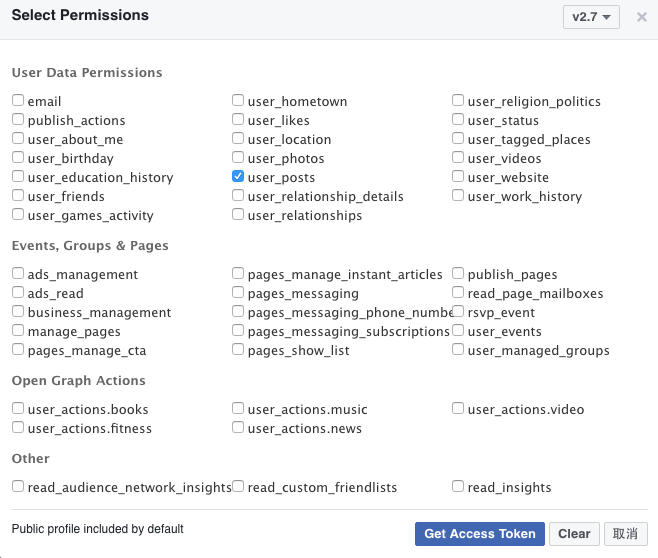
3.勾選token的權限,點選Get Token->Get User Access token,只要勾選user_posts,即可,此時會請你登入Facebook,登入後頁面的token即會刷新(注意這個Token有時間性,一段時間後要重新取得Token
4.取得時間代碼,到以下頁面:http://www.epochconverter.com/ 取得時間代碼,選擇的時間為那個時間點到現在你所發文的內容

1.安裝jieba模組包,其他模組皆為內建模組
$pip install jieba
2.程式碼取得臉書資訊
import requests
import json
import jieba
import collections
import re

# 輸入所需資訊
since = '輸入上面取得的時間'
token = '輸入你的fb token'
url = ('https://graph.facebook.com/me/posts?since=%s&access_token=%s'%(since,token))
#測試是否有資料
#print(url)
res = requests.get(url)
jd = json.loads(res.text)
2.觀察臉書資訊可以發現資料都放在message的tag,因此取出message的資料,再者發現臉書一次呈現25筆資料,因此透過while抓取每個分頁的網址再重新包回jd取處理
#利用迴圈抓取每頁的資訊並將message做分詞將全部字詞存入words list中
words =[]
while 'paging' in jd:
    for post in jd['data']:
        if 'message' in post:
            temp_words = list(jieba.cut(re.sub('\W*\d*', '', post['message'])))

            for word in temp_words:
                words.append(word)
    res = requests.get(jd['paging']['next'])
    jd = json.loads(res.text)
3.將資料做處理,分別作:
- list的字詞統計
- 統計好的資料做排序
- 把資料寫入文字檔
#透過collections套件做次數計算與字詞的排列
count_words = collections.Counter(words)
sorted_words = sorted(dict(count_words).items(),key  = lambda x:x[1],reverse = True)

#最後將結果寫入文字檔
with open('word.txt','w',encoding = 'utf-8') as fin:
    for word in sorted_words:
fin.write(word[0]+' '+str(word[1])+'\n')2.下載的版本為Desktop版,有14天免費試用,其他免費版本也可以,下載完畢後雙擊安裝,過程都下一步即可
3.開啟檔案,進行初次設定
- 按下 trial 14 day
- 填寫資料(亂填即可)


4.開啟執行完畢後的word.txt,資料直接複製到Tableau中(注意這邊要確認你的資料項目中只有文字,因為如果有數字交錯會造成null,因此先前在撰寫程式有利用regex取代相關錯誤文字)
- 開啟會到以下畫面,直接將文字貼上

- 貼上會有資料寫入畫面

- 選擇泡泡圖

- 執行後會呈現以下畫面

- 把欄位名稱(F1),拖曳至color ,讓資料呈現不同顏色,把數量(F2),拖曳到size

- 結果呈現


