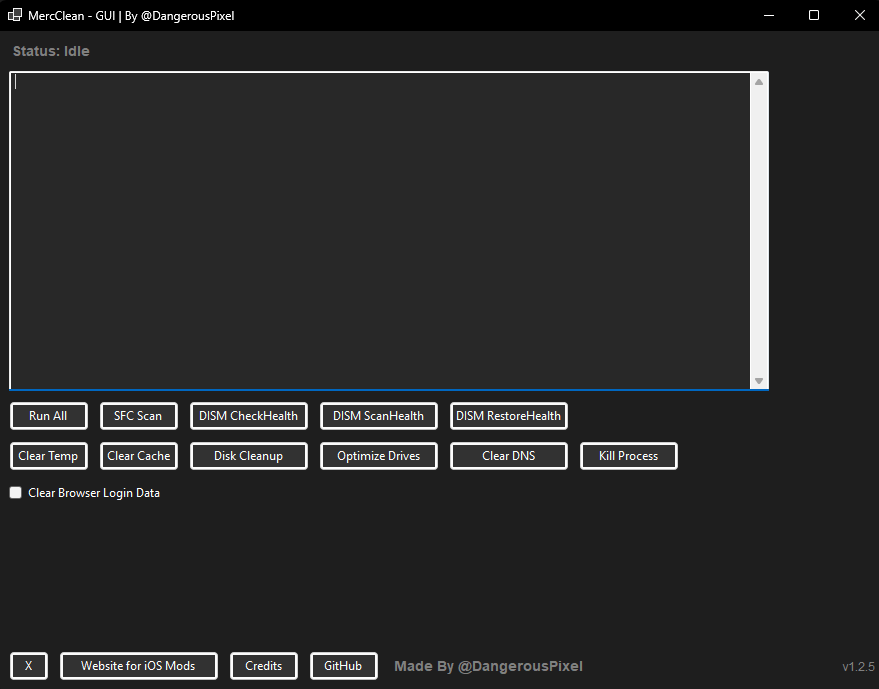
A Windows desktop application (WinForms) that provides a one-stop GUI for various system maintenance tasks—like SFC scans, DISM checks, clearing temp files/cache, and more. This tool is especially helpful for quickly troubleshooting and cleaning up Windows machines, with the ability to cancel operations mid-run if needed.
-
Run All
- Sequentially executes a full suite of scans and cleanups:
- SFC (
sfc /scannow) - DISM CheckHealth, ScanHealth, RestoreHealth
- Clear temporary files, browser caches
- Disk Cleanup
- Drive optimization
- DNS cache flush
- SFC (
- Sequentially executes a full suite of scans and cleanups:
-
Individual Maintenance Tasks
- Each function—SFC, DISM, Clear Temp, etc.—is available as a separate button.
-
Browser Data Management
- Clear Browser Cache: Removes browser cache files
- Optional Login Data Clearing: New checkbox feature allows you to optionally clear browser login data (cookies, saved passwords, etc.) with a warning popup for confirmation
-
Kill Process
- Allows you to cancel a currently running maintenance operation at any time, including stopping the entire "Run All" sequence.
-
Detailed Terminal Output
- Displays real-time command output (stdout/stderr) in a terminal-like text box, so you can monitor progress and see any errors.
-
Links & Credits
- Quick buttons to open relevant websites or show credits.
- Windows 10 or higher
.NET 6+ or .NET Framework 4.7.2+ (depending on your project setup)- NoW YoU CaN RuN ApP DiReCtLy WiThOuT AnY DePeNdANcIeS :)
- Administrator privileges (the application checks at startup)
- Clone or Download this repository.
- Open in Visual Studio (or another IDE supporting WinForms) and ensure you have the correct .NET SDK/Target.
- Build the solution, which creates an
.exe(or.exe + .dllfor .NET 6+) inside thebin\Debug\net6.0-windows\orbin\Release\net6.0-windows\folder (depending on your build configuration). - Run as Administrator. The application will display an error if not run with elevated privileges.
OR JUST INSTALL LATEST RELEASE :)
- Launch
MercClean - GUI.exe(right-click and "Run as administrator," if necessary). - Click any of the maintenance buttons, such as:
- SFC Scan to run
sfc /scannow. - DISM CheckHealth / ScanHealth / RestoreHealth for DISM checks.
- Clear Temp or Clear Cache for quick file clean-ups.
- Disk Cleanup or Optimize Drives for thorough Windows maintenance.
- Clear DNS to flush the DNS cache.
- SFC Scan to run
- Browser Data Options:
- Use Clear Cache to remove browser cache files only.
- Check the "Clear browser login data" checkbox if you also want to remove cookies, saved passwords, and other login-related data (a warning popup will confirm your choice).
- Run All to perform every task in sequence.
- If you need to abort, press Kill Process, which stops the current command and cancels any remaining tasks.
- Browser Login Data Protection: MAJOR FIX - Resolved critical issue where browser login data (cookies, saved passwords, session data) was being inadvertently cleared during cache cleanup operations
- Selective Browser Cleaning: Implemented separate controls for cache clearing vs. login data clearing, giving users full control over what gets removed
- Safety Confirmation System: Added warning popup with explicit confirmation when attempting to clear sensitive login data
- Improved User Control: Users can now safely clean browser cache without losing their saved passwords and login sessions
- Automatic Update Checking: Added background update checking that compares current version with latest GitHub releases and notifies users when updates are available
- Application Icon: Added custom application icon that displays in the title bar, taskbar, and file explorer
- Dynamic Version Display: Version number in the UI now automatically updates based on assembly version
- Improved Build System: Enhanced standalone executable generation with proper icon integration
- Enhanced UI: Dark theme styling for the new checkbox to match the application design
Contributions and pull requests are welcome! If you have bug fixes or new features to add:
- Fork this repository.
- Create a new branch with a descriptive name.
- Commit and push your changes.
- Create a pull request describing the modifications.
- X: @Mercenarry_ – For the original command-line concept.
- DPixel Team – For additional functionalities, GUI improvements, and the kill-process feature.
- Lilnynho – The generated executable can be distributed without requiring the installation of the .NET Runtime.