A comprehensive toolkit for creating bootable macOS installer images, consisting of two main components:
- mkmaciso – An automation script that uses only macOS built-in tools and commands to download and install the full macOS installer from Apple's servers into /Applications, then generate the smallest possible installer image for macOS installation.
- GitHub workflows – Action workflows that run
mkmacisoon Azure datacenter-hosted Mac minis, for users who don't have a working macOS.
See Usage for detailed instructions.
- Image Format Details
- Supported macOS Versions
- Usage
- Tips and Best Practices
- Requirements for mkmaciso
- Acknowledgments
- Legal Notice
- License
The mkmaciso script can generate macOS installer images in two different formats, each optimized for specific use cases:
- Best for: Virtual machine installations
- Compatible with: Proxmox VE, QEMU, VirtualBox, VMware
- How to use: Attach the ISO as a virtual DVD/CD drive to your VM
- Format details: True DVD/CD format image that can be mounted in Windows and used across all major virtualization platforms
- Best for: Creating bootable USB installation media
- Compatible with: Physical Mac hardware installations
- How to use: Flash to USB drive using Rufus (Windows) or
dd(Linux) orasr(macOS) - Format details: Raw disk image with GUID Partition Table, can also be converted to other virtual disk formats (VHD, VMDK) for use with virtual machines
| Version | Codename | Year | Version | Codename | Year | |
|---|---|---|---|---|---|---|
| 10.7 | Lion | 2011 | 10.15 | Catalina | 2019 | |
| 10.8 | Mountain Lion | 2012 | 11 | Big Sur | 2020 | |
| 10.9 | Mavericks | 2013 | 12 | Monterey | 2021 | |
| 10.10 | Yosemite | 2014 | 13 | Ventura | 2022 | |
| 10.11 | El Capitan | 2015 | 14 | Sonoma | 2023 | |
| 10.12 | Sierra | 2016 | 15 | Sequoia | 2024 | |
| 10.13 | High Sierra | 2017 | 26 | Tahoe | 2025 | |
| 10.14 | Mojave | 2018 |
Available workflows:
- Recovery ISO (Recommended) – Lightweight recovery image (build takes ~2-5 min) • Best for virtualization
- Full Installer – Complete offline installer (build takes ~10-60 min, 5-18GB) • Best for offline use
Tip
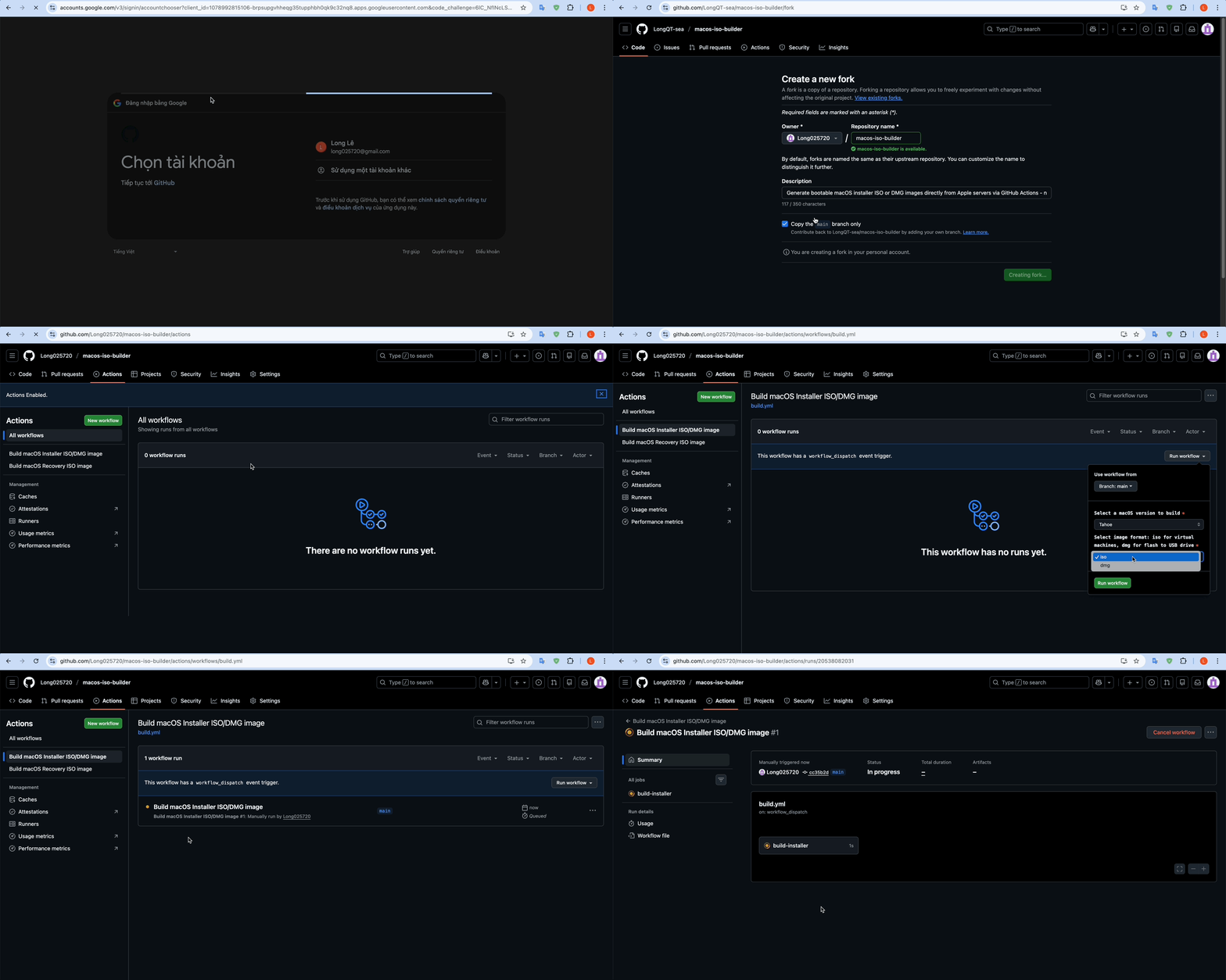
Click here to watch a visual guide (GIF) showing steps 1-7
-
Fork this repository (requires a GitHub account).
-
Navigate to the Actions tab in your forked repository.
-
Click the green "I understand my workflows, go ahead and enable them" button.
-
Select the "Build macOS Installer ISO/DMG image" or "Build macOS Recovery ISO image" workflow from the left sidebar.
-
Click the "Run workflow" button.
-
Configure the workflow inputs:
- macOS version – Choose a version (Sequoia, Sonoma, etc.).
- Image format – Choose
isofor virtual machines ordmgfor bootable USB drives.
-
Click the green "Run workflow" button to start the build.
-
Wait for the workflow to complete (this may take 10–60 minutes).
-
Open the completed workflow run and scroll down to the Artifacts section.
-
Download the artifact (e.g.,
macOS_Sequoia_15.7.3.iso). -
Extract the ZIP file to get your
.isoor.dmg.imgfile. The file is now ready to use!
Note
By default, artifacts are kept for 7 days. You can change this in the workflow YAML file.
If you already have access to a working macOS system or macOS virtual machine, you can run the script directly:
Quick run (replace 'tahoe' with your desired version):
curl -s https://raw.githubusercontent.com/LongQT-sea/macos-iso-builder/main/mkmaciso | bash -s tahoeDownload the script first, then run with parameters:
curl -O https://raw.githubusercontent.com/LongQT-sea/macos-iso-builder/main/mkmaciso
chmod +x mkmaciso

./mkmaciso --help
Interactive mode:
./mkmacisoNote
Attach the ISO image as a virtual CD/DVD drive to your VM.
Tip
Proxmox VE Users:
For the best macOS VM performance on Proxmox VE:
- Enable iGPU or dGPU passthrough for near-native graphics performance
- Consider using LongQT-sea/OpenCore-ISO for streamlined macOS installation
- For Intel integrated graphics passthrough, see LongQT-sea/intel-igpu-passthru
Tip
After flashing, there will be free/unallocated space remaining on the USB drive. Use Disk Management to create a new FAT32 partition and place your EFI folder there if needed.
Caution
When flashing under Linux with dd, double-check the target device! dd will overwrite without confirmation.
| Requirement | Details |
|---|---|
| OS | Minimum macOS 10.9+ (macOS 11+ recommended) |
| Architecture | Intel (x86_64) recommended; Apple Silicon supported with limitations |
| Disk Space | 20-40 GB temporary; final image varies |
| Internet | Required for downloading from Apple servers |
| Privileges | Administrator (sudo) access required |
- Apple — For macOS and the software update infrastructure
- Mavericks Forever — For documenting the macOS 10.9 recovery server protocol
- InsanelyMac community — For research on direct Apple CDN downloads
This tool downloads macOS images directly from Apple's official servers. Users are responsible for complying with Apple's Software License Agreement. macOS is a trademark of Apple Inc.
This project is licensed under the GPLv3 License. See LICENSE for details.