Easy to use effects for uGUI. Supports following effects.
- Grayscale tone
- Sepia tone
- Nega tone
- Pixelation
- Cutoff (alpha-based)
- Mono tone (alpha-based)
- Color setting
- Color additive
- Color subtract
- Blur fast
- Blur detail

- Unity 5.3+ (included Unity 2017.x)
- No other SDK are required
- Download UIEffect.unitypackage and install to your project.
- Import the package into your Unity project. Select
Import Package > Custom Packagefrom theAssetsmenu. - Add
UIEffectcomponent to UI element (Image, RawImage, Text, etc...) fromAdd Componentin inspector. - Choose effect type and adjust values in inspector.
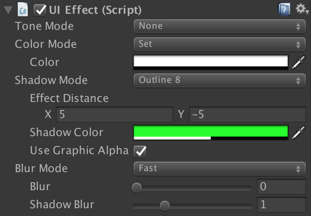
- Enjoy!
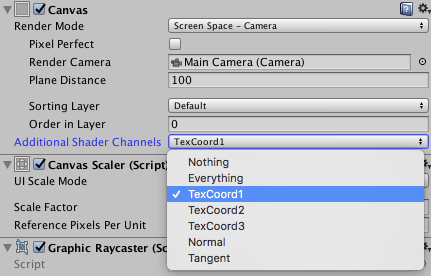
In Unity 5.6+, Canvas supports Additional Shader Channels.
Please enable TexCoord1 to use UIEffect.
- Feature: Add Pixelaration effect.
- Feature: Add Cutoff/Mono effect for patterned alpha images. It can be used for masks and transitions!
- Feature: Shader supports pre-processer macros (for example UNITY_VERTEX_OUTPUT_STEREO) for Unity 5.3.x, 5.4.x and 5.5.x.
- Feature: Supports changing value from animation.
- Feature: Supports Tone effect.
- grayscale
- sepia
- nega
- Feature: Supports Color effect.
- set
- add
- sub
- Feature: Supports Blur effect.
- fast
- detail
- Fix: Color effect will not be properly when it was rotated.
- Performance: Shader supports multi-compile for performance.
- Performance: Cache same effect materials to reduce draw calls.
- Improve: Supports mobile devices.
- Improve: Simplify component & inspector.
MIT