##Introduction:
This is a ionic-timepicker bower component which can be used with any Ionic framework's application.
##Prerequisites.
- node.js, bower and gulp.
##How to use:
-
In your project repository install the ionic time picker using bower
bower install ionic-timepicker --save-dev
-
Then you can see the following directory structure see in your project folder

Give the path of style.css, templates.js and ionic-timepicker.js in your index.html file.
<link href="lib/ionic-timepicker/dist/style.css" rel="stylesheet">

<!-- path to ionic/angularjs js -->
<script src="lib/ionic-timepicker/dist/templates.js"></script>
<script src="lib/ionic-timepicker/dist/ionic-timepicker.js"></script>- In your application module inject the dependency
ionic-timepicker, in order to work with the ionic time picker
angular.module('modulename', ['ionic', 'ionic-timepicker']){

}- Use the below format in your template's corresponding controller
$scope.slots = {epochTime: 12600, format: 12, step: 15};- Then use the below format in your template / html file
<ionic-timepicker etime="slots.epochTime" format="slots.format" step="slots.step">
    {{slots.epochTime}}
</ionic-timepicker>
a) ionic-timepicker is the directive, to which we can pass required vales.
b) etime takes epoch time, which will be converted to UTC.
c) format indicates 12 hour or 24 hour format. It can take two values, 12 or 24.
d) step indicates minute increment. It can take two values, 1 or 15.
You can also use any of my directives to convert the epoch time to string format.
Tested with angular#1.3.6 and ionic#1.0.0-beta.14.
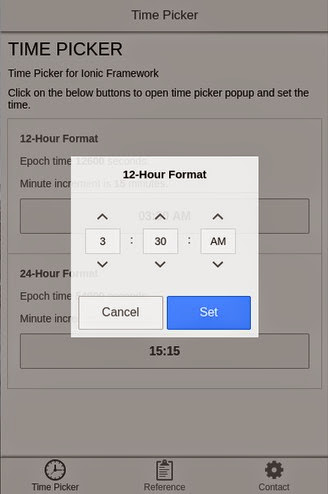
##Screen Shots:

##Versions:
The whole time picker functionality has been implemented, and can be installed with
bower install ionic-timepicker --save
Directive name has been modified.
##License: MIT
##Contact: gmail : rajeshwar.patlolla@gmail.com
github : https://github.com/rajeshwarpatlolla
twitter : https://twitter.com/rajeshwar_9032
facebook : https://www.facebook.com/rajeshwarpatlolla
paypal : rajeshwar.patlolla@gmail.com