Written by Stanley Huang, distributed under GPL. For more information, please visit http://www.arduinodev.com
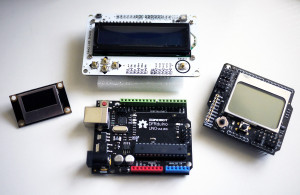
This library encapsulate several libraries for various Arduino LCD/LED display shields or modules into a set of unified APIs. It supports these hardware:
- DFRobot LCD4884 shield
- Nokia 3310/5100 LCD module
- LCD1602 shield
- SSD1306 OLED module
- ZT I2C OLED module
The library embeds font data for ASCII characters (5x7 and 8x16) and digits (8x8, 16x16, 16x24). It is extremely simple for display texts and numbers on desired position on a LCD screen with the library, while very little change in code is needed to switch from one LCD module to another.
To use a specific shield or module as the display for Arduino, you need to include library header at the beginning of the sketch.
#include <MultiLCD.h>
And use one of following declarations before your code.
For SSD1306 OLED module:
LCD_SSD1306 lcd;
For LCD4884 shield or Nokia 5100 module:
LCD_PCD8544 lcd;
For LCD1602 shield:
LCD_1602 lcd;
For ZT I2C OLED module:
LCD_ZTOLED lcd;
The library class inherits the Print class of Arduino, so that you can display texts on LCD with standard Arduino functions like this:
lcd.print("Hello, World!";)
lcd.print(foo, DEC);
lcd.print(bar, HEX);
lcd.print(1.23)         // gives "1.23"
lcd.print(1.23456, 2);  // gives "1.23"
Besides, it provides unified APIs for initializing and controlling the LCD, as well as some convenient operations.
void begin(); /* initializing */
void clear(); /* clear screen */
void setCursor(uint16_t column, uint8_t line); /* set current cursor, column is in pixel */
void setFont(FONT_SIZE size); /* set font size */
void printInt(unsigned int n); /* display a integer number */
void printLong(unsigned long n); /* display a long number */
void draw(const PROGMEM uint8_t* buffer, uint16_t x, uint16_t y, uint16_t width, uint16_t height); /* draw monochrome bitmap */
The code using the library can be extremely simple.
#include <Wire.h>
#include <MultiLCD.h>

LCD_SSD1306 lcd; /* for SSD1306 OLED module */

static const PROGMEM uint8_t smile[48 * 48 / 8] = {
0x00,0x00,0x00,0x00,0x00,0x00,0x80,0xC0,0xE0,0xF0,0xF8,0xF8,0xFC,0xFC,0xFE,0xFE,0x7E,0x7F,0x7F,0x3F,0x3F,0x3F,0x3F,0x3F,0x3F,0x3F,0x3F,0x3F,0x3F,0x7F,0x7F,0x7E,0xFE,0xFE,0xFC,0xFC,0xF8,0xF8,0xF0,0xE0,0xC0,0x80,0x00,0x00,0x00,0x00,0x00,0x00,
0x00,0xC0,0xF0,0xFC,0xFE,0xFF,0xFF,0xFF,0x3F,0x1F,0x0F,0x07,0x03,0x01,0x00,0x80,0x80,0x80,0x80,0x80,0x80,0x00,0x00,0x00,0x00,0x00,0x00,0x80,0x80,0x80,0x80,0x80,0x80,0x00,0x01,0x03,0x07,0x0F,0x1F,0x3F,0xFF,0xFF,0xFF,0xFE,0xFC,0xF0,0xC0,0x00,
0xFE,0xFF,0xFF,0xFF,0xFF,0xFF,0x07,0x00,0x00,0x00,0x00,0x00,0x00,0x00,0x06,0x1F,0x1F,0x1F,0x3F,0x1F,0x1F,0x02,0x00,0x00,0x00,0x00,0x06,0x1F,0x1F,0x1F,0x3F,0x1F,0x1F,0x02,0x00,0x00,0x00,0x00,0x00,0x00,0x00,0x07,0xFF,0xFF,0xFF,0xFF,0xFF,0xFE,
0x7F,0xFF,0xFF,0xFF,0xFF,0xFF,0xE0,0x00,0x00,0x30,0xF8,0xF8,0xF8,0xF8,0xE0,0xC0,0x80,0x00,0x00,0x00,0x00,0x00,0x00,0x00,0x00,0x00,0x00,0x00,0x00,0x00,0x00,0x80,0xC0,0xE0,0xF8,0xF8,0xFC,0xF8,0x30,0x00,0x00,0xE0,0xFF,0xFF,0xFF,0xFF,0xFF,0x7F,
0x00,0x03,0x0F,0x3F,0x7F,0xFF,0xFF,0xFF,0xFC,0xF8,0xF0,0xE1,0xC7,0x87,0x0F,0x1F,0x3F,0x3F,0x3E,0x7E,0x7C,0x7C,0x7C,0x78,0x78,0x7C,0x7C,0x7C,0x7E,0x3E,0x3F,0x3F,0x1F,0x0F,0x87,0xC7,0xE1,0xF0,0xF8,0xFC,0xFF,0xFF,0xFF,0x7F,0x3F,0x0F,0x03,0x00,
0x00,0x00,0x00,0x00,0x00,0x00,0x01,0x03,0x07,0x0F,0x1F,0x1F,0x3F,0x3F,0x7F,0x7F,0x7E,0xFE,0xFE,0xFC,0xFC,0xFC,0xFC,0xFC,0xFC,0xFC,0xFC,0xFC,0xFC,0xFE,0xFE,0x7E,0x7F,0x7F,0x3F,0x3F,0x1F,0x1F,0x0F,0x07,0x03,0x01,0x00,0x00,0x00,0x00,0x00,0x00,
};

void setup()
{
    lcd.begin();
}

void loop()
{
    lcd.clear();
    lcd.draw(smile, 40, 8, 48, 48);
    delay(2000);

    lcd.clear();
    lcd.setCursor(0, 0);
    lcd.setFont(FONT_SIZE_SMALL);
    lcd.print("Hello, world!");

    lcd.setCursor(0, 1);
    lcd.setFont(FONT_SIZE_MEDIUM);
    lcd.print("Hello, world!");

    lcd.setCursor(0, 3);
    lcd.setFont(FONT_SIZE_SMALL);
    lcd.printLong(12345678);

    lcd.setCursor(64, 3);
    lcd.setFont(FONT_SIZE_MEDIUM);
    lcd.printLong(12345678);

    lcd.setCursor(0, 4);
    lcd.setFont(FONT_SIZE_LARGE);
    lcd.printLong(12345678);

    lcd.setCursor(0, 6);
    lcd.setFont(FONT_SIZE_XLARGE);
    lcd.printLong(12345678);

    delay(3000);
}
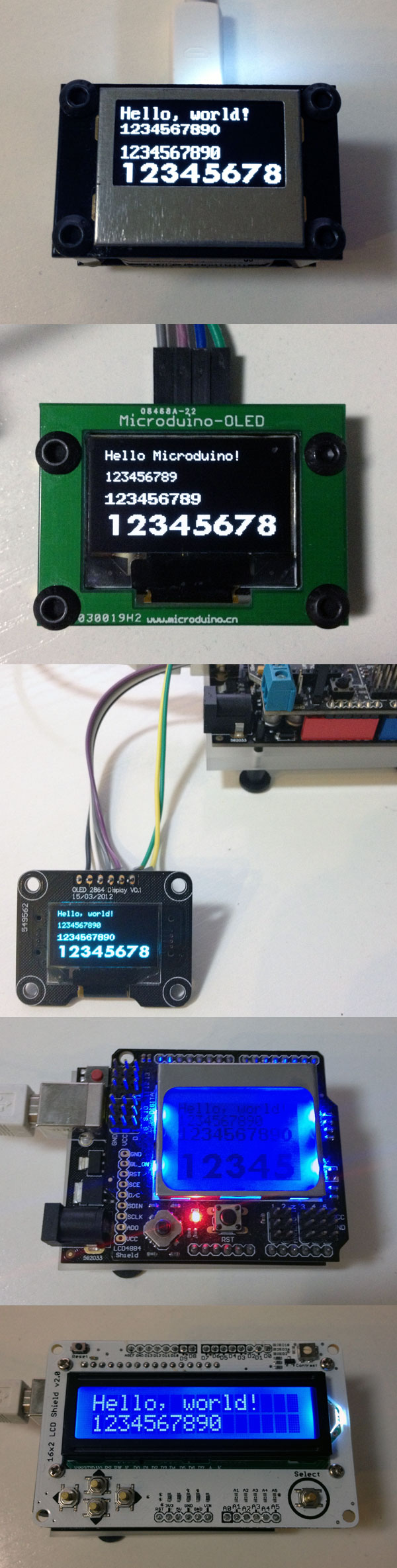
MultiLCD working with various Arduino LCD/OLED:
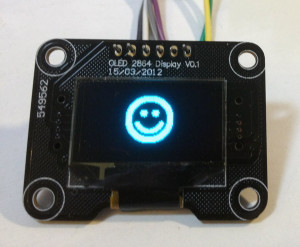
Drawing bitmap on SSD1306: