



The image picker is used for selecting single or multiple images from gallery.
- jQuery Free
- Single or multiple images selection
- Styling (...in progress)
- Add video support for paths that end in a supported video extension; .mp4 only for now. General idea is to show a play button that allow previewing the video then selection of the video from the video player.
npm install react-image-picker
For now, because the webpack config won’t run build-lib without exploding, you have to include the whole package into your create-react-app project into a subfolder of src; I like "lib". From your src folder do:
cd lib;
git clone https://github.com/perfectcube/react-image-picker.git
Then from the component where you want to use react-image-picker:
include the lib, like in the example:
import ImagePicker from 'lib/react-image-picker'
import 'lib/react-image-picker/src/index.scss'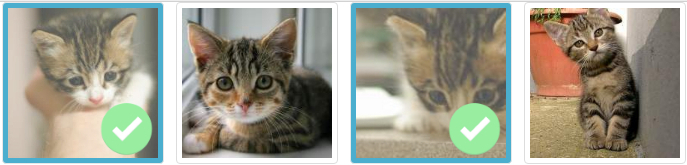
//ES6
import React, { Component } from 'react'
import ImagePicker from 'lib/react-image-picker'
import 'lib/react-image-picker/src/index.scss'

// an array of image paths
const images = [
  "https://pixabay.com/get/50e4d246485ab108f5d08460962f3f7e113bd6ed4e50744f702a7ed6924cc5_1280.jpg",
  "https://pixabay.com/get/50e9d5464c54b108f5d08460962f3f7e113bd6ed4e50744f702a7ed6924cc5_1280.jpg",
  "https://pixabay.com/get/57e9d5404953af14f6da8c7dda793076153bdaed5b4c704c732a7ed19548c458_1280.jpg",
  "https://pixabay.com/get/5ee0d44b4854b108f5d08460962f3f7e113bd6ed4e50744f702a7ed6924cc5_1280.jpg",
]

const chosen = [
  "https://pixabay.com/get/50e9d5464c54b108f5d08460962f3f7e113bd6ed4e50744f702a7ed6924cc5_1280.jpg",
  "https://pixabay.com/get/5ee0d44b4854b108f5d08460962f3f7e113bd6ed4e50744f702a7ed6924cc5_1280.jpg",
];

// OR if you want to maintain index positions without sniffPicked:
// const chosen = [
//   {src:"https://pixabay.com/get/50e9d5464c54b108f5d08460962f3f7e113bd6ed4e50744f702a7ed6924cc5_1280.jpg",index:1},
//   {src:"https://pixabay.com/get/5ee0d44b4854b108f5d08460962f3f7e113bd6ed4e50744f702a7ed6924cc5_1280.jpg", index:3},
// ];

class App extends Component {
  render() {
    return (
      <div>
        <ImagePicker
          images={imageList.map((image, index) => ({src: image, index: index}))}
          multiple={true}
          onPick={(picked,image,removed)=>{
            console.log({
              'images picked so far':picked,
              'last image':image,
              'last image removed':removed
            });
          }}
          picked={chosen}
          sniffPicked={true}
        />
      </div>
    )
  }
}

export default AppImagePicker.defaultProps = {
// Picked is passed in as an array of image paths. Internally we store this in an immutable Map()
picked: [],
// By default, don't bother sniffing the indexes of the pre-selected items in picked from the images array
sniffPicked: false,
// By default we'll multiselect
multiple: true,
// By default we don't pass you back the images selected. Define a callback if you want to get a list of what's been picked so far.
onPick: null,
}
ImagePicker.propTypes = {
// An array of images that you want to pick from. Each array member has this shape: {src: 'some src', index: some_index}.
// To get this array do this: <ImagePicker images={yourImageArray.map((image, index) => ({src: image, index: index}))}
images: PropTypes.array.isRequired,
// A bool, Can you select multiple images?
multiple: PropTypes.bool,
// A function that we call when you pick an image. You're passed back:
// • as the first argument, an array of the images that the image picker has chosen so far
// • as the second argument, an object with the following shape:
// src: the image path
// index: the position withing props.images where your image exists
// ... unless you're using picked && sniffPicked = false then you get -1
// if !props.multiple then this is the last image removed from the list
// else this is the last image that you clicked on
// • as the third argument, a boolean letting you know if second argument was removed from the list
onPick: PropTypes.func,
// An array of paths that are pre-chosen. If you pass in an array of objects, each with this
// shape: {src: 'some src', index: some_index}, then we'll persist the index where the chosen
// item was in the original collection. If you pass in a plain array of source paths then we'll
// pass you back -1 for the indexes on items that we don't know where they came from, even if we
// are tracking that were selected
picked: PropTypes.array,
// If you want to sniff for the index of the picked items, because you don't want to pass in an
// array of objects for picked that is shaped like [{src:'img/path',index:n},{src:'img2/path',index:x}]
// then we can sniff the selected indexes for you. This is super useful if the indexes change in
// search results but you still want to select the same images in the refined search results. Set
// this to true if you want to get back the indexes of each item that we select.
// This defaults to false meaning we'll pass you back a -1 for the index of the picked items.
sniffPicked: PropTypes.bool,
}React-Image-Picker is open-sourced software licensed under the MIT license