Nanolog is an extremely performant nanosecond scale logging system for C++ that exposes a simple printf-like API and achieves over 80 million logs/second at a median latency of just over 7 nanoseconds.
How it achieves this insane performance is by extracting static log information at runtime, only logging the dynamic components at runtime, and deferring formatting to an offline process. This basically shifts work out of the runtime and into the compilation and post-execution phases.
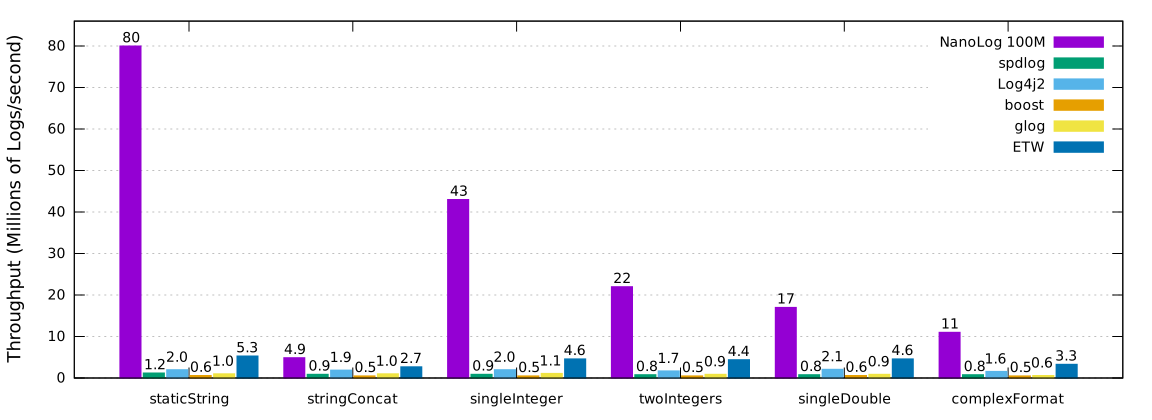
This section shows the performance of NanoLog with existing logging systems such as spdlog, Log4j2, Boost 1.55, glog, and Windows Event Tracing with Windows Software Trace Preprocessor (WPP).
Maximum throughput measured with 1 million messages logged back to back with no delay and 1-16 logging threads (NanoLog logged 100 million messages to generate a log file of comparable size). ETW is "Event Tracing for Windows." The log messages used can be found in the Log Message Map below.
Measured in nanoseconds and each cell represents the 50th / 99.9th tail latencies. The log messages used can be found in the Log Message Map below.
| Message | NanoLog | spdlog | Log4j2 | glog | Boost | ETW |
|---|---|---|---|---|---|---|
| staticString | 7/ 37 | 214/ 2546 | 174 / 3364 | 1198/ 5968 | 1764/ 3772 | 161/ 2967 |
| stringConcat | 7/ 36 | 279/ 905 | 256 / 25087 | 1212/ 5881 | 1829/ 5548 | 191/ 3365 |
| singleInteger | 7/ 32 | 268/ 855 | 180 / 9305 | 1242/ 5482 | 1914/ 5759 | 167/ 3007 |
| twoIntegers | 8/ 62 | 437/ 1416 | 183 / 10896 | 1399/ 6100 | 2333/ 7235 | 177/ 3183 |
| singleDouble | 8/ 43 | 585/ 1562 | 175 / 4351 | 1983/ 6957 | 2610/ 7079 | 165/ 3182 |
| complexFormat | 8/ 40 | 1776/ 5267 | 202 / 18207 | 2569/ 8877 | 3334/ 11038 | 218/ 3426 |
Log messages used in the benchmarks above. Italics indicate dynamic log arguments.
| Message ID | Log Message Used |
|---|---|
| staticString | Starting backup replica garbage collector thread |
| singleInteger | Backup storage speeds (min): 181 MB/s read |
| twoIntegers | buffer has consumed 1032024 bytes of extra storage, current allocation: 1016544 bytes |
| singleDouble | Using tombstone ratio balancer with ratio = 0.4 |
| complexFormat | Initialized InfUdDriver buffers: 50000 receive buffers (97 MB), 50 transmit buffers (0 MB), took 26.2 ms |
| stringConcat | Opened session with coordinator at basic+udp:host=192.168.1.140,port=12246 |
NanoLog depends on the following:
- C++11 Compiler: GNU gcc 4.9.2 or greater
- GNU Make 4.0 or greater
- Python 2.7.9 or greater
- POSIX AIO and Threads (usually installed with Linux)
As alluded to by the introductory text, in addition to using the NanoLog API, one has to integrate with NanoLog at the compilation and post-execution phases.
To use the NanoLog system in the code, one just has to #include "NanoLog.h" and invoke the NANO_LOG() function in a similar fashion to printf, with the exception of a log level before it. Example below:
#include "NanoLog.h"

int main() {
  NANO_LOG(NOTICE, "Hello World! This is an integer %d and a double %lf\r\n", 1, 2.0);
  return 0;
}
Valid log levels are DEBUG, NOTICE, WARNING, and ERROR and the logging level can be set via NanoLog::setLogLevel(...)
NanoLog requires users to compile their C++ files into *.o files using the NanoLog system.
For new projects, the easiest way to bootstrap this process is to copy the sample GNUMakefile and make the following changes:
-
Change the
NANOLOG_DIRvariable to refer to this project's root directory -
Change the
USER_SRCSvariable to refer to all your sources.
If you wish to integrate into NanoLog into an existing system with an existing GNUmakefile, perform the following:
- Copy all the variables in the "Required Library Variables" section in the sample GNUMakefile into your makefile.
- Compile your sources into *.o files using the
run-cxxfunction and ensure that theUSER_OBJScaptures all the *.o files. - Link the following the NanoLog library, posix aio and pthread libraries i.e.
-lNanoLog -lrt -pthreador use the variable$(NANO_LOG_LIBRARY_LIBS).
After compilation, a ./decompressor executable should have been generated in your makefile directory and after execution, you should have a binary log (default location: /tmp/compressedLog or /tmp/logFile).
To get a human readable log out, pass one into the other. Example:
./decompressor /tmp/logFile