Five sql queries for google_search_console #13
Conversation


|
Also added Level 5: Top 5 "First Appearance" queries write up |

 alonbrody
left a comment
alonbrody
left a comment
alonbrody
left a comment
There was a problem hiding this comment.
There's another change that probably needs to be implemented in multiple places
Where you divide integer by an integer the result will remain an integer (rounded down or up) so for example 1/3 will be 0 instead of 0.33
Multiplying by 1.00 should do the trick so 1*1.00/3 will give you the correct number
|
|
||
| ```sql | ||
| SELECT | ||
| TO_CHAR(date, 'ID') AS day_number, |
There was a problem hiding this comment.
Why would the user care about the day number if he has the day of week?
You can still order the results by it without returning it in the actual result set
There was a problem hiding this comment.
It was the easiest way I could think of to order the results set in the order the days of the week occur.
Removing day_number and changing the ORDER BY to ORDER BY TO_CHAR(date, 'ID') raises an error because of the GROUP BY. If you do ORDER BY day_of_week, it orders them in alphabetical order (Friday, Monday, etc.).
We could use a CTE at the start to avoid the GROUP BY error, but, as these queries are for beginners, returning the day number seems like a nice price to pay for a simpler query.
There was a problem hiding this comment.
You can do something like that instead:
SELECT day_of_week,
       avg_search_vol
FROM (SELECT TO_CHAR(DATE,'ID') AS day_number,
             TO_CHAR(DATE,'Day') AS day_of_week,
             AVG(clicks*1.00 / impressions) AS avg_search_vol
      FROM google_search_console_blog
      WHERE DATE>= CURRENT_DATE-INTERVAL '4 weeks'
      GROUP BY day_number,
               day_of_week)
ORDER BY day_number
| `query`| The search term typed into Google that your page(s) have ranked for. | ||
| `last_7_avg_pos`| The average position for that query over the last seven days. | ||
| `prev_7_avg_pos`| The average position for that query over the previous seven days. | ||
| `difference`| The change in average position week on week. A positive number means an increase in position and that the query ranks closer to #1. For example, if a page ranked #40 in the previous week and #5 last week, the difference is 40 - 5 = 35. Thus the page has increased its position by 35. |
There was a problem hiding this comment.
It might be just me but having last week and previous week is confusing. They are referring to different periods, yet their name is quite the same.
Same goes obviously for the naming convention in the query
There was a problem hiding this comment.
Yeah, I thought the same when writing it (Trevor suggested it). Shall we change them to "this week" and "last week" then?
There was a problem hiding this comment.
I think so. It will be less confusing I believe
| FROM google_search_console_blog | ||
| WHERE date >= current_date - interval '7 days' | ||
| AND position <= 30 | ||
| AND query IN (SELECT query |
There was a problem hiding this comment.
From my understanding this does not check
has never had position ≤ 30 before
It will just check if it was in position greater than 30 in the past but (and I'm not a Google Search expert) can't it be that it had both greater than 30 and smaller than 30 in the past?
There was a problem hiding this comment.
Hmm ok, I've done some research, and you're right.
My thinking was: in general, the trend for a particular keyword should be towards 1 so it's unlikely it will have flip-flopped between above and below 30 for an extended period.
But I've checked the data, and it looks weird. Here's what I've found:
Why can queries be both below and above 30?
- The same query is ranking for multiple pages, e.g., 'postgres vs mongodb' usually ranks in the top 5 for 'blog.panoply.io/postgresql-vs-mongodb' but not so high for 'blog.panoply.io/mongodb-and-mysql' or 'blog.panoply.io/cassandra-vs-mongodb'.
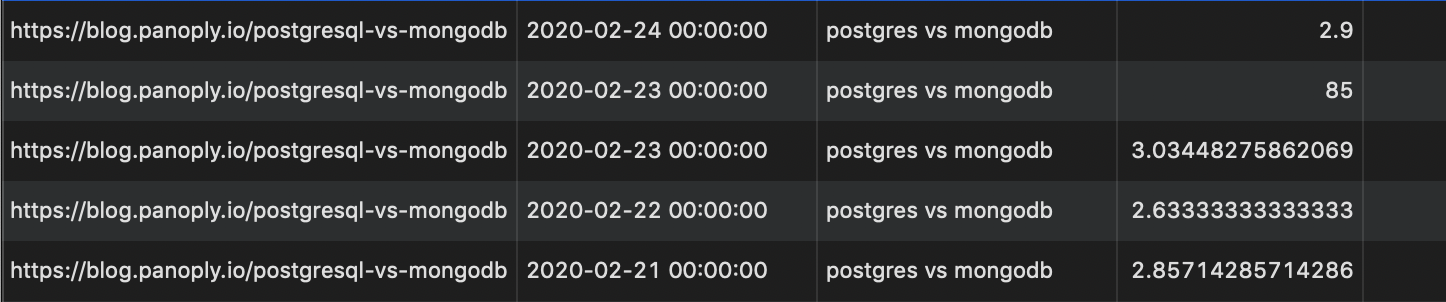
- There are random days where the query ranks super low (see first screenshot where 'postgres vs mongodb' ranks 2.9 on 2020-02-24 and 85 on 2020-02-23 and lower the days after). These seemingly random jumps in position happen fairly frequently (see other screenshot where it happens 3 times in the space of ~10 days). I checked several queries, and this happens for all of them. I fear perhaps google_search_console's data is not as reliable as we expected?
I'm not too well versed in SQL but these funny looking results make me think that perhaps this query is asking too much of the data?
Note: columns are page, date, query, position

There was a problem hiding this comment.
So perhaps we should change it to be a NOT IN query instead? Although I'm not a fan of NOT IN. This way, instead of filtering it based on the queries that had a position greater than 30 you will filter it based on position < 30. Anything that is not in this list should return from your query. No?
There was a problem hiding this comment.
I don't think changing to NOT IN will help. As you mentioned in your first comment and as the screenshots above indicate, it's possible that queries can be both > 30 and < 30 in the past and the rank can change each day seemingly randomly.
The screenshots' first two rows show how the query ranked < 30 one day and > 30 the next day.
Again, I think we may be asking too much of the data here.

Co-authored-by: alonbrody <alon.brody@gmail.com>

 codeananda
left a comment
codeananda
left a comment
codeananda
left a comment
There was a problem hiding this comment.
Made comments in response to yours, some of which are questions.
alonbrody
left a comment
alonbrody
left a comment
There was a problem hiding this comment.
Generally speaking except for the query in top_5_first_appearance_queries_per_page_last_7_days.md and the few open comments, it looks really good
|
|
||
| ```sql | ||
| SELECT | ||
| TO_CHAR(date, 'ID') AS day_number, |
There was a problem hiding this comment.
You can do something like that instead:
SELECT day_of_week,
       avg_search_vol
FROM (SELECT TO_CHAR(DATE,'ID') AS day_number,
             TO_CHAR(DATE,'Day') AS day_of_week,
             AVG(clicks*1.00 / impressions) AS avg_search_vol
      FROM google_search_console_blog
      WHERE DATE>= CURRENT_DATE-INTERVAL '4 weeks'
      GROUP BY day_number,
               day_of_week)
ORDER BY day_number
| `query`| The search term typed into Google that your page(s) have ranked for. | ||
| `last_7_avg_pos`| The average position for that query over the last seven days. | ||
| `prev_7_avg_pos`| The average position for that query over the previous seven days. | ||
| `difference`| The change in average position week on week. A positive number means an increase in position and that the query ranks closer to #1. For example, if a page ranked #40 in the previous week and #5 last week, the difference is 40 - 5 = 35. Thus the page has increased its position by 35. |
There was a problem hiding this comment.
I think so. It will be less confusing I believe
| FROM google_search_console_blog | ||
| WHERE date >= current_date - interval '7 days' | ||
| AND position <= 30 | ||
| AND query IN (SELECT query |
There was a problem hiding this comment.
So perhaps we should change it to be a NOT IN query instead? Although I'm not a fan of NOT IN. This way, instead of filtering it based on the queries that had a position greater than 30 you will filter it based on position < 30. Anything that is not in this list should return from your query. No?
codeananda
left a comment
codeananda
left a comment
There was a problem hiding this comment.
Resolved all previous comments apart from the NOT IN issue with the first appearance queries.
Glad to hear they look good!
2 participants


Write-ups for Levels 1-4 of the SQL project.
Some questions: