WiChain is a unique peer-to-peer chat application designed for local area networks (LANs). It blends a modern desktop user interface built with React and Tauri with a tamper-evident blockchain ledger to store chat history, offering a robust and secure local communication solution.
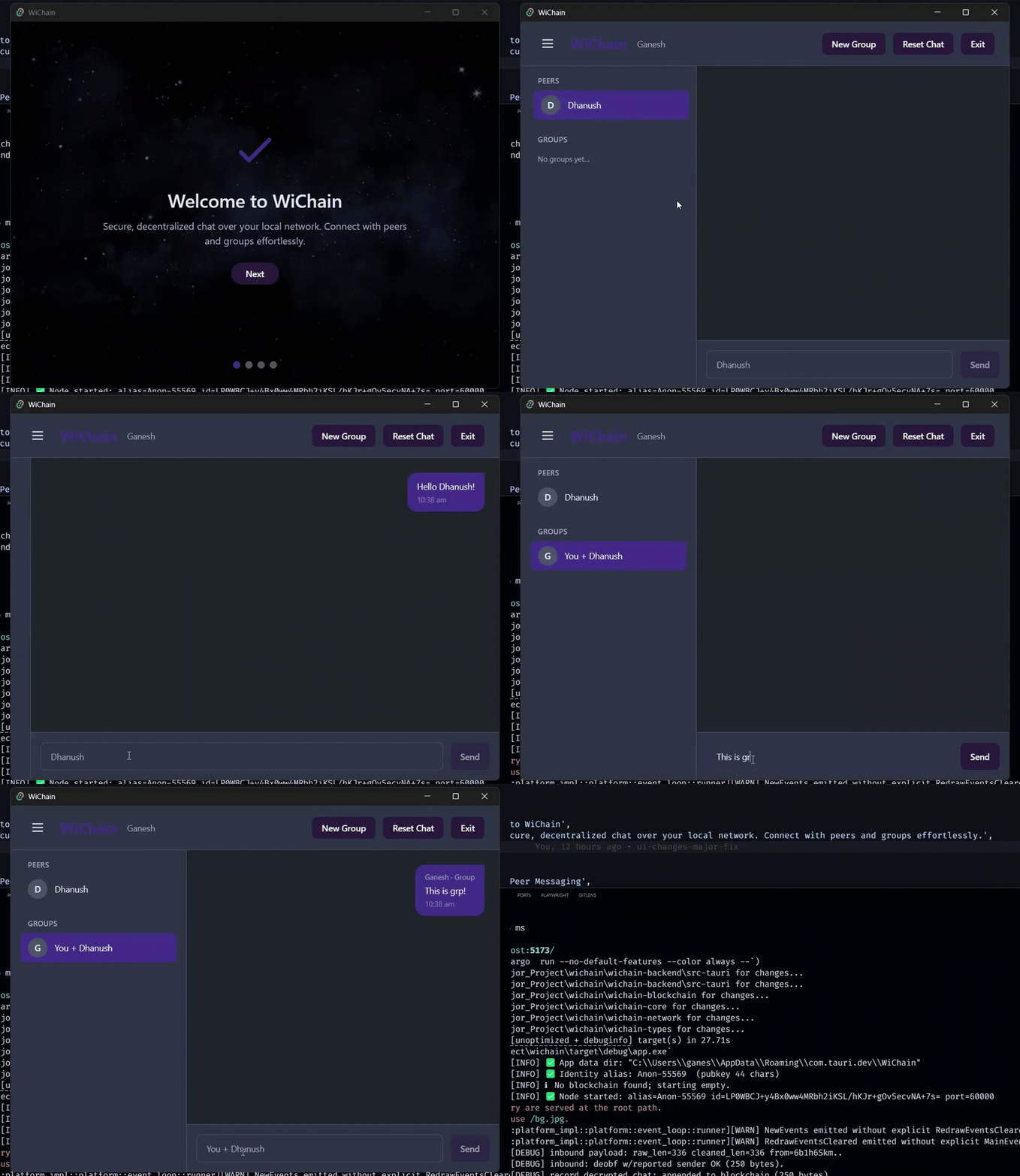
- Direct Peer & Group Messaging: Communicate directly with other users or in ephemeral groups over your LAN using UDP, without needing a central server.
- Signed, Verifiable Messages: All messages are signed using Ed25519, allowing recipients to verify the sender's authenticity.
- Blockchain-backed Chat History: Each node maintains a local, append-only blockchain, providing a tamper-evident record of all chat activity.
- Ephemeral Group Chats: Create temporary group chats with deterministic group IDs based on sorted member public keys.
- Simple Message Obfuscation: Messages are lightly obfuscated using SHA3-512 XOR for basic confidentiality on the LAN.
- Trust Scoring: Each peer locally tracks trust scores for other participants, increasing with valid data and decaying over time.
WiChain prioritizes privacy and integrity within a local network environment. It's designed to be a learning tool for decentralized systems and blockchain concepts, showcasing how a blockchain can be used for tamper-evidence rather than global consensus.
WiChain is built with a modular Rust backend and a responsive React frontend, integrated as a desktop application using Tauri.
+-------------------+         +-------------------+
|   Frontend (UI)   | <----> |   Tauri Backend   |
|  React + TS + CSS |         |  Rust + Tauri     |
+-------------------+         +-------------------+
         |                               |
         |  Tauri API (invoke/emit)      |
         v                               v
+-------------------+         +-------------------+
|   Blockchain      |         |   Network (UDP)   |
|   (Rust crate)    |         |   (Rust crate)    |
+-------------------+         +-------------------+
         |                               |
         +-------------------------------+
         |      wichain-core/types        |
         +-------------------------------+
The project is structured into several Rust crates for clear separation of concerns:
wichain-blockchain: Handles the core blockchain logic, including block definition, chain management, validation, and persistence.wichain-core: Manages message signing, verification, identity, key encoding/decoding, and the local trust scoring system.wichain-network: Manages peer discovery (UDP broadcast) and direct/group messaging (UDP unicast).wichain-backend: The main Tauri backend, orchestrating identity, blockchain, networking, group management, and message obfuscation.wichain-backend/frontend: The React-based user interface, handling UI state, peer/group selection, chat, and real-time updates.
- Authenticity: All messages are signed with Ed25519.
- Confidentiality: Basic message obfuscation (SHA3-512 XOR) for LAN privacy.
- Integrity: Local blockchain ensures chat history cannot be tampered with undetectably.
Latest Release: Download from GitHub Releases
- Download
wichain_x64.msi - Double-click the installer
- Follow the installation wizard
- Launch WiChain from Start Menu
# Download the .deb package
sudo dpkg -i wichain_amd64.deb
sudo apt-get install -f  # Fix dependencies

# Run
wichain# Download the AppImage
chmod +x wichain_amd64.AppImage
./wichain_amd64.AppImage- Download
wichain_x64.dmg - Open the DMG file
- Drag WiChain to Applications folder
- Launch from Applications
Note: On macOS, you may need to allow the app in System Preferences > Security & Privacy.
- Set Your Alias: When you first open WiChain, you'll be prompted to create an alias (username)
- Identity Generation: A unique Ed25519 keypair is automatically generated and stored locally
- Network Discovery: WiChain will start broadcasting on your LAN to find other peers
- WiChain automatically discovers peers on your local network via UDP broadcast
- Available peers appear in the left sidebar with their aliases and public keys
- Trust scores are displayed next to each peer (0-100)
- Click on any peer in the sidebar
- Type your message in the input field
- Press Enter or click Send
- Messages are automatically signed and verified
- Click "Create Group" in the sidebar
- Select multiple peers to include
- The group ID is deterministically generated from member keys
- All members receive group messages
- Groups are ephemeral (no persistence after closing)
- All messages show a verification status (✓ verified / ✗ failed)
- Hover over timestamps to see full message details
- View blockchain history in the Advanced Features panel
- Every message is signed with your private Ed25519 key
- Recipients verify signatures using your public key
- Tampered messages are automatically rejected
- Each device maintains its own blockchain of chat history
- Blocks contain message data, sender info, and timestamps
- Blockchain is append-only and tamper-evident
- View your blockchain in "Advanced Features"
- Messages are XOR-obfuscated using SHA3-512
- Provides basic confidentiality on LAN
- Not encryption, but prevents casual snooping
- Each peer has a local trust score (0-100)
- Score increases with valid messages
- Score decays over time for inactive peers
- Helps identify reliable participants
- Rust: Install from rustup.rs
- Node.js: Version 20+ (nodejs.org)
- System Dependencies:
- Linux:
sudo apt install libwebkit2gtk-4.1-dev libjavascriptcoregtk-4.1-dev libssl-dev libgtk-3-dev - macOS: Xcode Command Line Tools
- Windows: No additional dependencies
- Linux:
# Clone the repository
git clone https://github.com/YOUR_USERNAME/wichain.git
cd wichain

# Build Rust workspace
cargo build --release

# Install frontend dependencies
cd wichain-backend/frontend
npm install
npm run build

# Run the app
cd ..
cargo tauri dev  # Development mode
cargo tauri build # Production build- Ensure all devices are on the same LAN
- Check firewall settings (UDP ports must be open)
- Verify network discovery is enabled on your router
- Try restarting the app
- The sender's identity may have changed
- Message was tampered with in transit
- Clock skew between devices (check system time)
# Install missing dependencies
sudo apt update
sudo apt install libwebkit2gtk-4.1-dev libjavascriptcoregtk-4.1-dev \
                 libssl-dev libgtk-3-dev libayatana-appindicator3-dev \
librsvg2-dev libsoup-3.0-dev build-essential# Remove quarantine attribute
xattr -cr /Applications/WiChain.app- User Guide - Detailed usage instructions
- Architecture Documentation - Technical details and UML diagrams
- Build Guide - Cross-platform build instructions
- Changelog - Version history and updates
Contributions are welcome! Please:
- Fork the repository
- Create a feature branch (
git checkout -b feature/amazing-feature) - Commit your changes (
git commit -m 'Add amazing feature') - Push to the branch (
git push origin feature/amazing-feature) - Open a Pull Request
This project is open source and available for educational purposes.
- Bug Reports: Open an issue
- Feature Requests: Open an issue
- Questions: GitHub Discussions
WiChain is an open-source project designed for learning and experimentation, built with Rust, React, and Tauri. It's student-friendly and perfect for exploring decentralized chat and blockchain principles.