

This project will setup an api gateway endpoint, which you can have your github repository connect to. This will start and update a commit with the current build status. This will be triggered for any PR update, on any branch.
-
Setup an AWS CodeBuild project.
-
Create a GitHub API token here. Make sure to grant "repo" and "admin:repo_hook" permissions.
-
Create SecureString parameters in the AWS SSM Parameter Store for the GitHub username and access token. For example:
aws ssm put-parameter --name /path/to/github-username --value <GITHUB_USERNAME> --type SecureString
aws ssm put-parameter --name /path/to/github-access-token --value <GITHUB_ACCESS_TOKEN> --type SecureString
-
Get the KMS key ID used to encrypt the SSM parameters. For example:
aws kms describe-key --key-id alias/aws/ssm
To deploy this service with Serverless:
- Clone this repository
npm installdependencies- Export required environment variables
export CB_BUILD_PROJECT="your_codebuild_application_name"
export GITHUB_REPOSITORY="https://github.com/owner/repository"
export SSM_GITHUB_ACCESS_TOKEN="/path/to/github-access-token"  # Path in SSM
export KMS_SSM_KEYID="kms-key-id-used-by-ssm"- Export optional environment variables
export GITHUB_STATUS_CONTEXT="codebuild/pr"  # Tag associated with the status check in GitHub
export GITHUB_BUILD_EVENTS="pr_state"  # Comma-separated string of build events, supports "pr_state" and "pr_comment"
export GITHUB_BUILD_USERS=""  # Comma-separated string of GitHub users authorized to build from PR comments
export GITHUB_BUILD_COMMENT="go codebuild go"  # Case-insensitive string that will start a build from a PR comment
export CB_EXTERNAL_BUILDSPEC=false # Set to true if repo for the CodeBuild project is different from repo where webhook is created
export CB_GIT_REPO_ENV=REPO_TO_BUILD # Name of ENV variable CodeBuild project uses to know which repo to clone. Use with CB_EXTERNAL_BUILDSPEC.
export CB_GIT_REF_ENV=REF_TO_BUILD # Name of ENV variable CodeBuild project uses to know which git ref to checkout. Use with CB_EXTERNAL_BUILDSPEC.
export CB_ENV # key=value pairs of any extra Environment Variables to be included in the CodeBuild jobs. Example: CB_ENV="FOO=bar;ABC=123"- Run
serverless deploy
serverless deploy -v
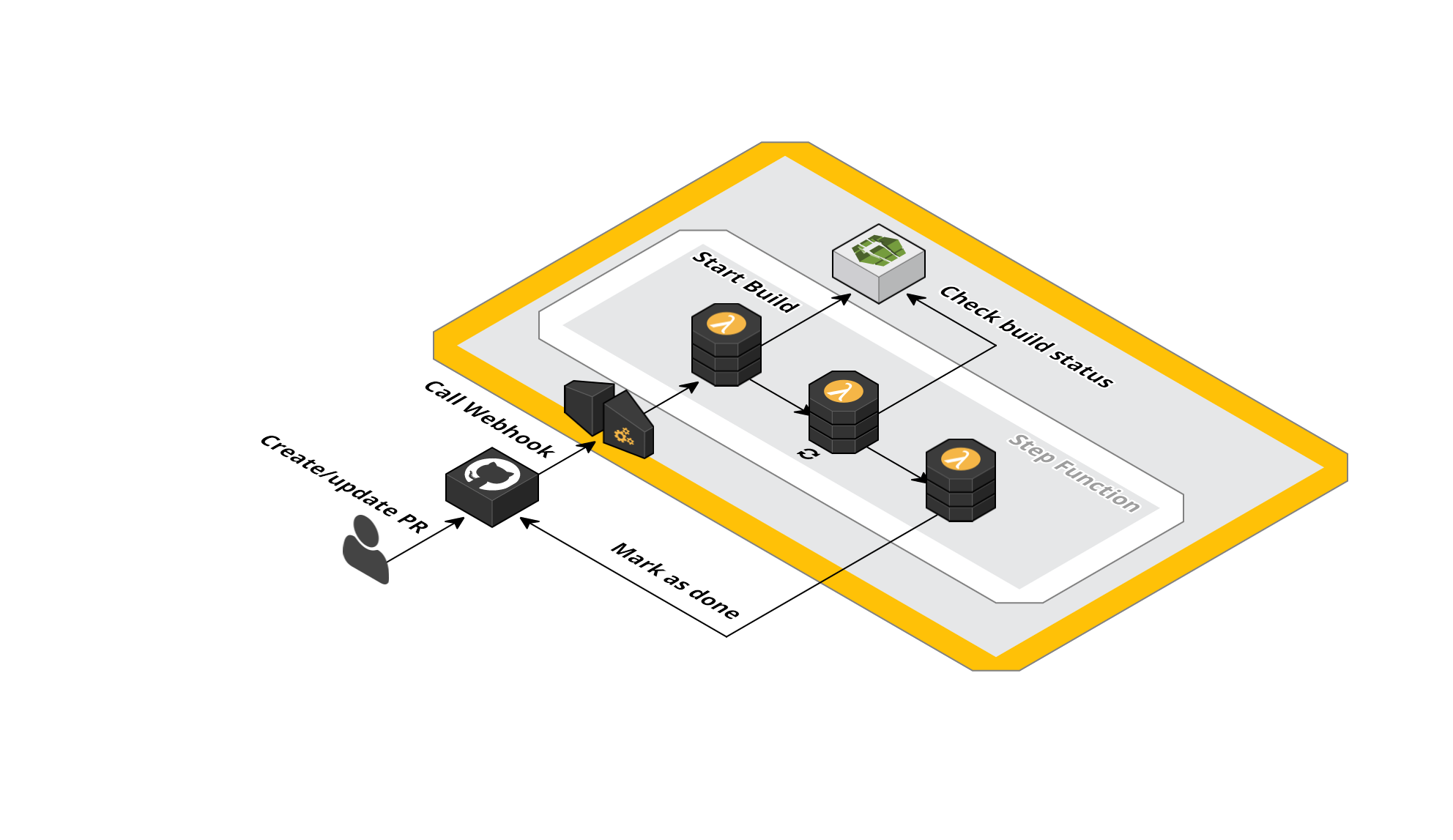
When you create a PR, a notification is sent to the API Gateway endpoint and
the lambda step function is triggered. This will trigger the start of a build
for your project, and set a status of pending on your specific commit. Then
it will start checking your build status every X seconds. When the status of
the build changes to done or failed, the github api is called and the PR
status will be updated accordingly.
In the Example below, a PR is create, and a build is run which fails. Then, a new commit is pushed, which fixes the build. When you click on the 'details' link of the PR status, it will take you to the CodeBuild build log.

- Add (optional) junit parsing, so it can comment on files with (possible) issues.
- Perhaps make build project dynamic through apigateway variable if possible.
- Doublecheck
editHookfunctionality. - Add
deleteHookfunctionality.