The purpose of this tutorial to show queue of steps for creating simple dasboard. This dashboard should have 2 wiether widgets with Temperature, the data should be requered via JOB but HTTP request. And 1 widget that get information using API call. I'm using Windows 8 and Ruby 2.3.3..
- Installation
- JOBS
- API
- Crete new Widget
- Several Dashboars on one server
- Google Sheets
- OpenSSh
- PRI
- Digital Ocean droplet
- Rbenv ruby-build rbenv-env install
- Smashing needs nodejs instaleld
- Start smashing as daemon
- Some notice
- SSHkit
- Create Widget by Rake
Take a look for a little bit I made decision to use Smashing because it's looks exactly the same in documentation. But the code is newer.
$ gem install smashing$ smashin new dashing-tutorialCreate newdashing-tutorialfolder where put all necessary files.$ cd dashing-tutorial$ bundlethis istall all required gems for running dashing.$ smashing startboom Error `rescue in create_default_data_source': No source of timezone data could be found. (TZInfo::DataSourceNotFound)
It was very predicatble that it's big problem to run something on windows. Going to try Ubuntu.
Because it's as usually failed to fire something a slightly serious using Windows and Ruby. I came back to my virtual UBUNTU. First I need to chech what servers are runing.
$ sudo netstat -pluntand if I found that some servers run I going to turn them off.$ sudo systemctl status nginxand$ sudo systemctl status apache2or$ sudo systemctl -all | grep -E 'apache|nginx'find what is working.$ sudo systemctl stop apache2stop apache service.$ sudo netstat -pluntto check that the ports dose not listen any more.
Hey it's nice I already have SSH keys installed both on github and my VM vare version. But if you need to do it, you can check it here.
- check
$ git --config user.name; git --config user.email - chage
$ vim .gitconfig - Now in windows I got the name of this repo
git remote -v - And clone this repo address into linux ssh cli, this would be great.
git clone git@github.com:lbvf50mobile/dashing-tutorial.git
Nice now I have this repo at the Linux virtual machine.
- To make thigs working faster I have an aliases in
.bashrc
alias pu='git push'
alias pl='git pull'
alias s='git status'
So getting new verison of my code from Windows, I need just print $ pl.
- Ok. Fire
$ bundle $ smahing startit works. And it's listing for0.0.0.0:3030this meand it's going to listen for all interfaces.ifconfig -aget my local IP.http://192.168.1.39:3030/samplein wondows browser and it's works fine. Iable to see this dashboard at the Linux Virtual machine, from my Windows workstaton. Success the dashboard available
1.7.1 Running smashing in BACKGROUND (be Able to close the SSH connettion with Linux Virtual Machine)
- First I need to find what process is listing
0.0.0.0:3030and I going to use$ sudo netstat -pluntand$ ps -aux | grep {pid_or_name} - PID/Program name is
11337/thin -R confi - and when I'm colsing the ssh conection with Virtual machine it's disapears. I cannot connect to it.
$ smashing start &to start program and be able to close terminal. And after this call it going to show the PID of process something like this11912- but it's intersting after
sudo netstat -pluntI see the name/pid11929/thin -R confi. I'll try tokill 11912and check what happens. Nothng happes - killing via
sudo netstat -pluntandkillPID I found listining0.0.0.0:3030
- Job implement it's reqests all the time the
Smashingis working, dose not metter are there any browsers looks at a dashboard - At
/dashboards/sample.rbI create two widjets withdata-view="Number"and two different data-id:data-id="wiether_salt"anddata-id="wiether_nsk". data-view="Number"- it's a type of widget.
    <li data-row="1" data-col="1" data-sizex="1" data-sizey="1">
      <div data-id="wiether_salt" data-view="Number" data-title="Weather in Salt Lake City"  "></div>
    </li>
     <li data-row="1" data-col="1" data-sizex="1" data-sizey="1">
      <div data-id="wiether_nsk" data-view="Number" data-title="Weather in Novosibirsk"  ></div>
    </li>
- data-id:
data-id="wiether_sault"anddata-id="wiether_nsk"these are addresses of widgets. On this adreses I going to send information. - At the
jobs\sample.rbI add two evetns that going to send infromation on newly created widgets using it's adresses.data-id="wiether_salt"and `data-id="wiether_nsk"
  send_event('wiether_salt',   { current: current_wiether_salt, last: last_wiether_salt })
  send_event('wiether_nsk',   { current: current_wiether_nsk, last: last_wiether_nsk})
- First add minitest to a gemfile.
- And start
$ bundlenow we have aminitestinstalled and able to create classes that going to be used by Smashing - Create folder for test and file:
$ mkdir test,$ touch test/test_helper.rb - Create file
test/wether_test.rbin this file I going to test the class for delivering data to data widget. - When file is created it's possbile to fire test with
ruby test/weater_test.rband use all power of TDD, in reach for success in the application - I added a new class
DashApp::Weatherinto thelibfolder, and it's automatically loaded into thejobs/sample.rbwhen I start smashing.
- Create variable
$ VARNAME=15 - Read variable
echo $TESTA - Export var to envirotnmen
$ export TESTA - Read variable from ruby script:
$ ruby -e "p ENV['TESTA'] - Create file for tocken
$ touch tmp, save data tocken data in thetmpfile,$ echo "MyTocken" > tmp - Save token valule from file to a
TESTAvariable.$ TESTA=$(cat 'tmp')and checkecho $TESTA - Greate. no need to use
exportit's already in environment:$ ruby -e "p ENV['TESTA'] - Wonderfull now We able to have Tokens in files, and do not include this files in git, by inclusing them into the
.gitignore.
- first I create the file
$ touch WEATHER_TOKENthis file will not be in git ignore to avoid saving tokins in github. - I create the file that going to save put
WEATHER_TOKENinto the envWEATHER_TOKEN, and this file isweather.sh - Incorrect Now to push tocket into ENV need to fire
$ ./weather.sh - !!! IMPORTANT after run
.wather.shall things works in context of bach file, but dose not work in laiter called ruby file. Need to insert manually content of$ ./weather.shand after manual insert it's works. - Now I need to know how to delte variable
$ export -n WEAHTER_TOKEN. - Need to use
source weather.sh
When in Linux it's better to use rbenv-var
- I going to check to the Environment variable set
$ printenv WEATHER_TOKEN - Then I going to delete it if it's exists
$ export -n WEATHER_TOKEN' and check again do it exists$ printenv WEATHER_TOKEN` - Next I'll create
.rbenv-varsfile by$ touch .rbenv-varsand put data fromWEATHER_TOKENfile to this new created file$ cat WEATHER_TOKEN > .rbenv-varsand addWEATHER_TOKEN=prefix. $ echo "WEATHER_TOKEN="$(cat 'WEATHER_TOKEN') > .rbenv-varsfeels great.$ ruby test/weather_test.rbworks fine. but$ printenv WATHER_TOKENis empty. Great and Neat.- Now start the the
$ smashing startwork.
- I created new
data-view="Number"widget withdata-id="api"at thedashboard/sample.rb.
<li data-row="1" data-col="1" data-sizex="1" data-sizey="1">
      <div data-id="api" data-view="Number" data-title="Send data Using API"  ></div>
</li>
- at the
config.ruI add tokenLETTESTALONGLONGTOKEN
set :auth_token, 'LETTESTALONGLONGTOKEN'
- and prepare
api.sh, take a look on similarities http://localhost:3030/widgets/**api** and data-id="api", also on set of json vaules.
curl -d '{ "auth_token": "LETTESTALONGLONGTOKEN", "current": "100", "last": "50" }' http://localhost:3030/widgets/api
- Upload data to the liniux, fire
source api.shand data transfered to the widget.
- Now I know what to do in term of Coffie Script, and main thing I need to find path how to
complie. - I going to create widget called
numto show just one number. It going to have 2 elementstitleandnumwhere I going to place number. - I create new
numdir for the new widget:$ mkdir widgets/num; [ -d widgets/num ] && echo "The dir is created" || echo "The dir is not created" - Next I'll create
num.htmlfile:$ touch widgets/num/num.html; [ -f widgets/num/num.html ] && echo "file ok" || echo "file fail" - In this file I going to have only 3 things:
title,numandnum10the multiplication num*10 to test some scripts action. - So here I created simple
widgets/num/num.htmlcontet, three lines withbtag anddata-bindattribute for each field:
title: <b data-bind="title"></b><br/>
num: <b data-bind="num"></b><br/>
num10: <b data-bind="num10"></b><br/>
- It's time for coffie script:
$ touch widgets/num/num.coffee; [ -f widgets/num/num.coffee ] && echo "c ok" || echo "c fail" - When file is created, I going add programm code to it.
class Dashing.Num extends Dashing.Widget
    @accessor 'num', Dashing.AnimatedValue
    @accessor 'num10', ->
        num10 = @get('num') * 10
        "#{num10}"
- It's time to create styles for newly create widget: and I going to copy this from the
numberwidged, and then change it a little bit. - Copy and check:
$ cp widgets/number/number.scss widgets/num/num.scss; [ -f widgets/num/num.scss ] && echo "copy ok" || echo "copy fail" - and add slight change,
numbersubsitute withnum - Inserting newly created widget into the dashboard: I going to open the
dashboards/sample.erband add newlielement there; withdata-id="n" data-view="Num" data-title="new Widget"
data-id="n"
data-view="Num"
data-title="new Widget" - new
liadded to thedashboards/sample.erb
<li data-row="1" data-col="1" data-sizex="1" data-sizey="1">
      <div data-id="n" data-view="Num" data-title="new Widget"></div>
</li>
- Now going to chage
api.shfile and add curl to send data to theninstance of theNumberwindget.
curl -d '{ "auth_token": "LETTESTALONGLONGTOKEN", "num": "77"}' http://localhost:3030/widgets/n
The data-id="n" stored into the http://localhost:3030/widgets/n
- and Test time, I fire the server with
smashing start - and in new terminal window fire
source api.sh - IT works!
host.com:port/(dashboard_name)line from source code- Defaulf dashboard sat at the
config.ru
configure do
  set :auth_token, 'AUTH_TOKEN'
  set :default_dashboard, 'my_favourite_dashboard' #<==== set default dashboard like this

  helpers do

    def protected!
      redirect('/auth/g') unless session[:user_id]
    end
- Docs here gist, youtube PY, youtube Ruby
- My First step is to add dependencies into the
Gemfile:gem 'google-api-client',gem 'google_drive'
$ echo "gem 'google_drive'" >> Gemfile; echo "gem 'google-api-client'" >> Gemfile; bundle
THIS TOOK 5-10 minutes.google-api-clienttook some time
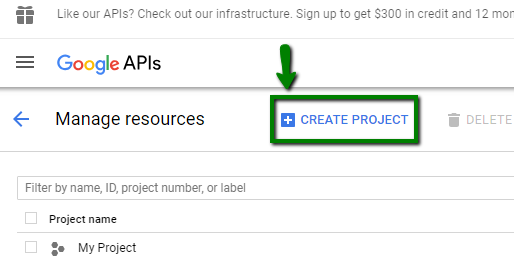
- go to google console and click
Create Project
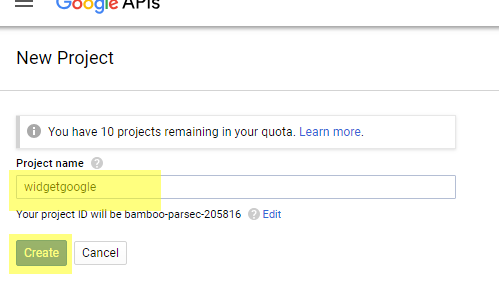
- I'll call it
widgetgoogle
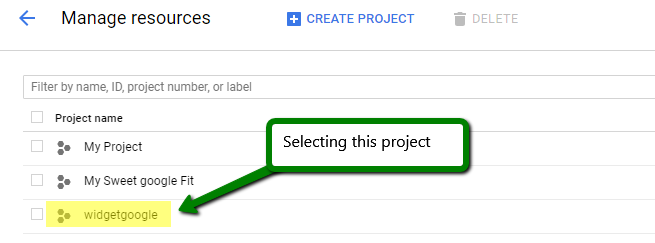
- Then click on this project name
widgetgoogle
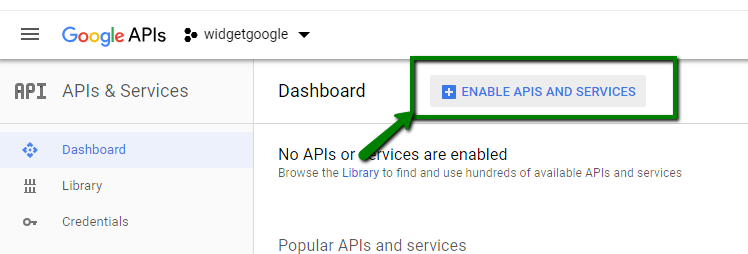
- Then click on big google API's when this project is selected.

- click enable API's and Services
- select
Driveand enable it.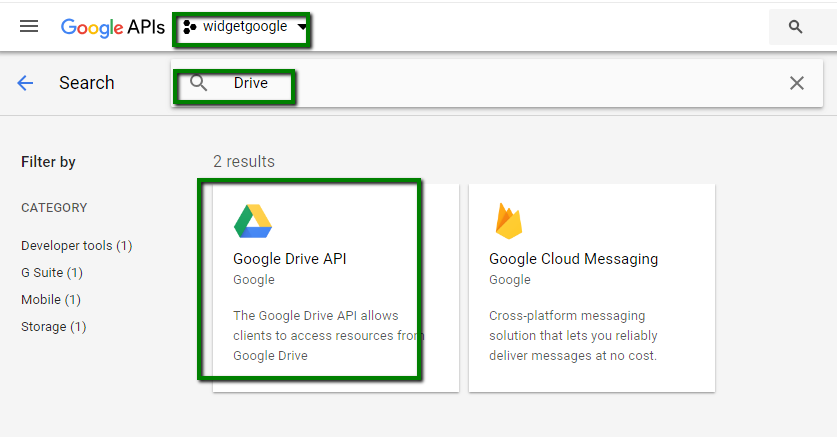
- copy widget here wg.json
- create Directory for a new widget. I'll do it using
google_widget.shjust because it faster. - Add data to the
dashboards/sample.erb
<li data-row="2" data-col="1" data-sizex="1" data-sizey="1">
  <div data-id="google_spreadsheet" data-view="GoogleSpreadsheet" data-title="Google Spreadsheet Cells Value"></div>
</li>
sudo cat /etc/ssh/sshd_config[ -f /etc/ssh/sshd_config ] && echo "yes this is file" || echo "no problem"git clone https://github.com/lbvf50mobile/dashing-tutorial.gitcd dashing-tutorialsource sh/01check
- First I need to make copy of
.bashrc, and I going to check correct namels -alF | grep bash,cat .bashrc, from~firesource dashing-tutorial/sh/03bashrc.sh - Now I need to create ssh using keys. adding 3 new lines to the
/etc/ssh/sshd_config, I add this data theresource dashing-tutorial/sh/04chssh.shagain run from the~ - I add scrit
sh/05restoressh.shto restore/etc/ssh/sshd_configin case of acceidend. sudo systemctl status sshsudo systemctl restart ssh- Just created new key called rpi, and again
sudo systemctl status sshsudo systemctl restart ssh- now connection to rpi works like this
ssh -p PORT -i ~/.ssh/rpi pi@IP - create script to install rbenv this script will be at the
sh/06rbenv.sh - no I going to install rbenv vars and it will be by the script
sh/07vars.sh $ rbenv install 2.3.1$ scp -p PORT -i ~/.ssh/rpi wg.json pi@IP:~/dashing-tutorial/wg.jsonnot work, impemented by VI, and .rbenv-vars too$ gem install bundlersudo gem install bundler- Issue: run server
smasing start &on RPI, close terminal, andsudo netstat -pluntdose not reflect this server. server stops.
Installing Smashing on digital ocean droplet.
And my first step is to create fast logging to the droplet without passprase so I be able by one keypress d log into this system. It's requires several steps.
- Logging using already existes keys.
$ ssh -i ~/.ssh/keys root@xxx.xxx.xxx.xx$ tails -10 ~/.bashrc$ echo 'alias d="ssh -i ~/.ssh/keys root@xxx.xxx.xxx.xx"' >> ~/.bashrc
- Check who really commit into the system.
$ last
- Create scripts and aliases for backup/resotre
authorised_keys(At curernt moment at the doplet I'm act as a ROOT, ths why # instad of $)- check for git
# git --version - test where do I am
# cd ~; pwd/root - copy smashing for using scripts I write here:
# git clone https://github.com/lbvf50mobile/dashing-tutorial.git - check the permisions for
authorized_keys# ls -alF ~/.ssh/authorized_keys-rw------- - generate copy of
authorized_keysby# source sh/08backak.sh
- check for git
- Generate new SSH keys pari without passfrase. and put it into the
autorised_keys$ ssh-keygen -t rsa -C "The comment"
-
Change
rootpassword- generate password with
sh/09pass.rb - now need to change password
# passwd
- generate password with
-
Now create new user.
- check list of users
# cat /etc/passwd - check list of groups
# cut -d: -f1 /etc/group - create new user by
# adduser boardwith nameboard
- check list of users
-
Establish ssh for new user.
- my user is not in
sshgroup. - now I going to create new keypair:
$ ssh-keygen -t rsa -C "The comment" - and try to load it by:
$ ssh-copy-id -i ~/.ssh/mykey user@host - IT'S VERY interesting because at the
cat /etc/ssh/sshd_configI have aPasswordAuthentication no - DOSE NOT WORK
- now I create
/home/board/.sshand there I going to createauthorized_keysand push key into this directory. I checked in existed system:.ssh/==drwx------, and~/.ssh/authorized_keys==-rw-------. Create file10createsshdir.shand fire it withsource 10createsshdir.sh# su board ; cd ~$ git clone https://github.com/lbvf50mobile/dashing-tutorial.git,cd dashing-tutorial,source sh/10createsshdir.sh$ echo KEY >> ~/.ssh/authorized_keys,$ cat ~/.ssh/authorized_keys$ ssh -i ~/.ssh/board board@xx.xxx.xxx.xxxConnected
- now I going to add user to a sudo group
# usermod -aG sudo board - RELOGIN
$ su board
- Test working on virtual machine to prevent the failure that leads to lose of connect with server.
- At virtual machine crate new user
tuserpassworddtuser1:$ sudo adduser tuser,$ su tuser,$ cd ~ - clone the
$ git clone https://github.com/lbvf50mobile/dashing-tutorial.gitto get set of scripts. and run changed10createsshdir.sh $ hostname -I- Create a keys for
tuserand attuserand move it to the~/.ssh/authorized_keys:$ ssh-keygen -t rsa -C "tuser test user ubuntu",$ scp -i ~/.shh/key tuser.pub user@host:~/tuser.pub - Test login
$ ssh -i ~/.ssh/tuser tuser@host. Success
- At virtual machine crate new user
- When I have a new user I able to test the way of deni ssh connect for username.
- first I create
tuseralias to be able fast in testing how do I turn of the SSH login.alias tuser="ssh -i ~/.ssh/tuser tuser@xxx.xxx.xxx.xxx" - now time to disable root
/etc/ssh/sshd_configPermitRootLogin no - but for testing purpose I going to use DenyUsers
- the permitions
-rw-r--r-- 1 root root 2539 Jun 22 2016 /etc/ssh/sshd_config - now I need scripts for backup/restore, I created
sshddirectory with two filessshd/sshd_backup.sh,sshd/sshd_restore.sh. - And now test,
git pull, set exectue permition,sshd/sshd_backup.sh 20180612_1,sudo echo "# TEST line 2018012_2" >> /etc/ssh/sshd_config,sshd/sshd_backup 20180612_2, thensshd/sshd_resore 20180612_2and check how do it works. $ chmod u+x sshd/sshd* ; ls -alF sshd$ sudo chmod o+w /etc/ssh/sshd_config$ sudo chmod o-w /etc/ssh/sshd_config$ tail -2 /etc/ssh/sshd_config ; ls -alF /etc/ssh/sshd_config$ sshd/sshd_backup.sh 20180612_2$ sshd/sshd_restore.sh 20180612_2 ; tail -1 /etc/ssh/sshd_configand$ sshd/sshd_restore.sh 20180612_1 ; tail -1 /etc/ssh/sshd_config$ sshd/sshd_apend.sh "DenyUsers tuser # 20180612 Tuesday"$ sudo systemctl status ssh$ sudo systemctl restart ssh$ tuserPermission denied (publickey). success I denied ssh access for tuser.- Loging by other user and then
su tuserthis works success
- first I create
- Implementing this task on the Droplet
-
upload the
sshddir, read the/etc/ssh/sshd_configchmod u+x sshd/sshd*ls -alF sshd
-
backup current config
sshd/sshd_backup.sh 20180612_1
-
add
PermitRootLogin no # 20180612 June Tuesdaysshd/sshd_apend.sh "PermitRootLogin no # 20180612 June Tuesday"- issue
UsePAM yesPermitRootLogin no # 20180612 June Tuesday vi /etc/ssh/sshd_configsshd/sshd_backup.sh 20180613norootll /etc/ssh/ | grep bk
-
resart
$ sudo systemctl status ssh$ sudo systemctl restart ssh- I still log in as root
sshd/sshd_backup.sh 20180613noroot1sshd/sshd_apend.sh "DenyUsers root # 20180613 Wendesday"sshd/sshd_backup.sh 20180613_denyuserroot$ sudo systemctl status ssh$ sudo systemctl restart ssh
-
test
- only after DenyUsers root it starts works
- found why there was
PermitRootLogin yesfound bygrep Root /etc/ssh/sshd_config ll /etc/ssh/ | grep bksshd/sshd_restore.sh 20180612_1- Change
PermitRootLogin yesonPermitRootLoging no sshd/sshd_backup.sh 20180613norootcorrect$ sudo systemctl status ssh$ sudo systemctl restart ssh- DONE all things works correctly.
- Check
$ su rootSUCCESS
-
- my user is not in
$ sh/11rbenv_build_vars.sh$ rbenv install -l# list all avaialable versions.$ rbenv install 2.3.7# install a Ruby version- error configure: error: no acceptable C compiler found in $PATH
- Here I may to install
build-essential - Or download
Rubyfor Linux - Going to build:
$ sudo apt-get update $ apt-get install autoconf bison build-essential libssl-dev libyaml-dev libreadline6-dev zlib1g-dev libncurses5-dev libffi-dev libgdbm3 libgdbm-dev(this require 163 mb, I do not whant to spend them)$ df -hI have 23Gb space.$ time rbenv install 2.3.7done (5m54.021s)$ rbenv global 2.3.7Choosing ruby version$ ruby --version- ruby 2.3.7p456 (2018-03-28 revision 63024) [x86_64-linux] Success
- Copy the
.rbenv-varswith this commandscp -i ~/.ssh/user .rbenv-vars userd@xxx.xxx.xxx.xxx:dashing-tutorial/.rbenv-vars - Copy the
wg.jsonwith this commandscp -i ~/.ssh/user wg.json userd@xxx.xxx.xxx.xxx:dashing-tutorial/.wg.json $ gem install bundler$ bundlesmashing startdose not works because of differnce in global and local instalation local with global
$ bundle show smashing,$ gem environmantbundler: failed to load command: thin (/home/board/.rbenv/versions/2.3.7/bin/thin)Error solution$ gem install thin$ sudo apt-get install -y nodejs
$ smashing start -dinstruction- error bundler: failed to load command: thin (/home/board/.rbenv/versions/2.3.7/bin/thin)
board@smashing:~/dashing-tutorial$ smashing start -d
bundler: failed to load command: thin (/home/board/.rbenv/versions/2.3.7/bin/thin)
Errno::EEXIST: File exists @ dir_s_mkdir - tmp
/home/board/.rbenv/versions/2.3.7/lib/ruby/2.3.0/fileutils.rb:254:in `mkdir'
/home/board/.rbenv/versions/2.3.7/lib/ruby/2.3.0/fileutils.rb:254:in `fu_mkdir'
/home/board/.rbenv/versions/2.3.7/lib/ruby/2.3.0/fileutils.rb:228:in `block (2 levels) in mkdir_p'
/home/board/.rbenv/versions/2.3.7/lib/ruby/2.3.0/fileutils.rb:226:in `reverse_each'
/home/board/.rbenv/versions/2.3.7/lib/ruby/2.3.0/fileutils.rb:226:in `block in mkdir_p'
/home/board/.rbenv/versions/2.3.7/lib/ruby/2.3.0/fileutils.rb:211:in `each'
/home/board/.rbenv/versions/2.3.7/lib/ruby/2.3.0/fileutils.rb:211:in `mkdir_p'
/home/board/.rbenv/versions/2.3.7/lib/ruby/gems/2.3.0/gems/thin-1.7.2/lib/thin/daemonizing.rb:49:in `daemonize'
/home/board/.rbenv/versions/2.3.7/lib/ruby/gems/2.3.0/gems/thin-1.7.2/lib/thin/controllers/controller.rb:62:in `start'
/home/board/.rbenv/versions/2.3.7/lib/ruby/gems/2.3.0/gems/thin-1.7.2/lib/thin/runner.rb:203:in `run_command'
/home/board/.rbenv/versions/2.3.7/lib/ruby/gems/2.3.0/gems/thin-1.7.2/lib/thin/runner.rb:159:in `run!'
/home/board/.rbenv/versions/2.3.7/lib/ruby/gems/2.3.0/gems/thin-1.7.2/bin/thin:6:in `<top (required)>'
/home/board/.rbenv/versions/2.3.7/bin/thin:22:in `load'
/home/board/.rbenv/versions/2.3.7/bin/thin:22:in `<top (required)>'
- vi /home/board/.rbenv/versions/2.3.7/lib/ruby/2.3.0/fileutils.rb
- delete the
tmpfile from the repo $ smashing start -dinstruction- Success
- If add
data-bindin to a widget html it going to clear all stuff wrote in parent html. - Jobs works independent of clients all the time a
Dashingis working. - Change size of widget box 'Laying out the widgets' at the
assets/javascripts/application.coffee. Also it's possible to do it at the dashboard.erbfile, as like asdashboards/sampletv.erb. - Change default dashboard at the
config.ru
$ gem install sshkit$ echo "gem 'sshkit'" >> Gemfile; bundle- https://www.rubyplus.com/articles/591 need to add
include SSHKit::DSL