Wisdom is an Emacs package that provides a structured way to write
Literate Emacs configuration in Org mode. Unlike traditional Org-based
configurations, which are limited to a single file and a single src
block per use-package, Wisdom supports multiple Org files, and first
class use-package declarations.
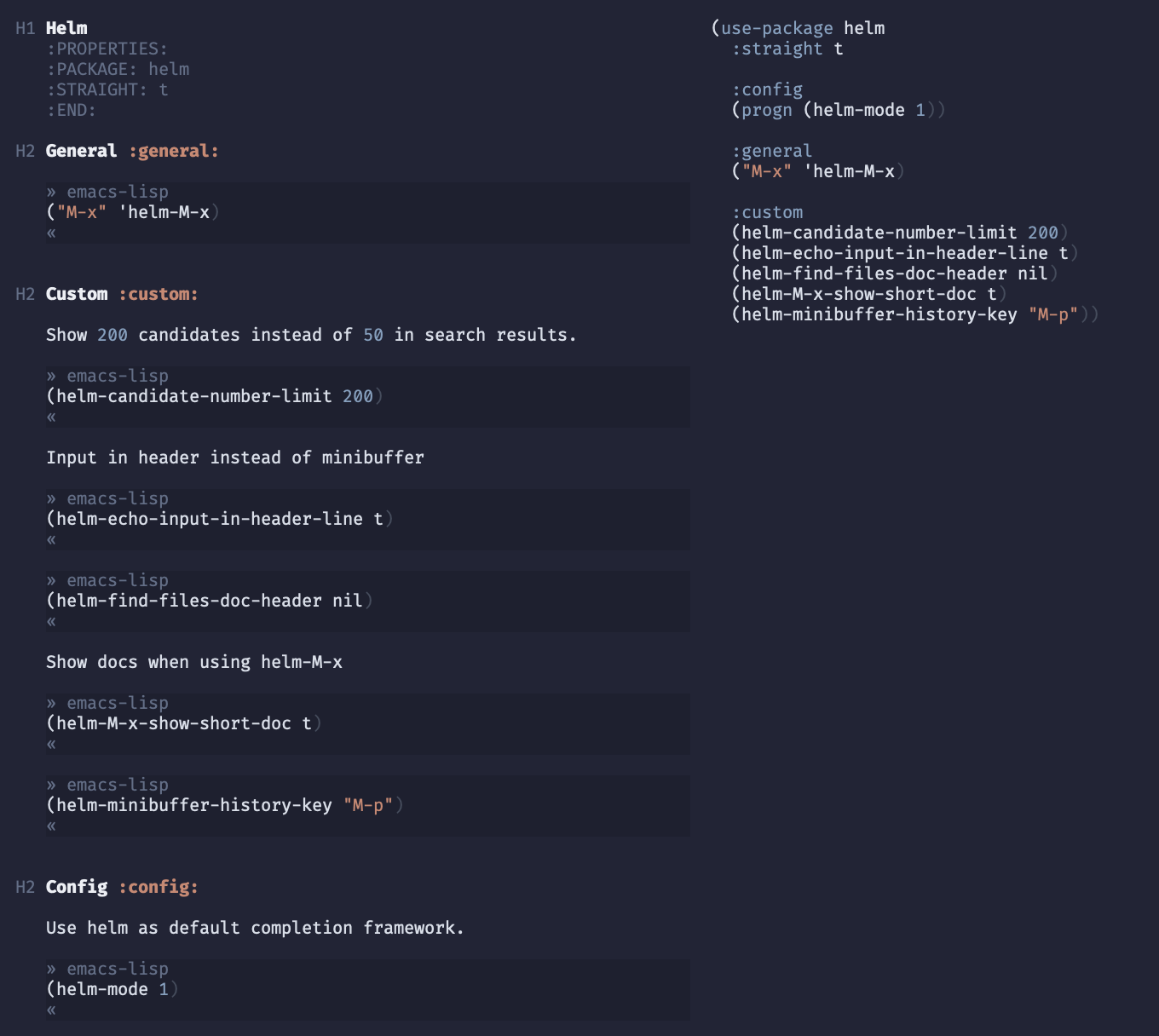
For real world examples: Emacs.d
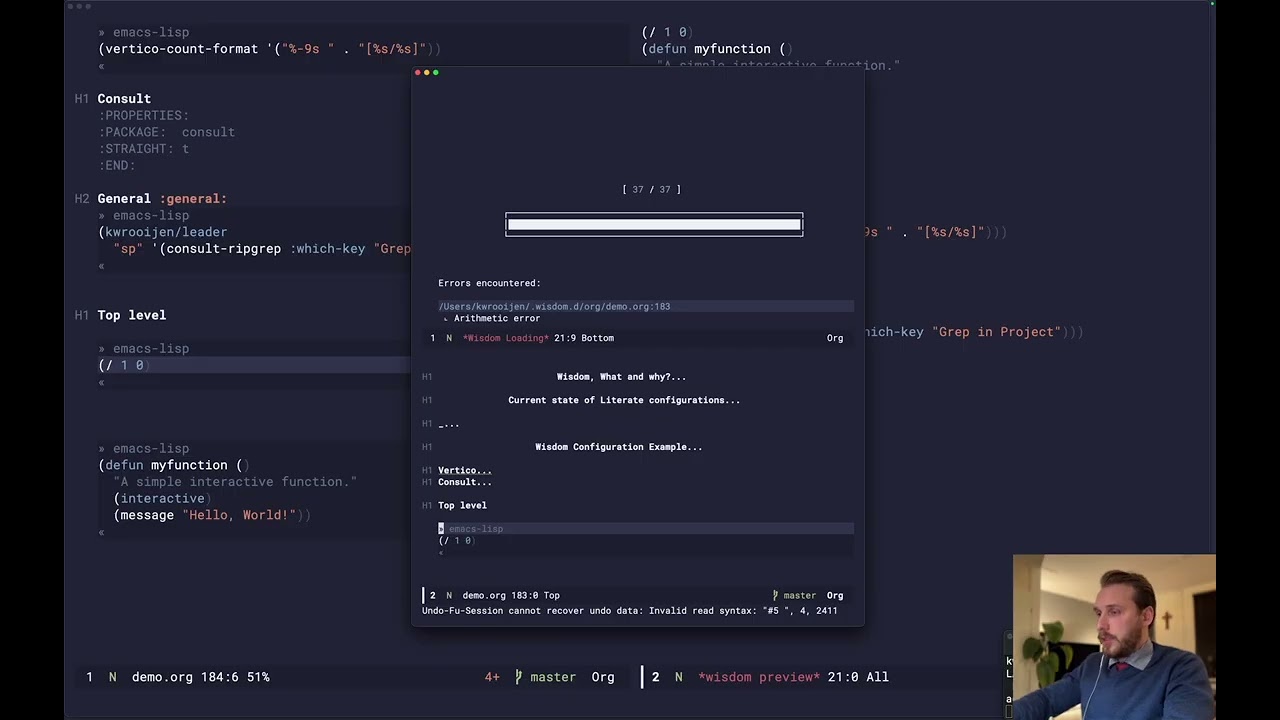

- Multi Org mode file configuration
- use-package first class integration
- Elisp file loading error handling
- Load remote Org files
To use Wisdom, you need to set up your Emacs environment with
straight.el for package management and ensure the latest version of
Org mode is installed. Below is a minimal init.el configuration to
get started.
;; Bootstrap straight.el
(defvar bootstrap-version)
(let ((bootstrap-file
       (expand-file-name
        "straight/repos/straight.el/bootstrap.el"
        (or (bound-and-true-p straight-base-dir)
            user-emacs-directory)))
      (bootstrap-version 7))
  (unless (file-exists-p bootstrap-file)
    (with-current-buffer
        (url-retrieve-synchronously
         "https://raw.githubusercontent.com/radian-software/straight.el/develop/install.el"
         'silent 'inhibit-cookies)
      (goto-char (point-max))
      (eval-print-last-sexp)))
  (load bootstrap-file nil 'nomessage))

;; Install Org mode
(straight-use-package 'org)

;; Install and configure Wisdom
(use-package wisdom
  :straight (wisdom :type git :host github :repo "kwrooijen/wisdom")
  :custom
  (wisdom-org-directory "~/.emacs.d/org")
  (wisdom-output-directory "~/.emacs.d/wisdom")
  (wisdom-remote-org-directory "~/.emacs.d/remote-org")
  (wisdom-remote-output-directory "~/.emacs.d/remote-wisdom")
  :config
(wisdom-boot))When developing your org files, use wisdom-preview and
wisdom-preview-mode to get a preview of the compiled emacs-lisp.
Any emacs-lisp source blocks in an org file, within the
wisdom-org-directory, will be compiled and loaded into Emacs at
boot.
Enable the package feature
#+BEGIN_SRC emacs-lisp
(setq package-feature-enabled t)
#+END_SRC
Wisdom allows us to defined use-package definitions using heading properties. All use-package keys map one to one with Wisdom (uppercase).
* Lispy
:PROPERTIES:
:PACKAGE: lispy
:STRAIGHT: t
:AFTER: evil-collection
:END:
This compiles down to
(use-package lispy
  :straight t
  :after evil)
Subheadings with use-package keys
* Lispy
:PROPERTIES:
:PACKAGE: lispy
:STRAIGHT: t
:AFTER: evil-collection
:END:

** Config :config:
#+BEGIN_SRC emacs-lisp
()
#+END_SRC

** Init :init:
#+BEGIN_SRC emacs-lisp
()
#+END_SRC

** Init :init:
#+BEGIN_SRC emacs-lisp
()
#+END_SRC

** General :general:
#+BEGIN_SRC emacs-lisp
()
#+END_SRC

** Hook :hook:
#+BEGIN_SRC emacs-lisp
()
#+END_SRC

** Custom :custom:
#+BEGIN_SRC emacs-lisp
()
#+END_SRC
(use-package lispy
 :straight t
 :after evil
 :config
 ()
 :init
 ()
 :init
 ()
 :general
 ()
 :hook
 ()
 :custom
())All src blocks are wrapped in condition-cases. This means that if one fails, the rest will continue.
#+BEGIN_SRC emacs-lisp
(/ 1 0) ;; Throws arithmetic error
#+END_SRC

#+BEGIN_SRC emacs-lisp
(setq some-var 123) ;; Doesn't get interrupted, even though it comes after the error.
#+END_SRC
Compiles down to
(condition-case err (progn (/ 1 0))
  (error
   (unless wisdom--booting
     (display-warning 'wisdom
                      (format "Error loading %s:%s - %s"
                              "/Users/kwrooijen/.wisdom.d/org/options.org"
                              4 (error-message-string err))
                      :error))))

(condition-case err (progn (setq some-var 123))
  (error
   (unless wisdom--booting
     (display-warning 'wisdom
                      (format "Error loading %s:%s - %s"
                              "/Users/kwrooijen/.wisdom.d/org/options.org"
                              8 (error-message-string err))
:error))))You can set the loading priority of an org file by setting the
#+PRIORITY: 0 attribute at the top of the file. Org files get sorted
by priority, therefore the lowest number loads first
Wisdom lets you to load external Org files, allowing you to create packages which can be easily distributed. Simply place the REMOTE attribute at the top of your org file with Github properties. This feature is still experimental and the design is likely to change.
#+REMOTE: (:host github :repo kwrooijen/test-org :file test.org :branch master)