


Tallr is a desktop dashboard for monitoring AI CLI sessions (Claude, Gemini, Codex) with real-time state detection and native notifications. Stay in flow by seeing when your AI is working, waiting, or done - all in a clean, always-on-top window so you can stay in flow without context switching.
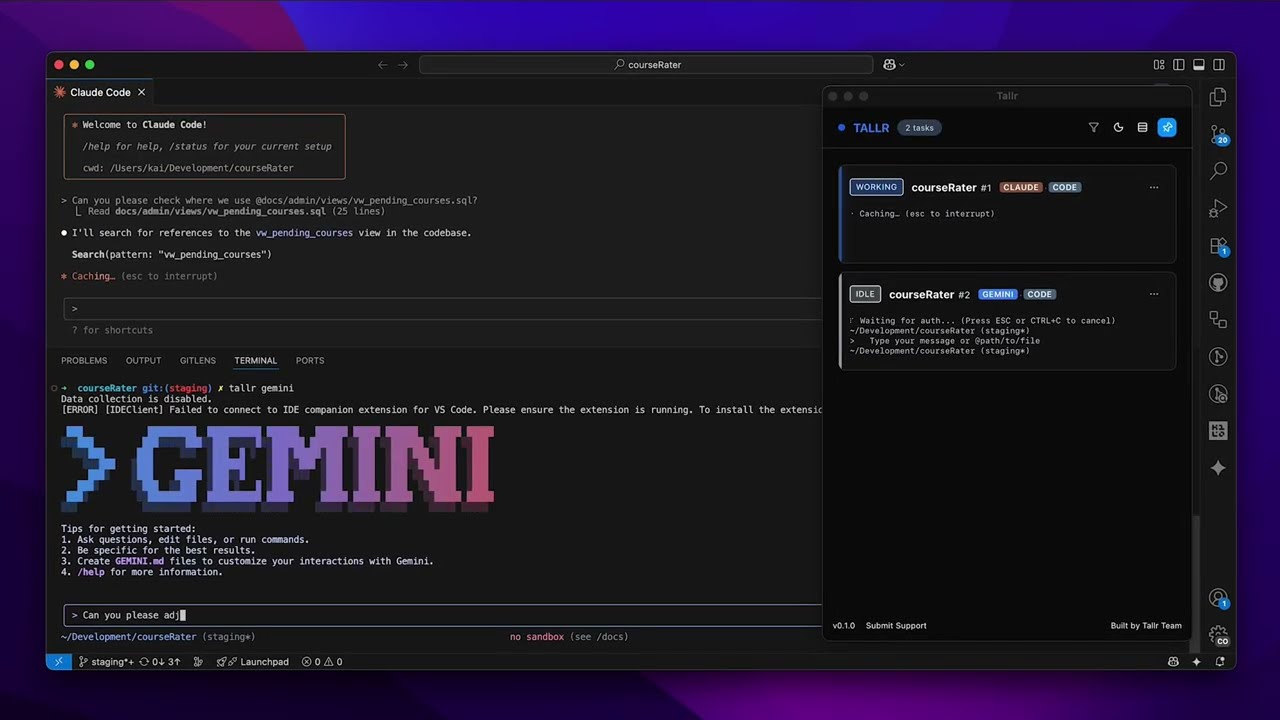
Author's Note: This started as a personal tool and learning experience. I'm constantly working to improve it, especially the state detection which I know is buggy (particularly for Codex and Gemini). My next goal is migrating from pattern recognition to a network-based approach for more accurate state tracking. If you find this useful, I'd love your feedback and patience as we make it better together.
➡️ https://github.com/kaihochak/tallr/releases
- Download the latest
.dmg - Open DMG and drag Tallr.app to Applications
- Remove quarantine (required until app is notarized):
xattr -cr /Applications/Tallr.app
- Open Tallr normally
Note: I'm still waiting for Apple Developer Program approval, so the app isn't notarized yet. The
xattrcommand removes the quarantine flag that causes the "damaged" error.
Quick Start
npm install
npm run tauri:dev
For full development setup, testing, debugging, and contribution guidelines, see CONTRIBUTING.md.
- Real-time monitoring of AI CLI sessions
- Smart notifications when attention is needed
- Session dashboard with expandable details
- IDE auto-detection (VS Code, Cursor, Zed, JetBrains, Windsurf, etc.)
- Always-on-top window and keyboard shortcuts
- State detection revamp: move from pattern + hooks to network-based (intercepting API) approach.
- Improve Gemini and Codex state detection accuracy and robustness.
- Incorporate user-suggested enhancements that are useful and attainable.
- Open the Tallr app
- In your terminal, run:
tallr claude    # Monitor Claude sessions
tallr gemini    # Monitor Gemini sessions
tallr codex # Monitor Codex sessions- Use your AI tool normally - Tallr tracks the session in real-time
The dashboard shows when your AI is working, waiting, or needs input. You'll get notifications when attention is needed.
Supported AI tools: Claude, Gemini, and Codex.
Tallr auto-detects your IDE, but some IDEs (like Cursor) are identified as VS Code. To use a specific IDE:
export TL_IDE=cursor # or code, zed, webstormTallr started as my personal tool to improve AI development workflows. As more people use it, contributors are encouraged and very much appreciated!
See CONTRIBUTING.md for:
- Development setup and requirements
- Testing and debugging workflows
- Code standards and conventions
- Pull request process
This project is licensed under the MIT License. See the LICENSE file for details.