



Okapi is a modern, minimalist HTTP web framework for Go, inspired by FastAPI's elegance. Designed for simplicity, performance, and developer happiness, it helps you build fast, scalable, and well-documented APIs with minimal boilerplate.
The framework is named after the okapi (/oʊˈkɑːpiː/), a rare and graceful mammal native to the rainforests of the northeastern Democratic Republic of the Congo. Just like its namesake, which resembles a blend of giraffe and zebra. Okapi blends simplicity and strength in a unique, powerful package.

✔ Intuitive & Expressive API – Clean, declarative syntax for effortless route and middleware definition.
✔ Automatic Request Binding – Seamlessly parse JSON, XML, form data, query params, headers, and path variables into structs.
✔ Built-in Auth & Security – Native support for JWT, Basic Auth, and custom middleware.
✔ Standard Library Compatibility - Integrates seamlessly with Go’s net/http standard library.
✔ Blazing Fast Routing – Optimized HTTP router with low overhead for high-performance applications.
✔ First-Class Documentation – OpenAPI 3.0 & Swagger UI integrated out of the box—auto-generate API docs with minimal effort.
✔ Dynamic Route Management – Easily enable or disable individual routes or groups, with automatic Swagger sync and no code commenting.
✔ Modern Tooling
- Route grouping & middleware chaining
- Static file serving
- Templating engine support
- CORS management
- Fine-grained timeout controls
✔ Developer Experience
- Minimal boilerplate
- Clear error handling
- Structured logging
- Easy testing
Built for speed, simplicity, and real-world use—whether you're prototyping or running in production.
- Easy to Learn: With familiar Go syntax and intuitive APIs, you can be productive in minutes—even on your first project.
- Lightweight and Unopinionated: Okapi is built from the ground up and doesn’t wrap or build on top of another framework. It gives you full control without unnecessary abstraction or bloat.
- Highly Flexible: Designed to adapt to your architecture and workflow—not the other way around.
- Built for Production: Fast, reliable, and efficient under real-world load. Okapi is optimized for performance without sacrificing developer experience.
- Standard Library Compatibility: Integrates seamlessly with Go’s net/http standard library, making it easy to combine Okapi with existing Go code and tools.
- Automatic OpenAPI Documentation: Generate comprehensive OpenAPI specs automatically for every route, keeping your API documentation always up to date with your code.
- Dynamic Route Management: Enable or disable routes and route groups at runtime. No need to comment out code—just toggle behavior cleanly and efficiently.
Ideal for:
- High-performance REST APIs
- Composable microservices
- Rapid prototyping
- Learning & teaching Go web development
Whether you're building your next startup, internal tools, or side projects—Okapi scales with you.
mkdir myapi && cd myapi
go mod init myapi
go get github.com/jkaninda/okapi@latestCreate a file named main.go:
package main

import (
  "github.com/jkaninda/okapi"
)
func main() {

	o := okapi.Default()

	o.Get("/", func(c okapi.Context) error {
		return c.OK(okapi.M{"message": "Hello from Okapi Web Framework!","License":"MIT"})
	})
	// Start the server
	if err := o.Start(); err != nil {
		panic(err)
	}
}
Run your server:
go run main.goVisit http://localhost:8080 to see the response.
{
  "License": "MIT",
  "message": "Hello from Okapi Web Framework!"
}package main
import (
"github.com/jkaninda/okapi"
"net/http"
)
type Response struct {
Success bool `json:"success"`
Message string `json:"message"`
Data Book `json:"data"`
}
type Book struct {
Name string `json:"name" maxLength:"50" minLength:"5" required:"true" description:"Book name"`
Price int `json:"price" min:"1" max:"100" required:"true" description:"Book price"`
}
type ErrorResponse struct {
Success bool `json:"success"`
Status int `json:"status"`
Details any `json:"details"`
}
func main() {
// Create a new Okapi instance with default config
o := okapi.Default()
o.Post("/books", func(c okapi.Context) error {
book := Book{}
err := c.Bind(&book)
if err != nil {
return c.ErrorBadRequest(ErrorResponse{Success: false, Status: http.StatusBadRequest, Details: err.Error()})
}
response := Response{
Success: true,
Message: "This is a simple HTTP POST",
Data: book,
}
return c.OK(response)
},
// OpenAPI Documentation
okapi.DocSummary("Create a new Book"), // Route Summary
okapi.DocRequestBody(Book{}), // Request body
okapi.DocResponse(Response{}), // Success Response body
okapi.DocResponse(http.StatusBadRequest, ErrorResponse{}), // Error response body
)
// Start the server
if err := o.Start(); err != nil {
panic(err)
}
}Now go to http://localhost:8080/docs to see the interactive API documentation generated by Okapi.
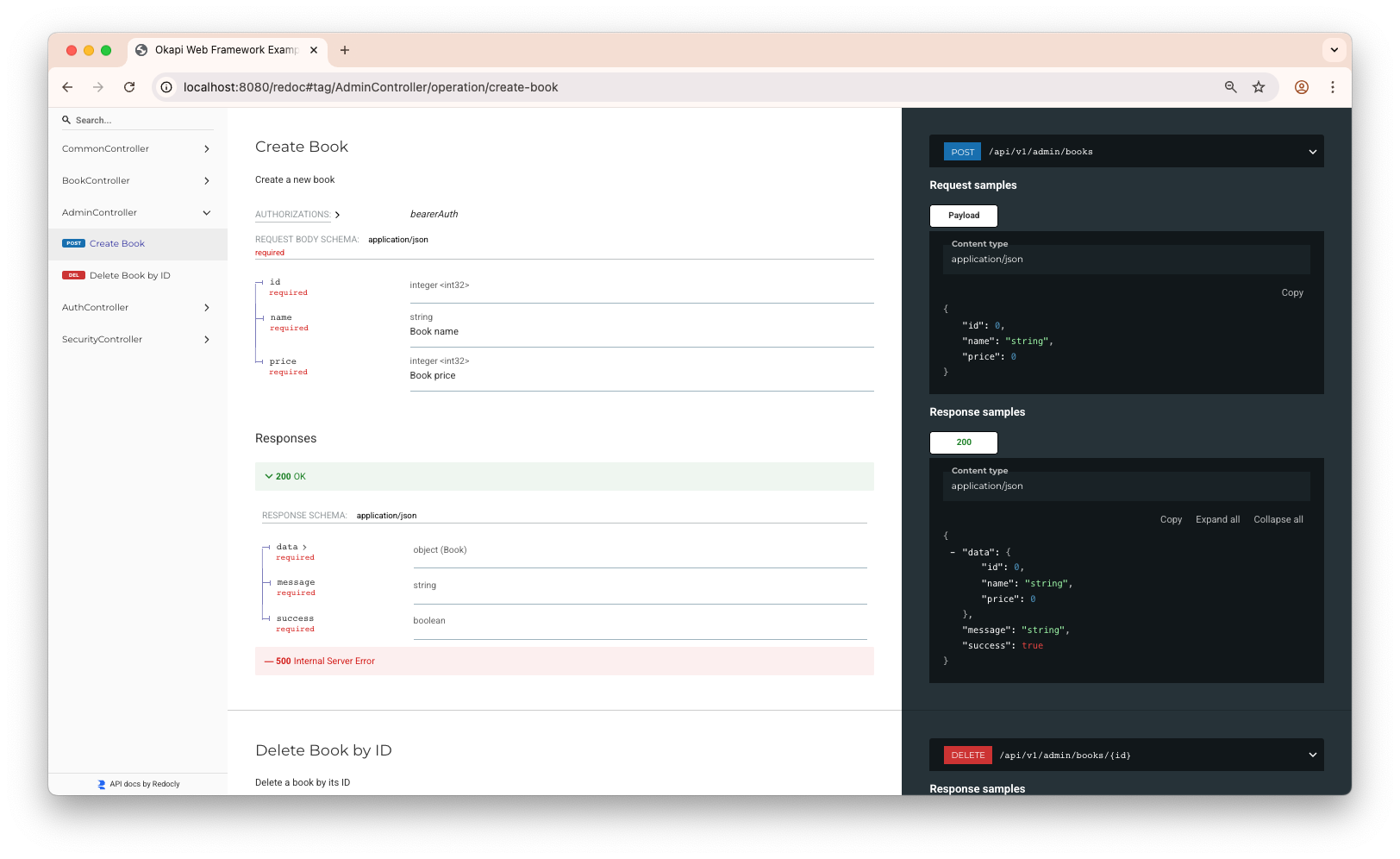
And now, go to http://localhost:8080/redoc to see the Redoc documentation.
Okapi supports all standard HTTP methods:
o.Get("/books", getBooks)
o.Post("/books", createBook)
o.Get("/books/:id", getBook)
o.Put("/books/:id", updateBook)
o.Delete("/books/:id", deleteBook)
Route groups in Okapi allow you to organize your routes under a common path prefix, apply middleware selectively, and control group-level behaviors like deprecation or disabling. This feature makes it easy to manage API versioning, logical route separation, and access control.
- Nesting: Define sub-groups within a parent group to build hierarchical route structures.
- Middleware: Attach middleware to a group to apply it to all nested routes.
- Deprecation: Mark a group as deprecated to indicate it's being phased out (useful for OpenAPI documentation).
- Disabling: Temporarily disable a group to return
404 Not Foundfor all its routes. - Tagging: Automatically tag routes in OpenAPI documentation based on group names.
o := okapi.Default()

// Create the main API group
api := o.Group("/api")

// Versioned subgroups
v1 := api.Group("/v1").Deprecated()        // Marked as deprecated
v2 := api.Group("/v2")                     // Active version
v3 := api.Group("v3", testMiddleware).Disable() // Disabled, returns 404

// Define routes
v1.Get("/books", getBooks)
v2.Get("/books", v2GetBooks)
v3.Get("/books", v3GetBooks) // Will not be accessible

// Admin subgroup with middleware
admin := api.Group("/admin", adminMiddleware)
admin.Get("/dashboard", getDashboard)
This structure improves route readability and maintainability, especially in larger APIs.
Okapi supports flexible and expressive route path patterns, including named parameters and wildcards:
o.Get("/books/{id}", getBook)       // Named path parameter using curly braces
o.Get("/books/:id", getBook)        // Named path parameter using colon prefix
o.Get("/*", getBook)                // Catch-all wildcard (matches everything)
o.Get("/*any", getBook)             // Catch-all with named parameter (name is ignored)
o.Get("/*path", getBook)            // Catch-all with named parameter
Use whichever syntax feels most natural — Okapi normalizes both {} and : styles for named parameters and supports glob-style wildcards for flexible matching.
o.Get("/books/:id", func(c okapi.Context) error {
	id := c.Param("id")
	return c.String(http.StatusOK, id)
})o.Get("/books", func(c okapi.Context) error {
name := c.Query("name")
return c.String(http.StatusOK, name)
})Handle standard form fields and file uploads:
o.Post("/books", func(c okapi.Context) error {
	name := c.FormValue("name")
	price := c.FormValue("price")

	logo, err := c.FormFile("logo")
	if err != nil {
        return c.AbortBadRequest("Bad request", err)
	}
	file, err := logo.Open()
	if err != nil {
            return c.AbortBadRequest("Bad request", err)
	}
	defer file.Close()
	// You can now read or save the uploaded file
	return c.String(http.StatusOK, "File uploaded successfully")
})Okapi provides powerful and flexible request binding that automatically maps incoming request data into Go structs. It supports two complementary binding styles:
In Flat Binding, you define a single struct where each field can be sourced from any part of the request.
This style allows you to mix request body fields (JSON, XML, YAML, Protobuf, Form) with query parameters, headers, cookies, and path parameters — all within a single struct.
type Book struct {
	ID     int    `json:"id" path:"id" query:"id" form:"id"`
	Name   string `json:"name" xml:"name" form:"name" minLength:"4" maxLength:"50" required:"true"`
	Price  int    `json:"price" form:"price" required:"true"`
	Logo   *multipart.FileHeader `form:"logo" required:"true"`
	Content string `header:"Content-Type" json:"content-type" xml:"content-type" required:"true"`
	// Supports both ?tags=a&tags=b and ?tags=a,b
	Tags []string `form:"tags" query:"tags" default:"a,b"`
}

o.Post("/books", func(c okapi.Context) error {
	book := &Book{}
	if err := c.Bind(book); err != nil {
		return c.ErrorBadRequest(err)
	}
	return c.JSON(http.StatusOK, book)
})In Body Field Binding, your struct defines a dedicated Body field (or a field tagged as body) that represents the main request payload.
Other fields in the struct represent query params, headers, cookies, or path parameters.
This pattern promotes a clean separation between metadata and the request content, making it ideal for larger APIs and OpenAPI generation.
type BookRequest struct {
	Body struct {
		Name  string `json:"name" minLength:"4" maxLength:"50" required:"true"`
		Price int    `json:"price" required:"true"`
		Logo  *multipart.FileHeader `form:"logo" required:"true"`
	} `json:"body"` // Request body

	ID        int      `json:"id" param:"id" query:"id"`        // from path or query
	Tags      []string `query:"tags" default:"a,b"`             // supports ?tags=a&tags=b and ?tags=a,b
	APIKey    string   `header:"X-API-Key" required:"true"`     // from header
	SessionID string   `cookie:"session_id" json:"session_id"`  // from cookie
}

o.Post("/books", func(c okapi.Context) error {
	bookReq := &BookRequest{}
	if err := c.Bind(bookReq); err != nil {
		return c.ErrorBadRequest(err)
	}
	return c.Respond(bookReq)
})| Source | Tag(s) | Notes |
|---|---|---|
| Path parameters | path, param |
Extracted from URL path variables (e.g. /books/:id, /books/{id}). |
| Query parameters | query |
Automatically parses arrays (?tags=a&tags=b or ?tags=a,b). |
| Headers | header |
Reads values from HTTP headers. |
| Cookies | cookie |
Reads cookie values. |
| Form fields | form |
Supports both standard and multipart forms (file uploads). |
| JSON body | json |
Automatically decoded if Content-Type: application/json. |
| XML body | xml |
Automatically decoded if Content-Type: application/xml. |
| OpenAPI metadata | description, doc |
Used for generated OpenAPI documentation. |
Okapi supports declarative validation and default value assignment through struct tags.
| Field Type | Tag | Description |
|---|---|---|
string |
minLength:"10" |
Minimum string length (10 chars). |
string |
maxLength:"50" |
Maximum string length (50 chars). |
number |
min:"5" |
Minimum numeric value. |
number |
max:"100" |
Maximum numeric value. |
any |
default:"..." |
Default value if field is empty. |
any |
required:"true" |
Field must be provided. |
When using c.Respond(), Okapi automatically serializes the response struct into the HTTP response.
It inspects struct tags to determine:
- the HTTP status code
- response headers
- cookies
- and the response body (encoded according to the
Acceptheader).
type BookResponse struct {
	// HTTP status code (default: 200)
	Status int `status:"true" json:"status"`

	// Response body
	Body struct {
		ID    int    `json:"id"`
		Name  string `json:"name"`
		Price int    `json:"price"`
	} `json:"body"`

	// Custom headers
	XRequestID string `header:"X-Request-ID" json:"x-request-id"`

	// Cookies
	SessionID string `cookie:"session_id" json:"session_id"`
}

o.Get("/books/:id", func(c okapi.Context) error {
	book := BookResponse{
		Status: http.StatusOK,
		Body: struct {
			ID    int    `json:"id"`
			Name  string `json:"name"`
			Price int    `json:"price"`
		}{
			ID:    1,
			Name:  "The Great Go Book",
			Price: 20,
		},
		XRequestID: "req-12345",
		SessionID:  "sess-67890",
	}
	return c.Respond(book)
})auth := okapi.BasicAuth{
Username: "admin",
Password: "password",
Realm: "Restricted",
ContextKey: "user",// where to store the username e.g. "user", default(username)
}
// Global middleware
o.Use(auth.Middleware)
// Attach SingleRouteMiddleware to this route only, without affecting others
o.Get("/", SingleRouteMiddlewareHandler).Use(SingleRouteMiddleware)
// Group middleware
o.Get("/admin", adminHandler)Okapi includes powerful and flexible JWT middleware to secure your routes with JSON Web Tokens. It supports multiple signing mechanisms, key sources, claim validation strategies, and OpenAPI integration.
- HS256 symmetric signing via
SigningSecret - RS256 and other asymmetric algorithms via
RSAKey - Remote JWKS discovery via
JwksUrl(e.g., OIDC or Auth0) - Local JWKS via
JwksFile - Claims validation with
ClaimsExpressionorValidateClaims - OpenAPI integration with
.WithBearerAuth() - Selective claim forwarding using
ForwardClaims
jwtAuth := okapi.JWTAuth{
    SigningSecret: []byte("supersecret"),      // Shared secret for HS256
    TokenLookup:   "header:Authorization",     // Token source: header, query, or cookie (default: header:Authorization)
    ContextKey:    "user",                     // Key under which claims are stored in context
}jwtAuth := okapi.JWTAuth{
JwksUrl: "https://example.com/.well-known/jwks.json", // Remote JWKS URL
TokenLookup: "header:Authorization",
ContextKey: "user",
}Use ClaimsExpression to define rules for validating claims using simple expressions. This is ideal for access control based on roles, scopes, or other custom claim logic.
Equals(field, value)Prefix(field, prefix)Contains(field, val1, val2, ...)OneOf(field, val1, val2, ...)
!— NOT&&— AND (evaluated before OR)||— OR (evaluated after AND)
Example:
jwtAuth := okapi.JWTAuth{
    SigningSecret:    []byte("supersecret"),
    ClaimsExpression: "Equals(`email_verified`, `true`) && Equals(`user.role`, `admin`) && Contains(`tags`, `gold`, `silver`)",
    TokenLookup:      "header:Authorization",
    ContextKey:       "user",
    ForwardClaims: map[string]string{
        "email": "user.email",
        "role":  "user.role",
        "name":  "user.name",
    },
}ForwardClaims lets you expose specific claims to your handlers via the request context. This keeps handlers decoupled from the full JWT while retaining useful information.
Supports dot notation for nested claims.
Example:
jwtAuth.ForwardClaims = map[string]string{
    "email": "user.email",
    "role":  "user.role",
    "name":  "user.name",
}
Get these claims in your handler:
func whoAmIHandler(c okapi.Context) error {
    email := c.GetString("email")
    if email == "" {
        return c.AbortUnauthorized("Unauthorized", fmt.Errorf("user not authenticated"))
    }
	slog.Info("Who am I am ", "email", email, "role", c.GetString("role"), "name", c.GetString("name"))
// Respond with the current user information
    return c.JSON(http.StatusOK, M{
                "email": email,
                "role":  c.GetString("role"),
                "name":  c.GetString("name"),
		}, )
}You can define your own ValidateClaims function to fully control claim checks. Use this for advanced logic beyond what ClaimsExpression supports.
You can combine this with ClaimsExpression for more complex scenarios.
Example:
jwtAuth.ValidateClaims = func(c Context, claims jwt.Claims) error {
    method := c.Request().Method
    slog.Info("Request method,", "method", method)
    mapClaims, ok := claims.(jwt.MapClaims)
    if !ok {
        return errors.New("invalid claims type")
    }

    if emailVerified, _ := mapClaims["email_verified"].(bool); !emailVerified {
        return errors.New("email not verified")
    }

    if role, _ := mapClaims["role"].(string); role != "admin" {
        return errors.New("unauthorized role")
    }

    return nil
}The OnUnauthorized handler lets you customize responses for failed JWT validations, including:
- Missing or malformed tokens
- Expired tokens
- Failed claims validation (via either
ClaimsExpressionorValidateClaims)
Example Implementation:
auth := okapi.JWTAuth{
    Audience:      "okapi.example.com",
    SigningSecret: SigningSecret,
    // ... other configurations
    OnUnauthorized: func(c okapi.Context) error {
        // Return custom unauthorized response
        return c.ErrorUnauthorized("Unauthorized")
    },
}Apply the JWT middleware to route groups or individual routes to require authentication.
// Apply middleware globally (optional)
o.Use(jwtAuth.Middleware)

admin := o.Group("/admin", jwtAuth.Middleware). // Protect /admin routes
    WithBearerAuth()                            // Adds Bearer auth to OpenAPI docs

admin.Get("/users", adminGetUsersHandler)       // Secured route

// Attach SingleRouteMiddleware to this route only, without affecting others
o.Get("/", SingleRouteMiddlewareHandler).Use(SingleRouteMiddleware)cors := okapi.Cors{AllowedOrigins: []string{"http://localhost:8080", "https://example.com"}, AllowedHeaders: []string{}}
o := okapi.New(okapi.WithCors(cors))
o.Get("/", func(c okapi.Context) error {
return c.String(http.StatusOK, "Hello World!")
})func customMiddleware(next okapi.HandlerFunc) okapi.HandlerFunc {
return func(c okapi.Context) error {
start := time.Now()
err := next(c)
log.Printf("Request took %v", time.Since(start))
return err
}
}
o.Use(customMiddleware)o.UseMiddleware(func(handler http.Handler) http.Handler {
return http.HandlerFunc(func(w http.ResponseWriter, r *http.Request) {
slog.Info("Hello Go standard HTTP middleware function")
handler.ServeHTTP(w, r)
})
})Okapi provides automatic OpenAPI (Swagger) documentation generation with a built-in interactive UI. The documentation is dynamically generated from your route definitions, ensuring it always stays in sync with your API implementation.
- Using
okapi.Default()Documentation is enabled by default and served at/docs.
o := okapi.Default() // Docs available at /docs- Using
okapi.New()withWithOpenAPIDocs()If you initialize Okapi withokapi.New(), documentation is disabled by default. You can enable it withWithOpenAPIDocs(), this approach also allows you to dynamically disable the documentation at runtime (e.g., in production) based on environment variables or configuration.
o := okapi.New() // Disabled
if os.Getenv("ENABLE_DOCS") == "true" {
	o.WithOpenAPIDocs()
}You can customize the OpenAPI documentation by passing a configuration object to WithOpenAPIDocs().
o := okapi.New().WithOpenAPIDocs(
    okapi.OpenAPI{
        Title:      "Example API",
        Version:    "1.0.0",
        Contact: okapi.Contact{
            Name:  "API Support",
            Email: "support@example.com",
        },
    },
)You can define authentication mechanisms for your API, such as Basic Auth, Bearer tokens, and OAuth2 flows.
o.WithOpenAPIDocs(okapi.OpenAPI{
    Title:   "Okapi Web Framework Example",
    Version: "1.0.0",
    License: okapi.License{Name: "MIT"},
    SecuritySchemes: okapi.SecuritySchemes{
        {
            Name:   "basicAuth",
            Type:   "http",
            Scheme: "basic",
        },
        {
            Name:         "bearerAuth",
            Type:         "http",
            Scheme:       "bearer",
            BearerFormat: "JWT",
        },
        {
            Name: "OAuth2",
            Type: "oauth2",
            Flows: &okapi.OAuthFlows{
                AuthorizationCode: &okapi.OAuthFlow{
                    AuthorizationURL: "https://auth.example.com/authorize",
                    TokenURL:         "https://auth.example.com/token",
                    Scopes: map[string]string{
                        "read":  "Read access",
                        "write": "Write access",
                    },
                },
            },
        },
    },
})You can apply security schemes to individual routes or entire route groups.
var bearerAuthSecurity = []map[string][]string{
    {"bearerAuth": {}},
}

o.Get("/books", getBooksHandler).WithSecurity(bearerAuthSecurity...)api := o.Group("/api", jwtMiddleware).WithSecurity(bearerAuthSecurity)
api.Get("/", apiHandler)Tip: If you are defining routes using
RouteDefinition, you can also set security directly using theSecurityfield.
Okapi makes it simple to attach OpenAPI documentation to your routes. You can choose between composable functions for concise definitions or a fluent builder for more flexibility.
This is the simplest and most readable approach — ideal for small or medium routes.
Each okapi.Doc* function documents a specific part of your endpoint.
o.Get("/books", getBooksHandler,
    okapi.DocSummary("List all available books"),
    okapi.DocTags("Books"),
    okapi.DocQueryParam("author", "string", "Filter by author name", false),
    okapi.DocQueryParam("limit", "int", "Maximum results to return (default 20)", false),
    okapi.DocResponseHeader("X-Client-Id", "string", "Client ID of the request"),
    okapi.DocResponse([]Book{}), // Shorthand for DocResponse(200, value)
    okapi.DocResponse(400, ErrorResponse{}),
    okapi.DocResponse(401, ErrorResponse{}),
)
When to use: Use this style for routes with straightforward request/response documentation.
For more complex or dynamic documentation setups, use the builder pattern via okapi.Doc().
This approach allows chaining multiple configuration methods and calling .Build() (or .AsOption()) at the end.
o.Post("/books", createBookHandler,
    okapi.Doc().
        Summary("Add a new book to the inventory").
        Tags("Books").
        BearerAuth().
        ResponseHeader("X-Client-Id", "string", "Client ID of the request").
        RequestBody(BookRequest{}).
        Response(201, Book{}).
        Response(400, ErrorResponse{}).
        Response(401, ErrorResponse{}).
        Build(),
)
When to use: Use this style for advanced or reusable route documentation — for example, when generating parts dynamically or reusing shared doc definitions.
| Method | Description |
|---|---|
DocSummary() / Doc().Summary() |
Short endpoint summary |
DocTags() / Doc().Tags() |
Group endpoints under tags |
DocBearerAuth() / Doc().BearerAuth() |
Enable Bearer token authentication |
DocRequestBody() / Doc().RequestBody() |
Document request body schema |
DocResponse() / Doc().Response() |
Document response schema or status codes |
DocPathParam() / Doc().PathParam() |
Document path parameters |
DocQueryParam() / Doc().QueryParam() |
Document query parameters |
DocHeader() / Doc().Header() |
Document request headers |
DocResponseHeader() / Doc().ResponseHeader() |
Document response headers |
DocDeprecated() / Doc().Deprecated() |
Mark route as deprecated |
The Body Field Style allows you to define a struct where a dedicated Body field (or a field tagged as body) represents the main request payload.
Other fields in the same struct can represent query parameters, headers, cookies, or path parameters.
// BookRequest defines a request with structured fields and validations.
type BookRequest struct {
  Body struct {
    Name  string                `json:"name" minLength:"4" maxLength:"50" required:"true"`
    Price int                   `json:"price" required:"true"`
    Logo  *multipart.FileHeader `form:"logo" required:"true"`
  } `json:"body"` // Request body section

  ID        int      `param:"id" query:"id"`             // from path or query
  Tags      []string `query:"tags" default:"a,b"`        // supports ?tags=a&tags=b and ?tags=a,b
  APIKey    string   `header:"X-API-Key" required:"true"`// from header
  SessionID string   `cookie:"session_id"`               // from cookie
}
type BookResponse struct {
Version string `header:"X-Version"`
Status int
Body Book
}o.Post("/books", func(c okapi.Context) error {
req := &BookRequest{}
// Validate request body
if err := c.Bind(req); err != nil {
return c.ErrorBadRequest(err)
}
return c.Respond(req)
},
okapi.Request(&BookRequest{}), // Request body
okapi.Response(&BookResponse{}), // Response body
)o.Post("/books", func(c okapi.Context) error {
req := &BookRequest{}
if err := c.Bind(req); err != nil {
return c.ErrorBadRequest(err)
}
return c.Respond(req)
}).WithIO(&BookRequest{}, &BookRequest{}) // Both request & responseo.Post("/books", func(c okapi.Context) error {
req := &BookRequest{}
if err := c.Bind(req); err != nil {
return c.ErrorBadRequest(err)
}
return c.Respond(req)
}).WithInput(&BookRequest{}) // Request onlyo.Post("/books", func(c okapi.Context) error {
req := &BookRequest{}
if err := c.Bind(req); err != nil {
return c.ErrorBadRequest(err)
}
return c.Respond(req)
}).WithOutput(&BookRequest{}) // Response only| Style | Best For |
|---|---|
| Composable Functions | Simple, direct, quick to write |
Fluent Builder (Doc()) |
Complex or reusable route docs |
| Body Field Style | Declarative binding & validation |
| WithIO / WithInput / WithOutput | Auto-document request/response schemas |
Okapi automatically generates Swagger UI for all routes:
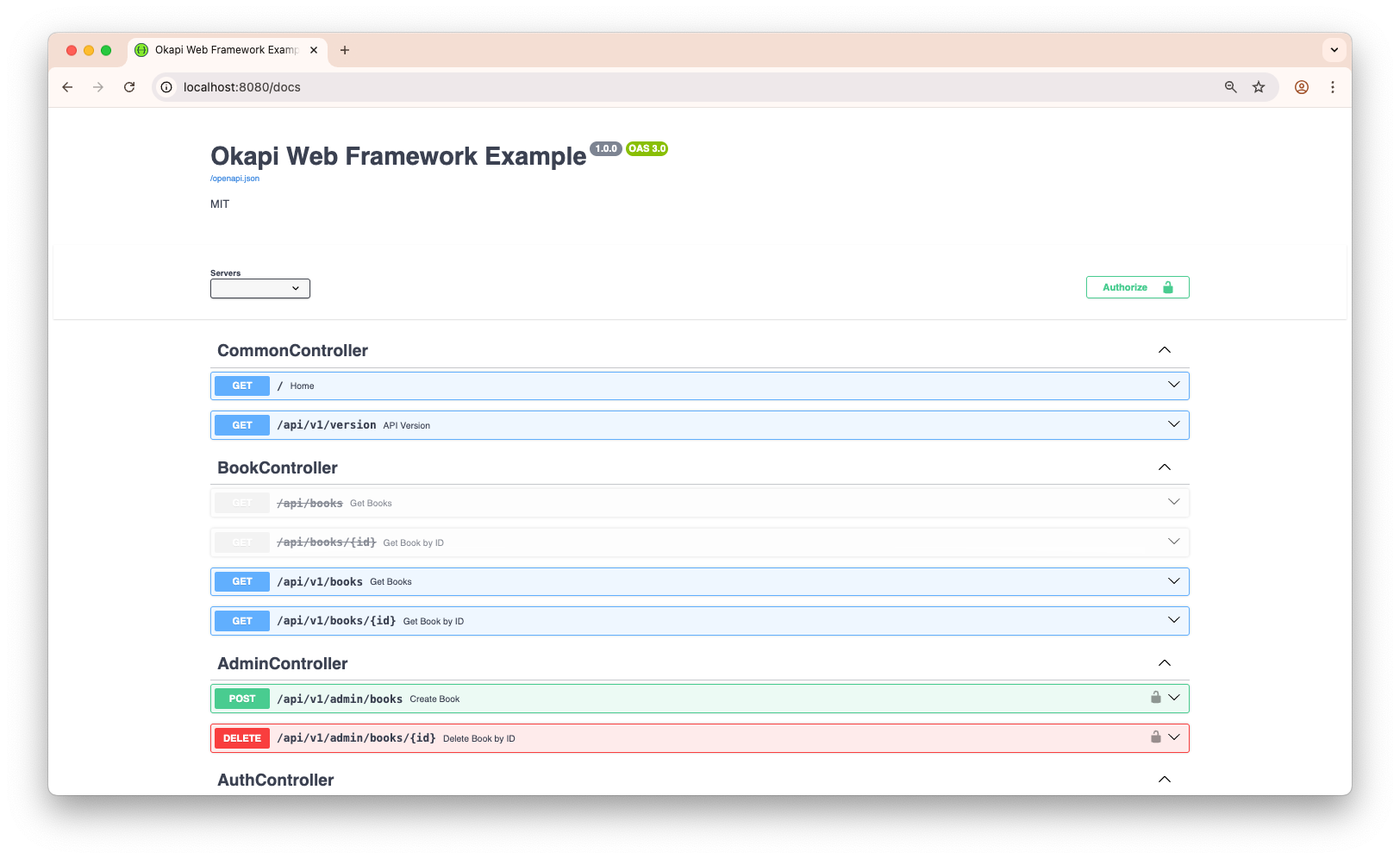
Okapi gives you flexible control over your API by allowing routes and route groups to be dynamically enabled or disabled. This is a clean and efficient alternative to commenting out code when you want to temporarily remove endpoints.
You can disable:
- Individual routes — blocks access to a specific endpoint
- Route groups — disables an entire section of your API, including all nested routes
This behavior is reflected both in runtime responses and API documentation.
| Type | HTTP Response | Swagger Docs | Affects Child Routes |
|---|---|---|---|
| Disabled Route | 404 Not Found |
Hidden | N/A |
| Disabled Group | 404 Not Found |
Hidden | Yes — all nested |
- Disabled routes/groups return a
404 Not Found - Automatically excluded from Swagger/OpenAPI documentation
- Disabling a group recursively disables all nested routes and sub-groups
- No need to comment out code — just call
.Disable()or.Enable()
- Temporarily removing endpoints during maintenance
- Controlling access based on feature flags
- Deprecating old API versions
- Creating toggleable test or staging routes
app := okapi.Default()

// Create the root API group
api := app.Group("api")

// Define and disable v1 group
v1 := api.Group("v1").Disable() // All v1 routes return 404 and are hidden from docs
v1.Get("/", func(c okapi.Context) error {
    return c.OK(okapi.M{"version": "v1"})
})

// Define active v2 group
v2 := api.Group("v2")
v2.Get("/", func(c okapi.Context) error {
    return c.OK(okapi.M{"version": "v2"})
})

// Start the server
if err := app.Start(); err != nil {
    panic(err)
}-
Disabled Route:
- Responds with
404 Not Found - Excluded from Swagger docs
- Responds with
-
Disabled Group:
- All nested routes and sub-groups are recursively disabled
- All affected routes are hidden from Swagger
To re-enable any route or group, simply call the .Enable() method or remove the .Disable() call.
o.Renderer = okapi.RendererFunc(func(w io.Writer, name string, data interface{}, c okapi.Context) error {
	tmpl, err := template.ParseFiles("templates/" + name + ".html")
	if err != nil {
		return err
	}
	return tmpl.ExecuteTemplate(w, name, data)
})type Template struct {
templates *template.Template
}
func (t *Template) Render(w io.Writer, name string, data interface{}, c okapi.Context) error {
return t.templates.ExecuteTemplate(w, name, data)
}
tmpl := &Template{
templates: template.Must(template.ParseGlob("templates/*.html")),
}
o.With().WithRenderer(&Template{templates: template.Must(template.ParseGlob("public/views/*.html"))})
// or
// o.With().WithRenderer(tmpl)o.Get("/", func(c okapi.Context) error {
return c.Render(http.StatusOK, "welcome", okapi.M{
"title": "Welcome Page",
"message": "Hello from Okapi!",
})
})Serve static assets and individual files:
// Serve a single file
o.Get("/favicon.ico", func(c okapi.Context) error {
	c.ServeFile("public/favicon.ico")
	return nil
})

// Serve an entire directory
o.Static("/static", "public/assets")// Initialize TLS configuration for secure HTTPS connections
tls, err := okapi.LoadTLSConfig("path/to/cert.pem", "path/to/key.pem", "", false)
if err != nil {
panic(fmt.Sprintf("Failed to load TLS configuration: %v", err))
}
// Create a new Okapi instance with default config
// With OpenAPI enabled, /docs
o := okapi.Default()
// Use HTTPS
// o := okapi.New(okapi.WithTLS(tls))
// Configure a secondary HTTPS server listening on port 8443
// This creates both HTTP (8080) and HTTPS (8443) endpoints
o.With(okapi.WithTLSServer(":8443", tls))
// Register application routes and handlers
o.Get("/", func(c okapi.Context) error {
return c.JSON(http.StatusOK, okapi.M{
"message": "Welcome to Okapi!",
"status": "operational",
})
})
// Start the servers
// This will launch both HTTP and HTTPS listeners in separate goroutines
log.Println("Starting server on :8080 (HTTP) and :8443 (HTTPS)")
if err := o.Start(); err != nil {
panic(fmt.Sprintf("Server failed to start: %v", err))
}
}Okapi provides a powerful and lightweight Context object that wraps the HTTP request and response. It is designed to simplify handling HTTP requests by offering a clean and expressive API for accessing request data, binding parameters, sending responses, and managing errors.
The Context is passed to all route handlers and supports:
- Accessing path parameters, query parameters, form values, file uploads, and headers
- Binding request data to structs using various formats (JSON, XML, YAML, form data, etc.)
- Sending structured responses (JSON, text, HTML, XML, file)
- Handling cookies, headers, and other request metadata
- Managing the request lifecycle (e.g., aborting early)
- Built-in helpers for standardized error responses
- Access to the underlying
*http.Requestandhttp.ResponseWriterfor low-level control
This makes it easy to focus on business logic without worrying about low-level HTTP details.
| Method | Description |
|---|---|
Request() |
The underlying *http.Request for accessing request data |
Response() |
The underlying http.ResponseWriter for sending responses |
The context supports multiple binding mechanisms depending on content type and request source
Okapi provides a rich set of response methods to send various types of responses back to the client. These methods automatically set the appropriate HTTP status codes and content types.
Okapi provides a comprehensive error-handling system. You can return an error directly from your route handler, and Okapi will format the response automatically.
Additionally, the Context includes many helper methods to send standardized HTTP error responses with custom messages and optional wrapped errors.
These helpers provide consistency and reduce boilerplate when handling errors in your handlers or middleware.
Okapi provides a clean, declarative way to define and register routes. It supports all standard HTTP methods, including GET, POST, PUT, DELETE, PATCH, and OPTIONS.
You can define routes individually or register multiple routes at once using the okapi.RegisterRoutes function and the RouteDefinition struct, which is especially useful when organizing routes by controller or feature module.
To group and manage routes more effectively, you can define them as a slice of okapi.RouteDefinition. This pattern is ideal for structuring routes in controllers or service layers.
type BookController struct{}

func (bc *BookController) GetBooks(c okapi.Context) error {
	// Simulate fetching books from a database
	return c.OK(okapi.M{"success": true, "message": "Books retrieved successfully"})
}

func (bc *BookController) CreateBook(c okapi.Context) error {
	// Simulate creating a book in a database
	return c.Created(okapi.M{
		"success": true,
		"message": "Book created successfully",
	})
}func (bc *BookController) Routes() []okapi.RouteDefinition {
apiGroup := &okapi.Group{Prefix: "/api"}
return []okapi.RouteDefinition{
{
Method: http.MethodGet,
Path: "/books",
Handler: bc.GetBooks,
Group: apiGroup,
Summary: "List Books",
Description: `Retrieve a list of all books in the inventory.`,
Request: &BookRequest{}, // OpenAPI documentation
Response: &BooksResponse{}, // OpenAPI documentation
},
{
Method: http.MethodPost,
Path: "/books",
Handler: bc.CreateBook,
Group: apiGroup,
Middlewares: []okapi.Middleware{customMiddleware}
Security: bearerAuthSecurity, // Apply Bearer Auth security scheme
Options: []okapi.RouteOption{
okapi.DocSummary("Create Book"), // OpenAPI documentation
},
},
}
}You can register routes using one of the following approaches:
app := okapi.Default()
bookController := &BookController{}

// Method 1: Register directly to the app instance
app.Register(bookController.Routes()...)

// Using a route group
// apiGroup := app.Group("/api")
// apiGroup.Register(bookController.Routes()...)


// Method 2: Use the global helper to register with the target instance
okapi.RegisterRoutes(app, bookController.Routes())
Both methods achieve the same result, choose the one that best fits your project’s style.
See the example in the examples/route-definition directory for a complete application using this pattern.
Okapi integrates seamlessly with Go’s net/http standard library, enabling you to:
- Use existing
http.Handlermiddleware - Register standard
http.HandlerFunchandlers - Combine Okapi-style routes with standard library handlers
This makes Okapi ideal for gradual adoption or hybrid use in existing Go projects.
Okapi’s UseMiddleware bridges standard http.Handler middleware into Okapi’s middleware system. This lets you reuse the wide ecosystem of community-built middleware—such as logging, metrics, tracing, compression, and more.
func (o *Okapi) UseMiddleware(middleware func(http.Handler) http.Handler)o := okapi.Default()
// Add a custom version header to all responses
o.UseMiddleware(func(next http.Handler) http.Handler {
return http.HandlerFunc(func(w http.ResponseWriter, r *http.Request) {
w.Header().Set("X-Version", "v1.2.0")
next.ServeHTTP(w, r)
})
})You can register any http.HandlerFunc using HandleStd, or use full http.Handler instances via HandleHTTP. These retain Okapi’s routing and middleware features while supporting familiar handler signatures.
func (o *Okapi) HandleStd(method, path string, handler http.HandlerFunc, opts ...RouteOption)o := okapi.Default()
o.HandleStd("GET", "/greeting", func(w http.ResponseWriter, r *http.Request) {
w.Write([]byte("Hello from Okapi!"))
})Migrating an existing net/http application? Okapi makes it painless.
You can mix Okapi and standard handlers in the same application:
// Okapi-style route
o.Handle("GET", "/okapi", func(c okapi.Context) error {
    return c.OK(okapi.M{"status": "ok"})
})

// Standard library handler
o.HandleStd("GET", "/standard", func(w http.ResponseWriter, r *http.Request) {
    w.WriteHeader(http.StatusOK)
    w.Write([]byte("standard response"))
})http.HandlerFunc: must manually callw.WriteHeader(...)okapi.Handle: can return an error or use helpers likec.JSON,c.Text,c.OK,c.ErrorNotFound()orc.AbortBadRequest()
Are you building a microservices architecture? Do you need a powerful yet lightweight API Gateway or a high-performance reverse proxy to secure and manage your services effortlessly?
Check out my other project — Goma Gateway.
Goma Gateway is a high-performance, declarative API Gateway built for modern microservices. It comes with a rich set of built-in middleware, including:
- Basic, JWT, OAuth2, LDAP, and ForwardAuth authentication
- Caching and rate limiting
- Bot detection
- Built-in load balancing
- Simple configuration with minimal overhead
- ...and more!
Protocol support: REST, GraphQL, gRPC, TCP, and UDP
Security: Automatic HTTPS via Let’s Encrypt or use your own TLS certificates
Whether you're managing internal APIs or exposing public endpoints, Goma Gateway helps you do it efficiently, securely, and with minimal complexity.
Contributions are welcome!
- Fork the repository
- Create a feature branch
- Commit your changes
- Push to your fork
- Open a Pull Request
⭐ If you find Okapi useful, please consider giving it a star on GitHub!
- Bug Reports: GitHub Issues
- Feature Requests: GitHub Discussions
- Contact: Open an issue for any questions
- LinkedIn: Jonas Kaninda
This project is licensed under the MIT License. See the LICENSE file for details.
Made with ❤️ for the Go community
⭐ Star us on GitHub — it helps!
Copyright (c) 2025 Jonas Kaninda


![@dependabot[bot]](https://avatars.githubusercontent.com/in/29110?s=64&v=4)


