


LazyLLMs is a TUI-based (Terminal UI) Model Manager, inspired by LazyDocker, designed for monitoring, managing, and interacting with AI models, specifically Ollama models. With LazyLLMs, you can view real-time system resource usage and control running AI models directly from your terminal. It’s a powerful tool for developers and AI enthusiasts who want a lightweight, efficient way to manage their models without the overhead of graphical interfaces.
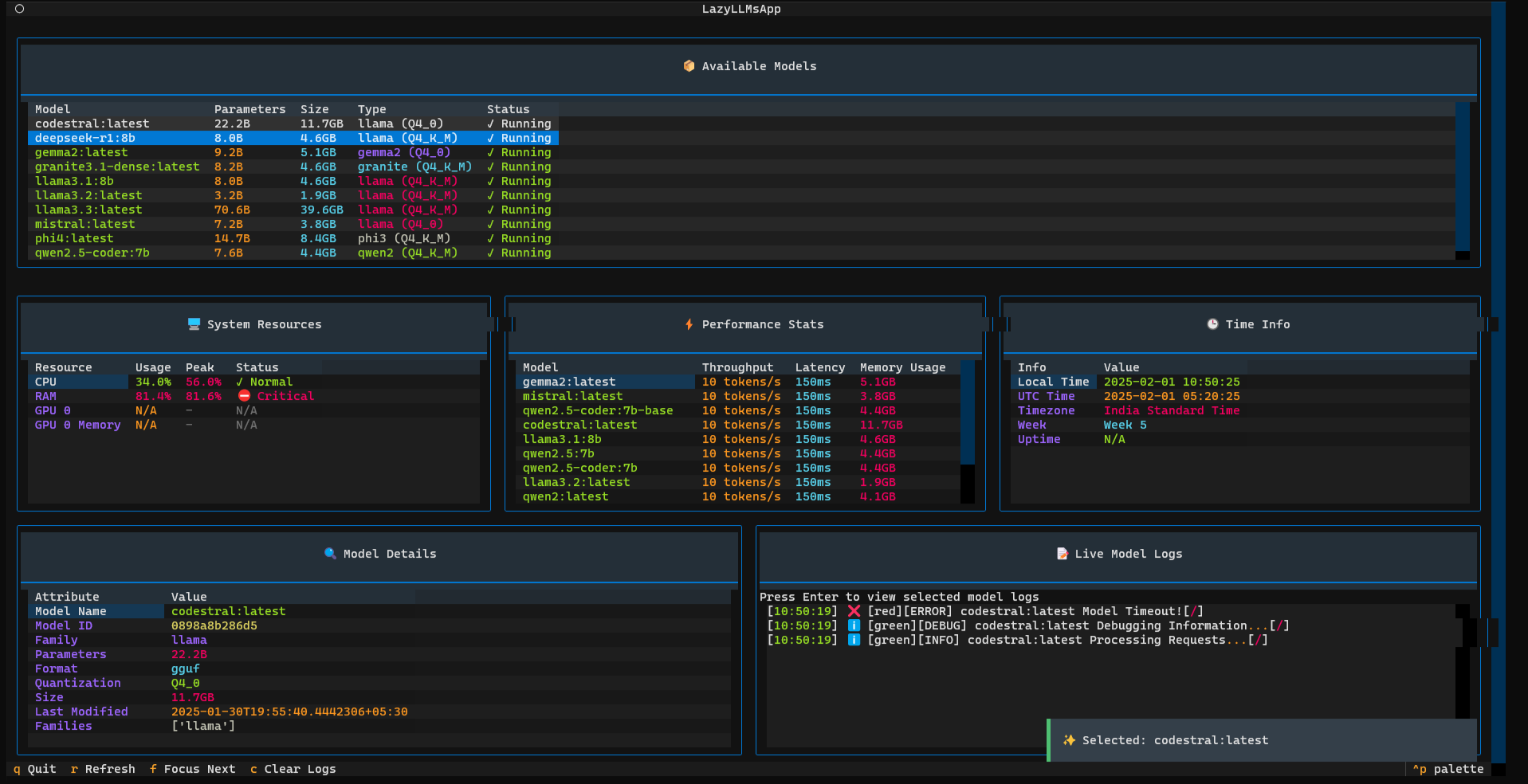
- 🔹 Real-Time Monitoring: View live stats of running AI models including their performance and system resource usage.
- 🔹 Resource Management: Track critical system resources such as CPU, RAM, GPU, and VRAM to ensure optimal model performance.
- 🔹 Model Control: Start, stop, and manage models via simple CLI commands.
- 🔹 Interactive Interface: Navigate through an intuitive TUI powered by Rich and Textual libraries.
🖐 Monitor Running AI Models: Get an overview of all active models, their configurations, and resource usage.
🖐 Track System Resource Usage: Keep tabs on CPU, RAM, GPU, and VRAM in real time.
🖐 Start & Stop Models via CLI: Manage the lifecycle of your AI models effortlessly from the terminal.
🖐 TUI-Based Interactive Interface: Utilize a clean, responsive UI for managing models with minimal effort.
🖐 Performance Metrics: View detailed performance stats including throughput, latency, and memory usage.
🖐 Live Log Monitoring: Inspect logs in real-time to debug and monitor model behaviors.
git clone https://github.com/your-repo/lazyllms.git
cd lazyllmspython -m venv lazyllms_venv
source lazyllms_venv/bin/activate # For macOS/Linux
lazyllms_venv\Scripts\activate # For Windowspip install -r requirements.txtpython main.py list🔹 This will show all currently running AI models with their details and resource usage.
python main.py tui🔹 Key Features in TUI:
- ✔️ Displays running models in a table with detailed stats
- ✔️ Shows system resource usage (CPU, RAM, GPU, VRAM)
- ✔️ Press
rto refresh data. - ✔️ Press
qto quit the TUI. - ✔️ Press
lto toggle live logs.
This view provides a comprehensive display of:
- 🔹 Available Models: Name, parameters, size, type, and status.
- 🔹 System Resources: CPU, RAM, GPU, VRAM usage in real time.
- 🔹 Performance Stats: Throughput, latency, and memory usage for each model.
- 🔹 Model Details & Live Logs: Detailed view of selected model attributes and real-time logs.
🚀 Auto-refreshing UI: Enable real-time updates without the need for manual refresh.
🔥 Live Log Monitoring: Advanced logging features with filtering and search capabilities.
📦 Docker & Kubernetes Support: Seamless monitoring of AI models running inside containerized environments.
⚡ GPU Load Optimization: Enhanced tracking of GPU-specific metrics and performance tuning.
We welcome contributions from the community! Follow these simple steps to contribute:
1️⃣ Fork the repository.
2️⃣ Create a Feature Branch:
git checkout -b feature-xyz3️⃣ Commit Your Changes:
git commit -m "Added feature xyz"4️⃣ Push to Your Fork:
git push origin feature-xyz5️⃣ Submit a Pull Request 🚀
This project is MIT Licensed. See the LICENSE file for more details.
📧 Email: email@example.com
Thank you for using LazyLLMs! 🚀 Feel free to share your feedback and contributions!