A Professional Floating AI Translation Tool
Real-time streaming translation • Multi-window support • Text-to-speech • Always on top



English • 简体中文 • 繁體中文 • 日本語 • Français • Deutsch • Español • 한국어 • Русский • Türkçe
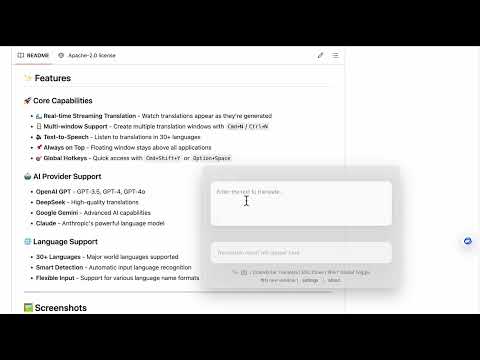
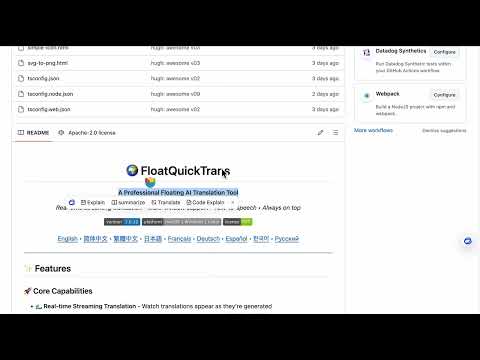
- 🌊 Real-time Streaming Translation - Watch translations appear as they're generated
- 🪟 Multi-window Support - Create multiple translation windows with
Cmd+N/Ctrl+N - 🔊 Text-to-Speech - Listen to translations in 30+ languages
- 📌 Always on Top - Floating window stays above all applications
- 🎯 Global Hotkeys - Quick access with
Cmd+Shift+YorOption+Space
- TODO: OpenAI GPT - GPT-3.5, GPT-4, GPT-4o
- DeepSeek - High-quality translations
- Google Gemini - Advanced AI capabilities
- TODO:Claude - Anthropic's powerful language model
⚠️ OpenAI and Claude: No API keys available yet, so no support for now. Sorry about that.
- 30+ Languages - Major world languages supported
- Smart Detection - Automatic input language recognition
- Flexible Input - Support for various language name formats
Floating window stays above all applications


- Node.js 18+
- pnpm (recommended) or npm
# Clone the repository
git clone https://github.com/hughedward/FloatQuickTrans.git
cd FloatQuickTrans

# Install dependencies
pnpm install# Start development server
pnpm dev# Build for your platform
pnpm build
# Platform-specific builds
pnpm build:mac # macOS
pnpm build:win # Windows
pnpm build:linux # Linux- Click the Settings button in the app
- Choose your preferred AI provider
- Enter your API key
- Select default translation language
| Provider | API Key Required | Features |
|---|---|---|
| OpenAI | TODO | GPT-3.5, GPT-4, GPT-4o |
| DeepSeek | ✅ | High-quality translation |
| Google Gemini | ✅ | Advanced AI capabilities |
| Claude | TODO | Anthropic's language model |
- Input Text - Type or paste text to translate
- Set Target Language - Click language button to change
- Translate - Press
Cmd+Enteror click translate - Listen - Click 🔊 icon to hear pronunciation
- Create New Window - Press
Cmd+N(macOS) orCtrl+N(Windows) - Independent Translation - Each window works separately
- Compare Results - Use multiple windows to compare translations
Cmd+Shift+Y/Ctrl+Shift+Y- Show/hide all windowsCmd+N/Ctrl+N- Create new translation windowCmd+Enter- Execute translationESC- Close current window
- Frontend: React 19 + TypeScript
- Desktop: Electron 35
- Build Tool: Vite + electron-vite
- Styling: CSS with glass morphism effects
src/
├── main/           # Electron main process
├── renderer/       # React frontend
├── preload/        # Electron preload scripts
└── model/          # AI providers & language maps
We welcome contributions from the community! If you'd like to contribute, please follow these steps:
- Fork the repository
- Create your feature branch (
git checkout -b feature/amazing-feature/git checkout -b bugfix/fix-xxx) - Commit your changes (
git commit -m 'Add amazing feature'/git commit -m 'Fix xxx bug:xxxx').Make your changes and commit them with descriptive messages/shotcuts.Please write comments in the code as much as possible. - Push to the branch (
git push origin feature/amazing-feature/git push origin bugfix/fix-xxx).Please keep the code clean. - Open a Pull Request. Submit a pull request.It is recommended to focus on a single feature or fix, avoiding making too many changes at once.
- We'll review your PR and merge it once it's ready. We'll also appreciate it if you're willing to help review other PRs as well!
This project is licensed under the MIT License - see the LICENSE file for details.
- Built with Electron and React
- Icons from Bootstrap Icons
- AI providers: OpenAI, DeepSeek, Google, Anthropic
Made with ❤️ for the global community
thanks
https://www.star-history.com/#hughedward/FloatQuickTrans&Date
If you find my work helpful, I’d be truly grateful if you’d consider sponsoring me.


Your support is the driving force behind my creations.🎉

