#HTProgressHUD
HTProgressHUD is an replacement for UIProgressHUD, the undocumented UI component in iOS.
And it is also replacement for MBProgressHUD.
MBProgressHUD is too old, and causes so many crashes.
So I re-implemented it, with newer-APIs, more stability and more customizabilities.



##Requirements
###iOS SDK
-
iOS 5.0 or higher
-
Automatic Reference Counting (ARC)
###Frameworks
-
UIKit.framework
-
Foundation.framework
-
CoreGraphic.framework
-
QuartzCore.framework
##Specifications
###Indicators
It has following built-in indicators.
-
Indicator with
UIActivityIndicatorView.Indicator with large white
UIActivityIndicatorView. -
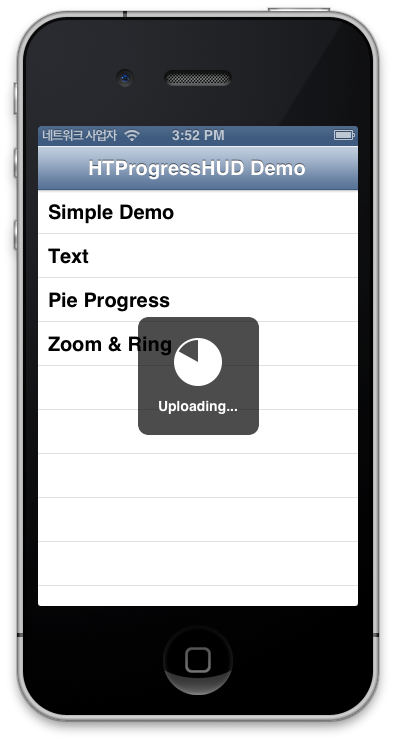
Pie-chart like indicator.
Indicator that shows progress with pie-chart like component.
-
Ring-shaped indicator.
Indicator that shows progress with ring shaped component.
And you can also customize indicator by subclassing HTProgressHUDIndicatorView.
###Animations
It has following built-in animations.
-
Fade animation.
-
Fade with zoom animation.
You can even customize animation by subclassing HTProgressHUDAnimation.
##Installation
###Cocoapods
You can install HTProgressHUD with CocoaPods.
-
Add a line for HTProgressHUD to your
Podfile.pod 'HTProgressHUD', '~> 0.1.1' -
Run install or update command.
pod install -
import HTProgressHUD
#import <HTProgressHUD/HTProgressHUD.h>
###As a Static Library
You can add HTProgressHUD as a static library
-
Clone or download HTProgressHUD
-
Delete .git & .gitignore if exists
-
Delete Examples folder if you want
-
Move the HTProgressHUD folder into the you project's folder
-
From within Xcode, Open your project or workspace & add
HTProgressHUD.xcodeproj -
HTProgressHUD should appear in the Xcode Project Navigator
-
Click on the
Your Projectentry, Targets → Your Target → Build Phases → Target Dependencies → + “HTProgressHUD” -
Click on the
Your Projectentry, Targets → Your Target → Build Phases → Link Binary with Libraries +libHTProgressHUD.a -
Click on the
Your Projectentry, Targets → Your Target → Build Settings → Search Paths → User Header Search Paths → +HTProgressHUD's path -
Click on the
Your Projectentry, Targets → Your Target → Build Settings → Linking → Other Linker Flags → +-ObjC -
Done
###As source files
Copy following files into your project.
-
HTProgressHUD.h -
HTProgressHUD.m -
HTProgressHUDAnimation.h -
HTProgressHUDAnimation.m -
HTProgressHUDFadeAnimation.h -
HTProgressHUDFadeAnimation.m -
HTProgressHUDFadeZoomAnimation.h -
HTProgressHUDFadeZoomAnimation.m -
HTProgressHUDIndicatorView.h -
HTProgressHUDIndicatorView.m -
HTProgressHUDPieIndicatorView.h -
HTProgressHUDPieIndicatorView.m -
HTProgressHUDRingIndicatorView.h -
HTProgressHUDRingIndicatorView.m
##Usages
###Example
HTProgressHUD *HUD = [[HTProgressHUD alloc] init];
[HUD showInView:self.view];
[HUD hideAfterDelay:3];
###More Complex Example
__block HTProgressHUD *progressHUD = [[HTProgressHUD alloc] init];
progressHUD.animation = [HTProgressHUDFadeZoomAnimation animation];
progressHUD.indicatorView = [HTProgressHUDIndicatorView indicatorViewWithType:HTProgressHUDIndicatorTypePie];
progressHUD.text = @"Loading...";

[progressHUD showWithAnimation:YES inView:self.view whileExecutingBlock:^{
    float r = 0.01;
    for (int i = 0; i <= 1 / r; i++) {
        [NSThread sleepForTimeInterval:r];
        progressHUD.progress = i * r;
        if (progressHUD.progress > 0.5) {
            progressHUD.text = @"Almost done";
        }
    }
}];
or See HTProgressHUDExample Project.
###Customization
See the source of built-in animations and built-in indicators. These are also kind of customized animations/indicators.
##Three-line Summary
-
MBProgressHUD is useful.
-
But it causes so many crashes.
-
So I reinvented the wheel.