



Today we showcase an application using Apache Cassandra™ as a backend implemented with Quarkus, and experience some developer joy with features that often have been an envy for Java programmers - hot reloading, debugging, containerizing and finally generating native code.
There are many other features of the Quarkus platform that we will not be looking into that are widely considered as unique strengths of the platform including testing.
The application we will be using is based on Jake's port of the TodoMVC code originally written by Pete Hunt. The example is modified from https://github.com/huksley/todo-react-ssr-serverless.

a screenshot of this simple app is below.

ℹ️ Objective(s) of workshop
Whether you're a seasoned programmer or relatively new to programming, you will be spending a lot of time in an Integrated Development Environment and the "inner loop" of development with a lightweight CI/CD cycle.
Once you have a stable environment after repeated iterations in the editor, testing environments, profiler, debugger, etc. you push it to the outer loop which has a more robust CI/CD cycle usually backed by gitops, Jenkins and other CI/CD tools.
The objective of today's workshop is to understand how the Quarkus platform simplifies the "inner loop" of development which results in huge developer productivity gains. You will see in today's workshop you can go from plain old Java to containers with relative ease and yet not make a significant change in devlopment.
Although, the Quarkus platform leverages the new reactive paradigm, the developer tools are drawn from a list that they are familar with and complements them. The focus is not so much on better programs (which is always necessary) but about the day-to-day life of a developer having to bridge the gap between their existing platforms and taking a plunge into microservices, service mesh and so on.
ℹ️ Frequently asked questions
- Can I run the workshop on my computer?
There is nothing preventing you from running the workshop on your own machine. If you do so, you will need java jdk11+, Graal VM, Maven, an IDE like VSCode, IntelliJ, Eclipse, Spring STS. You will have to adapt commands and paths based on your environment and install the dependencies by yourself. We won't provide support to keep on track with schedule.
We strive to make our hands-on workshops prerequisites free -- who has the time to install prerequistes? :-)
However, a docker login credential, some familiarity with Visual Studio and Giptod although not strictly necessary might help.
It doesn't matter if you join our workshop live or you prefer to do at your own pace, we have you covered. In this repository, you'll find everything you need for this workshop:
- Slide deck
- Discord chat
- Questions and Answers
- [Worskhop code] (https://github.com/datastaxdevs/quarkus-astra-intro-demo)
- Create Astra DB Instance
- Create Astra Token
- Launch Gitpod
- Know your Gitpod
- Setup your Application
- Run Unit test(s)
- quarkus:dev and Hot Reloading
- Debugging
- Packaging
- Containerizing
- Native Image
- Homework
ASTRA DB is the simplest way to run Cassandra with zero operations at all - just push the button and get your cluster. No credit card required, $25.00 USD credit every month, roughly 80GB of storage and 20 million read/write operations storage monthly (numbers that have gone up in the last few days) - sufficient to run small production workloads.
✅ Register (if needed) and Sign In to Astra DB https://astra.datastax.com: You can use your Github, Google accounts or register with an email.
Make sure to chose a password with minimum 8 characters, containing upper and lowercase letters, at least one number and special character
✅ Choose "Start Free Now"
Choose the "Start Free Now" plan, then "Get Started" to work in the free tier.
You will have plenty of free initial credit (renewed each month!), roughly corresponding to 40 GB of storage, 30M reads and 5M writes.
If this is not enough for you, congratulations! You are most likely running a mid- to large-sized business! In that case you should switch to a paid plan.
(You can follow this guide to set up your free-tier database with the $25 monthly credit.)

To create the database:
-
For the database name -
workshops. While Astra DB allows you to fill in these fields with values of your own choosing, please follow our recommendations to ensure the application runs properly. -
For the keyspace name -
todolist. It's really important that you use the name "todolist" for the code to work. In short:
| Parameter | Value |
|---|---|
| Database name | workshops |
| Keyspace name | todolist |
You can technically use whatever you want and update the code to reflect the keyspace. This is really to get you on a happy path for the first run.
-
For provider and region: Choose any provider (either GCP, AWS or Azure). Region is where your database will reside physically (choose one close to you or your users).
-
Create the database. Review all the fields to make sure they are as shown, and click the
Create Databasebutton.
You will see your new database pending in the Dashboard.
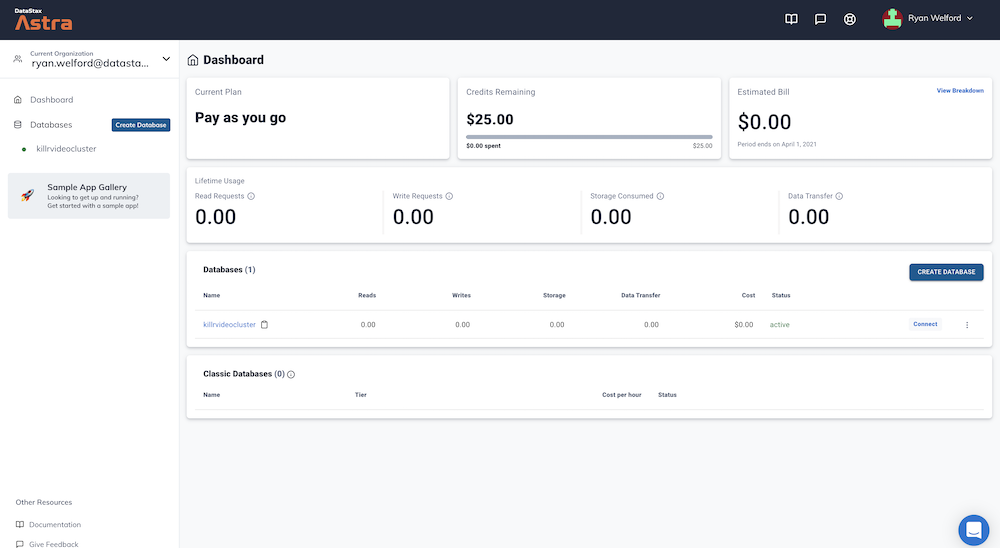
The status will change to Active when the database is ready, this will only take 2-3 minutes. You will also receive an email when it is ready.
👁️ Walkthrough

We need to create a token that we will use as our credentials.
✅ Step 4a: Generate Token
Following the Manage Application Tokens docs create a token with Database Admnistrator roles.
-
Go the
Organization Settings -
Go to
Token Management -
Pick the role
Database Admnistratoron the select box -
Click Generate token
👁️ Walkthrough

This is what the token page looks like. You can now download the values as a CSV. We will need those values but you can also keep this window open for use later.

Notice the clipboard icon at the end of each value.
-
Client Id:We will use it as a username to contact Cassandra in the fieldquarkus.cassandra.auth.usernamein theapplication.propertiesfile. -
Client Secret:We will use it as a password to contact Cassandra in the fieldquarkus.cassandra.auth.passwordin theapplication.propertiesfile. -
appToken:It can be used as an api token Key to interact with APIs but we won't use it in the workshop today.
To know more about roles, tokens, etc. you can lok at this video.
Note: Make sure you don't close the window accidentally or otherwise - if you close this window before you copy the values, the application token is lost forever. They won't be available later for security reasons. You'll have to create a new application token
We are now set with the database and credentials. Let's start coding with Quarkus!
Gitpod is an IDE 100% online based on VS Code. To initialize your environment simply click on the button below (CTRL + Click to open in new tab) You will be asked for you github account, as needed.

👁️ Expected output
The screenshot may be slightly different based on your default skin and a few edits in the read me.

That's it. Gitpod provides all tools we will need today including maven and exposing port 8080, ports 5005 which is used for debugging, etc.
You may safely ignore the error output at the end of the terminal window.
👁️ Expected output

Although GitPod terminal might seem to be available, the setup might still be ongoing. Wait for a few minutes before entering commands in the GitPod terminal window.
Take a moment to read this entire section since it'll help you with the rest of the workshop as you'll be spending most of your time in Gitpod. If you're familiar with Gitpod, you can easily skip this entire section.
The extreme left side has the explorer view(1). The top left, middle to right is where you'll be editing files(2), etc. and the bottom left, middle to right is what we will refer to as the Gitpod terminal window(3) as shown below.
👁️ Expected output

You can always get back to the file explorer view whenever by clicking on the hamburger menu on the top left followed by View and Explorer as shown below.

✅ Step 4a: Know your public URL
The workshop application has opened with an ephemeral URL. To know the URL where your application endpoint will be exposed you can run the following command in the terminal after the build has completed. Please note this URL and open this up in a new browser window as shown below.
gp url 8080👁️ Expected output

Although the application is not running yet, launch a new browser window (don't close it for the rest of the workshop since you'll continually keep using this. If you accidentally close it, just come back to this step. The browser will generate an error (due to application not running yet) which is fine for now as shown below.
👁️ Expected output

You may encounter the following at different steps and although this may not be applicable right away, the steps are included in advance and summarized here so that you can keep an eye out for it. Different paths and different environments might be slightly different although Gipod levels the playing field a bit.
You can allow cutting and pasting into the window by clicking on Allow as shown below.

Or allow ports to be opened by just exiting windows that are informational messages about ports like below.

To run the application you need to provide the credentials and identifier to the application.
Issue the following command from the Gitpod terminal window.
gp open src/main/resources/application.properties

✅ Step 5a: Enter 2 values from the token
Enter the values of Client Id and Client Secret from values noted earlier for username and password respectively. The two lines with a TBD in comments is shown below.

✅ Step 5b: Download the secure connect bundle
This next step is probably the most involved step in the entire workshop. The goal of this step is to get the customized connect bundle into Gitpod. One of the several ways of doing this is as follows.
Start with the Astra DB dashboard and for the database workshops,
- Click on
Connecttab. - Click on Connect using a driver
Java. - Click on
Download Bundle. - Click on
Secure Connect Bundleto be able to copy the link locally.
as shown below.

Locate the file locally in the finder/explorer window. Drag and drop the file into the Gitpod explorer window (on the left side, making sure that the cursor, indicating the drop is positioned in the Gitpod explorer window as shown below.

In the Gitpod terminal window, verify that you dropped the right file and at the top level directory
ls -l secure-connect-workshops.zipThe file size should be roughly 12K otherwise something may have gone wrong in the process.
👁️ Expected output
-rw-r--r-- 1 gitpod gitpod 12231 Oct 26 00:15 secure-connect-workshops.zip
TADA your application is now configured we can finally play with some code.
The application is now set you should be able to interact with your DB. Let's demonstrate some capabilities.
✅ Step 6a: Use CqlSession
Interaction with Cassandra is implemented in Java through drivers and the main Class is CqlSession.
Higher level frameworks like Quarkus, Spring, Spring Data, rely on this object so let's make sure it is part of your context with a @QuarkusTest. Let's run this unit test in the Gitpod terminal window.
mvn test -Dtest=com.datastaxdev.AstraDemoCQLTest👁️ Expected output
Picked up JAVA_TOOL_OPTIONS: -Xmx2576m
[INFO] Scanning for projects...
[INFO]
[INFO] ---------------< quarkus-astra-demo:quarkus-astra-demo >----------------
[INFO] Building quarkus-astra-demo 0.01
[INFO] --------------------------------[ jar ]---------------------------------
[INFO]
[INFO] --- quarkus-maven-plugin:2.2.0.Final:generate-code (default) @ quarkus-astra-demo ---
[INFO]
[INFO] --- maven-resources-plugin:2.6:resources (default-resources) @ quarkus-astra-demo ---
[INFO] Using 'UTF-8' encoding to copy filtered resources.
[INFO] Copying 27 resources
[INFO]
[INFO] --- maven-compiler-plugin:3.8.1:compile (default-compile) @ quarkus-astra-demo ---
[INFO] Nothing to compile - all classes are up to date
[INFO]
[INFO] --- quarkus-maven-plugin:2.2.0.Final:generate-code-tests (default) @ quarkus-astra-demo ---
[INFO]
[INFO] --- maven-resources-plugin:2.6:testResources (default-testResources) @ quarkus-astra-demo ---
[INFO] Using 'UTF-8' encoding to copy filtered resources.
[INFO] skip non existing resourceDirectory /workspace/quarkus-astra-demos/src/test/resources
[INFO]
[INFO] --- maven-compiler-plugin:3.8.1:testCompile (default-testCompile) @ quarkus-astra-demo ---
[INFO] Nothing to compile - all classes are up to date
[INFO]
[INFO] --- maven-surefire-plugin:3.0.0-M5:test (default-test) @ quarkus-astra-demo ---
[INFO]
[INFO] -------------------------------------------------------
[INFO]  T E S T S
[INFO] -------------------------------------------------------
[ERROR] Picked up JAVA_TOOL_OPTIONS: -Xmx2576m
[INFO] Running com.datastax.AstraDemoCQLTest
2021-10-25 00:19:16,659 WARN  [com.dat.oss.qua.dep.int.CassandraClientProcessor] (build-14) Micrometer metrics were enabled by configuration, but MicrometerMetricsFactory was not found.
2021-10-25 00:19:16,661 WARN  [com.dat.oss.qua.dep.int.CassandraClientProcessor] (build-14) Make sure to include a dependency to the java-driver-metrics-micrometer module.
2021-10-25 00:19:17,102 INFO  [com.dat.oss.dri.int.cor.DefaultMavenCoordinates] (main) DataStax Java driver for Apache Cassandra(R) (com.datastax.oss:java-driver-core) version 4.13.0
2021-10-25 00:19:17,576 INFO  [com.dat.oss.qua.run.int.qua.CassandraClientStarter] (main) Eagerly initializing Quarkus Cassandra client.
2021-10-25 00:19:18,531 INFO  [com.dat.oss.dri.int.cor.tim.Clock] (vert.x-eventloop-thread-0) Could not access native clock (see debug logs for details), falling back to Java system clock
2021-10-25 00:19:20,037 INFO  [com.dat.oss.dri.int.cor.ses.DefaultSession] (vert.x-eventloop-thread-8) [s0] Negotiated protocol version V4 for the initial contact point, but cluster seems to support V5, keeping the negotiated version
**** Table created true****
2021-10-25 00:19:20,912 INFO  [io.quarkus] (main) Quarkus 2.1.2.Final on JVM started in 5.737s. Listening on: http://localhost:8081
2021-10-25 00:19:20,913 INFO  [io.quarkus] (main) Profile test activated.
2021-10-25 00:19:20,913 INFO  [io.quarkus] (main) Installed features: [cassandra-client, cdi, kubernetes, micrometer, resteasy-reactive, resteasy-reactive-jackson, smallrye-context-propagation, smallrye-health, smallrye-openapi, swagger-ui]
[INFO] Tests run: 1, Failures: 0, Errors: 0, Skipped: 0, Time elapsed: 7.384 s - in com.datastax.AstraDemoCQLTest
2021-10-25 00:19:22,157 INFO  [com.dat.oss.qua.run.int.qua.CassandraClientRecorder] (main) Closing Quarkus Cassandra session.
2021-10-25 00:19:22,180 INFO  [io.quarkus] (main) Quarkus stopped in 0.034s
[INFO]
[INFO] Results:
[INFO]
[INFO] Tests run: 1, Failures: 0, Errors: 0, Skipped: 0
[INFO]
[INFO] ------------------------------------------------------------------------
[INFO] BUILD SUCCESS
[INFO] ------------------------------------------------------------------------
[INFO] Total time:  12.498 s
[INFO] Finished at: 2021-10-25T00:19:22Z
[INFO] ------------------------------------------------------------------------
Verfiy that the table got created with the following command
mvn test -Dcom.datastaxdev.AstraDemoCQLTest | grep -i table👁️ Expected output
**** Table created true****
Although a significant strength of the Quarkus platform is it's testing capabilities we will skip tests going foraward and focus on the other capabilities of the platform (perhaps, another workshop sometime focussed mainly on testing capabilities, assuming there is enough demand).
Before we get started let's check that the Graal VM is available.
echo $GRAALVM_HOME
👁️ Expected output
/home/gitpod/.sdkman/candidates/java/current
✅ Step 7a: Begin dev
In the Gitpod terminal window, We will begin the inner loop journey in dev mode using the following command.
mvn quarkus:dev -DskipTests👁️ Expected output
--
2021-10-25 06:05:16,063 WARN  [com.dat.oss.qua.dep.int.CassandraClientProcessor] (build-53) Micrometer metrics were enabled by configuration, but MicrometerMetricsFactory was not found.
2021-10-25 06:05:16,067 WARN  [com.dat.oss.qua.dep.int.CassandraClientProcessor] (build-53) Make sure to include a dependency to the java-driver-metrics-micrometer module.
__  ____  __  _____   ___  __ ____  ______
 --/ __ \/ / / / _ | / _ \/ //_/ / / / __/
 -/ /_/ / /_/ / __ |/ , _/ ,< / /_/ /\ \
--\___\_\____/_/ |_/_/|_/_/|_|\____/___/
2021-10-25 06:05:16,936 INFO  [com.dat.oss.dri.int.cor.DefaultMavenCoordinates] (Quarkus Main Thread) DataStax Java driver for Apache Cassandra(R) (com.datastax.oss:java-driver-core) version 4.13.0
2021-10-25 06:05:18,467 INFO  [com.dat.oss.dri.int.cor.tim.Clock] (vert.x-eventloop-thread-0) Could not access native clock (see debug logs for details), falling back to Java system clock
2021-10-25 06:05:20,065 INFO  [com.dat.oss.dri.int.cor.ses.DefaultSession] (vert.x-eventloop-thread-8) [s0] Negotiated protocol version V4 for the initial contact point, but cluster seems to support V5, keeping the negotiated version
**** Table created true****
2021-10-25 06:05:20,925 INFO  [com.dat.oss.qua.run.int.qua.CassandraClientStarter] (Quarkus Main Thread) Eagerly initializing Quarkus Cassandra client.
2021-10-25 06:05:20,975 INFO  [io.quarkus] (Quarkus Main Thread) quarkus-astra-intro-demo 0.01 on JVM (powered by Quarkus 2.3.0.Final) started in 7.197s. Listening on: http://localhost:8080
2021-10-25 06:05:20,977 INFO  [io.quarkus] (Quarkus Main Thread) Profile dev activated. Live Coding activated.
2021-10-25 06:05:20,978 INFO  [io.quarkus] (Quarkus Main Thread) Installed features: [cassandra-client, cdi, kubernetes, micrometer, resteasy-reactive, resteasy-reactive-jackson, smallrye-context-propagation, smallrye-health, smallrye-openapi, swagger-ui, vertx]

--
Tests paused
Press [r] to resume testing, [o] Toggle test output, [h] for more options>
✅ Step 7b: Explore dev
Typing h in the terminal window should bring up the following
👁️ Expected output
== HTTP

[w] - Open the application in a browser
[d] - Open the Dev UI in a browser

== System

[s] - Force restart
[i] - Toggle instrumentation based reload (disabled)
[l] - Toggle live reload (enabled)
[j] - Toggle log levels (INFO)
[h] - Shows this help
[q] - Quits the application

--
Tests paused
Press [r] to resume testing, [o] Toggle test output, [h] for more options>
You can try the different options available.
Try connecting to the application in a browswer by hitting the w key as indicated above. This should bring up the application as below.
👁️ Expected output

✅ Step 7c: Hot reload Now, let's go ahead and make an illustrative change.
Navigate to the file src/main/java/resources/META-INF/resources/index.html and change the data-ribbon entry from "Fork me on Github" to "Fork me today on Github."
Hitting w again in the terminal window, you should see the hot reloading features of the platform as shown below.
👁️ Expected output

You could add a few entries to the "todo list" as shown below.
👁️ Expected output

✅ Step 7d: Quarkus dev metrics
You can get Quarkus development metrics and so on hitting the d key as indicated in the help and this should bring up a window that looks like below.
👁️ Expected output

You can always get out of development mode by hitting q or hitting +C.
You can always get back to the file explorer view whenever by clicking on the hamburger menu on the top left followed by View and Explorer as shown below.
Let's go ahead and hit +C to exit out of the running application if you have not already.
Now issue the following command to open up the file where we will subsequently set a breakpoint to be hit whenever we create a new todo item.
✅ Step 8a: Set breakpoint
gp open src/main/java/com/datastaxdev/todo/AstraTODO.java
Now navigate to line 60 and set a breakpoint by clicking to the left of the line number 60 and you'll see a stop sign as shown below.

If the application is not running in the Gitpod terminal window, re-run it with the following command and we will debug it live.
mvn quarkus:dev -DskipTests✅ Step 8b: Start debugging
First, click on the debug button on the left towards top.
Then, click on the arrow on the top left to start debugging as shown below.

Notice debug related information populate in the left side of the window as shown below.

We will demonstrate debugging by fixing a todo item that was entered although there are more powerful features that you can try.
Go to the new browser window you created and the application should be up and running. Hit enter after filling up a todo item as shown below. The application freezes and you see a red square that signals the breakpoint has been hit.

Now that you hit the breakpoint, Cool! Let's go back to the Gitpod window and verify if the breakpoint was really hit. You should see something like below.
👁️ Expected output

✅ Step 8c: Use debugger features
Now, fix the entry spelling in debug mode by clicking on the left(>) arrow of todo, double clicking on the title entry and entering debugging. Finally, hit arrow button in the top small middle pane in the center which will allow the application to continue as shown below.

You should see that the updated entry that you fixed with a debug session is what's persisted.
Hit <Ctrl+C> in the GitPod terminal window to exit the application.
✅ Step 9a: Package You can package up the application with the command below.
mvn clean package -DskipTests👁️ Expected output
Picked up JAVA_TOOL_OPTIONS: -Xmx2576m
[INFO] Scanning for projects...
[INFO]
[INFO] ---------< quarkus-astra-intro-demo:quarkus-astra-intro-demo >----------
[INFO] Building quarkus-astra-intro-demo 0.01
[INFO] --------------------------------[ jar ]---------------------------------
[INFO]
[INFO] --- maven-clean-plugin:2.5:clean (default-clean) @ quarkus-astra-intro-demo ---
[INFO] Deleting /workspace/quarkus-astra-intro-demo/target
[INFO]
[INFO] --- quarkus-maven-plugin:2.1.2.Final:generate-code (default) @ quarkus-astra-intro-demo ---
[INFO]
[INFO] --- maven-resources-plugin:2.6:resources (default-resources) @ quarkus-astra-intro-demo ---
[INFO] Using 'UTF-8' encoding to copy filtered resources.
[INFO] Copying 24 resources
[INFO]
[INFO] --- maven-compiler-plugin:3.8.1:compile (default-compile) @ quarkus-astra-intro-demo ---
[INFO] Changes detected - recompiling the module!
[INFO] Compiling 3 source files to /workspace/quarkus-astra-intro-demo/target/classes
[INFO]
[INFO] --- quarkus-maven-plugin:2.1.2.Final:generate-code-tests (default) @ quarkus-astra-intro-demo ---
[INFO]
[INFO] --- maven-resources-plugin:2.6:testResources (default-testResources) @ quarkus-astra-intro-demo ---
[INFO] Using 'UTF-8' encoding to copy filtered resources.
[INFO] skip non existing resourceDirectory /workspace/quarkus-astra-intro-demo/src/test/resources
[INFO]
[INFO] --- maven-compiler-plugin:3.8.1:testCompile (default-testCompile) @ quarkus-astra-intro-demo ---
[INFO] Changes detected - recompiling the module!
[INFO] Compiling 2 source files to /workspace/quarkus-astra-intro-demo/target/test-classes
[INFO]
[INFO] --- maven-surefire-plugin:3.0.0-M5:test (default-test) @ quarkus-astra-intro-demo ---
[INFO] Tests are skipped.
[INFO]
[INFO] --- maven-jar-plugin:2.4:jar (default-jar) @ quarkus-astra-intro-demo ---
[INFO] Building jar: /workspace/quarkus-astra-intro-demo/target/quarkus-astra-intro-demo-0.01.jar
[INFO]
[INFO] --- quarkus-maven-plugin:2.1.2.Final:build (default) @ quarkus-astra-intro-demo ---
[INFO] [org.jboss.threads] JBoss Threads version 3.4.2.Final
[WARNING] Error reading service account token from: [/var/run/secrets/kubernetes.io/serviceaccount/token]. Ignoring.
[WARNING] Error reading service account token from: [/var/run/secrets/kubernetes.io/serviceaccount/token]. Ignoring.
[WARNING] Error reading service account token from: [/var/run/secrets/kubernetes.io/serviceaccount/token]. Ignoring.
[INFO] Checking for existing resources in: /workspace/quarkus-astra-intro-demo/src/main/kubernetes.
[WARNING] Micrometer metrics were enabled by configuration, but MicrometerMetricsFactory was not found.
[WARNING] Make sure to include a dependency to the java-driver-metrics-micrometer module.
[INFO] [io.quarkus.deployment.QuarkusAugmentor] Quarkus augmentation completed in 2637ms
[INFO] ------------------------------------------------------------------------
[INFO] BUILD SUCCESS
[INFO] ------------------------------------------------------------------------
[INFO] Total time:  9.417 s
[INFO] Finished at: 2021-10-25T16:28:44Z
[INFO] ------------------------------------------------------------------------
✅ Step 9b: Run
You can run the recently packaged application as below.
java -jar ./target/quarkus-app/quarkus-run.jar👁️ Expected output
Picked up JAVA_TOOL_OPTIONS: -Xmx2576m
__  ____  __  _____   ___  __ ____  ______
 --/ __ \/ / / / _ | / _ \/ //_/ / / / __/
 -/ /_/ / /_/ / __ |/ , _/ ,< / /_/ /\ \
--\___\_\____/_/ |_/_/|_/_/|_|\____/___/
2021-10-25 16:14:42,250 INFO  [com.dat.oss.dri.int.cor.DefaultMavenCoordinates] (main) DataStax Java driver for Apache Cassandra(R) (com.datastax.oss:java-driver-core) version 4.13.0
2021-10-25 16:14:42,895 INFO  [com.dat.oss.qua.run.int.qua.CassandraClientStarter] (main) Eagerly initializing Quarkus Cassandra client.
2021-10-25 16:14:43,992 INFO  [com.dat.oss.dri.int.cor.tim.Clock] (vert.x-eventloop-thread-0) Could not access native clock (see debug logs for details), falling back to Java system clock
2021-10-25 16:14:45,589 INFO  [com.dat.oss.dri.int.cor.ses.DefaultSession] (vert.x-eventloop-thread-8) [s0] Negotiated protocol version V4 for the initial contact point, but cluster seems to support V5, keeping the negotiated version
**** Table created true****
2021-10-25 16:14:46,474 INFO  [io.quarkus] (main) quarkus-astra-intro-demo 0.01 on JVM (powered by Quarkus 2.1.2.Final) started in 4.771s. Listening on: http://0.0.0.0:8080
2021-10-25 16:14:46,478 INFO  [io.quarkus] (main) Profile prod activated.
2021-10-25 16:14:46,479 INFO  [io.quarkus] (main) Installed features: [cassandra-client, cdi, kubernetes, micrometer, resteasy-reactive, resteasy-reactive-jackson, smallrye-context-propagation, smallrye-health, smallrye-openapi]
You can play with the application from the new browser window you created in step 4.
Hit <Ctrl+C> in the GitPod terminal window to exit the application.
✅ Step 10a: Adjust for containerization
We are using the Jib plugin for easy containerization. Copy the secure connect bundle to the directory that Jib will create on the container as below. We take advantage of the property of Jib plugin which automaticaly includes the relevant artifacts from the src/main/jib sub-directory as part of the process -- we include the secure connect bundle to be able to connect to the Astra database.
mkdir -p src/main/jib/workspace/quarkus-astra-intro-demo/
cp secure-connect-workshops.zip src/main/jib/workspace/quarkus-astra-intro-demo/
✅ Step 10b: Containerize
Let's containerize the application with the following command.
mvn clean package -Dquarkus.container-image.build=true -Dquarkus.container-runtime=docker -DskipTestsCheck that the image exists on your local repository with the following command.
docker imagesExpected Output
REPOSITORY                 TAG       IMAGE ID       CREATED          SIZE
gitpod/quarkus-cassandra   0.01      77431983359a   26 seconds ago   216MB
✅ Step 10c: Run the containerized image
You can execute the recently generated containerized image with the following command.
docker run -i --rm -p 8080:8080 gitpod/quarkus-cassandra:0.01Hit <Ctrl+C> in the GitPod terminal window to exit the application.
✅ **Step 10d: docker login [OPTIONAL] **
Login to Dockerhub to be able to push containerized images and to be able for you and the rest of the world to pull them.
If you do not have a docker login credential you can skip this step and go right to Native Image
docker loginExpected Output
Login with your Docker ID to push and pull images from Docker Hub. If you don't have a Docker ID, head over to https://hub.docker.com to create one.
Username: ragsns
Password:
WARNING! Your password will be stored unencrypted in /home/gitpod/.docker/config.json.
Configure a credential helper to remove this warning. See
https://docs.docker.com/engine/reference/commandline/login/#credentials-store

Login Succeeded
✅ Step 10e: Push to Dockerhub
Let's not only build the containerized image but also push it to DockerHub (be sure to substitute your docker ID) with the following command.
mvn clean package -Dquarkus.container-image.build=true -Dquarkus.container-image.push=true -Dquarkus.container-image.group=<dockerhub-username> -Dquarkus.container-runtime=docker -DskipTestsIn today's world of microservices and service meshes, it's all about deploying to Kubernetes.
Issue the following command in the Gitpod terminal window to look at the Kubernetes manifests that are automatically generated.
gp open target/kubernetes/kubernetes.yml
It's left as an exercise to the attendee to deploy this to a Kubernetes cluster using the generated manifests in the sub-directory target/kubernetes/.
Finally, Quarkus can build a native executable image with the help of the GraalVM that was pre-installed with a simple command as below. Get yourself some coffee or water as this will take almost 10 minutes but exceuting this image will be super fast with minimal startup time since it does not depend on the JVM.
✅ Step 11a: Generating Native Image
mvn clean package -Pnative -DskipTestsPicked up JAVA_TOOL_OPTIONS: -Xmx2576m
[INFO] Scanning for projects...
[INFO]
[INFO] ---------< quarkus-astra-intro-demo:quarkus-astra-intro-demo >----------
[INFO] Building quarkus-astra-intro-demo 0.01
[INFO] --------------------------------[ jar ]---------------------------------
[INFO]
[INFO] --- maven-clean-plugin:2.5:clean (default-clean) @ quarkus-astra-intro-demo ---
[INFO] Deleting /workspace/quarkus-astra-intro-demo/target
[INFO]
[INFO] --- quarkus-maven-plugin:2.3.0.Final:generate-code (default) @ quarkus-astra-intro-demo ---
[INFO]
[INFO] --- maven-resources-plugin:2.6:resources (default-resources) @ quarkus-astra-intro-demo ---
[INFO] Using 'UTF-8' encoding to copy filtered resources.
[INFO] Copying 24 resources
[INFO]
[INFO] --- maven-compiler-plugin:3.8.1:compile (default-compile) @ quarkus-astra-intro-demo ---
[INFO] Changes detected - recompiling the module!
[INFO] Compiling 3 source files to /workspace/quarkus-astra-intro-demo/target/classes
[INFO]
[INFO] --- quarkus-maven-plugin:2.3.0.Final:generate-code-tests (default) @ quarkus-astra-intro-demo ---
[INFO]
[INFO] --- maven-resources-plugin:2.6:testResources (default-testResources) @ quarkus-astra-intro-demo ---
[INFO] Using 'UTF-8' encoding to copy filtered resources.
[INFO] skip non existing resourceDirectory /workspace/quarkus-astra-intro-demo/src/test/resources
[INFO]
[INFO] --- maven-compiler-plugin:3.8.1:testCompile (default-testCompile) @ quarkus-astra-intro-demo ---
[INFO] Changes detected - recompiling the module!
[INFO] Compiling 2 source files to /workspace/quarkus-astra-intro-demo/target/test-classes
[INFO]
[INFO] --- maven-surefire-plugin:3.0.0-M5:test (default-test) @ quarkus-astra-intro-demo ---
[INFO] Tests are skipped.
[INFO]
[INFO] --- maven-jar-plugin:2.4:jar (default-jar) @ quarkus-astra-intro-demo ---
[INFO] Building jar: /workspace/quarkus-astra-intro-demo/target/quarkus-astra-intro-demo-0.01.jar
[INFO]
[INFO] --- quarkus-maven-plugin:2.3.0.Final:build (default) @ quarkus-astra-intro-demo ---
[INFO] [org.jboss.threads] JBoss Threads version 3.4.2.Final
[WARNING] Error reading service account token from: [/var/run/secrets/kubernetes.io/serviceaccount/token]. Ignoring.
[WARNING] Error reading service account token from: [/var/run/secrets/kubernetes.io/serviceaccount/token]. Ignoring.
[WARNING] Error reading service account token from: [/var/run/secrets/kubernetes.io/serviceaccount/token]. Ignoring.
[INFO] Checking for existing resources in: /workspace/quarkus-astra-intro-demo/src/main/kubernetes.
gitpod /workspace/quarkus-astra-intro-demo $ docker run -i -t -p 8080:8080 ragsns/quarkus-cassandra:0.01__ ____ __ _____ ___ __ ____ ______
--/ __ \/ / / / _ | / _ \/ //_/ / / / __/
-/ /_/ / /_/ / __ |/ , _/ ,< / /_/ /\ \
--\___\_\____/_/ |_/_/|_/_/|_|\____/___/
2021-10-25 19:59:17,692 INFO [com.dat.oss.dri.int.cor.DefaultMavenCoordinates] (main) DataStax Java driver for Apache Cassandra(R) (com.datastax.oss:java-driver-core) version 4.13.0
2021-10-25 19:59:20,282 INFO [com.dat.oss.dri.int.cor.tim.Clock] (vert.x-eventloop-thread-0) Could not access native clock (see debug logs for details), falling back to Java system clock
2021-10-25 19:59:22,039 INFO [com.dat.oss.dri.int.cor.ses.DefaultSession] (vert.x-eventloop-thread-8) [s0] Negotiated protocol version V4 for the initial contact point, but cluster seems to support V5, keeping the negotiated version
**** Table created true****
2021-10-25 19:59:22,936 INFO [com.dat.oss.qua.run.int.qua.CassandraClientStarter] (main) Eagerly initializing Quarkus Cassandra client.
2021-10-25 19:59:23,049 INFO [io.quarkus] (main) quarkus-astra-intro-demo 0.01 on JVM (powered by Quarkus 2.3.0.Final) started in 6.339s. Listening on: http://0.0.0.0:8080
2021-10-25 19:59:23,056 INFO [io.quarkus] (main) Profile prod activated.
2021-10-25 19:59:23,056 INFO [io.quarkus] (main) Installed features: [cassandra-client, cdi, kubernetes, micrometer, resteasy-reactive, resteasy-reactive-jackson, smallrye-context-propagation, smallrye-health, smallrye-openapi, vertx]
^C2021-10-25 20:00:18,114 INFO [com.dat.oss.qua.run.int.qua.CassandraClientRecorder] (Shutdown thread) Closing Quarkus Cassandra session.
2021-10-25 20:00:18,160 INFO [io.quarkus] (Shutdown thread) quarkus-astra-intro-demo stopped in 0.075s
gitpod /workspace/quarkus-astra-intro-demo $ mvn clean package -Pnative -DskipTests
Picked up JAVA_TOOL_OPTIONS: -Xmx2576m
[INFO] Scanning for projects...
[INFO]
[INFO] ---------< quarkus-astra-intro-demo:quarkus-astra-intro-demo >----------
[INFO] Building quarkus-astra-intro-demo 0.01
[INFO] --------------------------------[ jar ]---------------------------------
[INFO]
[INFO] --- maven-clean-plugin:2.5:clean (default-clean) @ quarkus-astra-intro-demo ---
[INFO] Deleting /workspace/quarkus-astra-intro-demo/target
[INFO]
[INFO] --- quarkus-maven-plugin:2.3.0.Final:generate-code (default) @ quarkus-astra-intro-demo ---
[INFO]
[INFO] --- maven-resources-plugin:2.6:resources (default-resources) @ quarkus-astra-intro-demo ---
[INFO] Using 'UTF-8' encoding to copy filtered resources.
[INFO] Copying 24 resources
[INFO]
[INFO] --- maven-compiler-plugin:3.8.1:compile (default-compile) @ quarkus-astra-intro-demo ---
[INFO] Changes detected - recompiling the module!
[INFO] Compiling 3 source files to /workspace/quarkus-astra-intro-demo/target/classes
[INFO]
[INFO] --- quarkus-maven-plugin:2.3.0.Final:generate-code-tests (default) @ quarkus-astra-intro-demo ---
[INFO]
[INFO] --- maven-resources-plugin:2.6:testResources (default-testResources) @ quarkus-astra-intro-demo ---
[INFO] Using 'UTF-8' encoding to copy filtered resources.
[INFO] skip non existing resourceDirectory /workspace/quarkus-astra-intro-demo/src/test/resources
[INFO]
[INFO] --- maven-compiler-plugin:3.8.1:testCompile (default-testCompile) @ quarkus-astra-intro-demo ---
[INFO] Changes detected - recompiling the module!
[INFO] Compiling 2 source files to /workspace/quarkus-astra-intro-demo/target/test-classes
[INFO]
[INFO] --- maven-surefire-plugin:3.0.0-M5:test (default-test) @ quarkus-astra-intro-demo ---
[INFO] Tests are skipped.
[INFO]
[INFO] --- maven-jar-plugin:2.4:jar (default-jar) @ quarkus-astra-intro-demo ---
[INFO] Building jar: /workspace/quarkus-astra-intro-demo/target/quarkus-astra-intro-demo-0.01.jar
[INFO]
[INFO] --- quarkus-maven-plugin:2.3.0.Final:build (default) @ quarkus-astra-intro-demo ---
[INFO] [org.jboss.threads] JBoss Threads version 3.4.2.Final
[WARNING] Error reading service account token from: [/var/run/secrets/kubernetes.io/serviceaccount/token]. Ignoring.
[WARNING] Error reading service account token from: [/var/run/secrets/kubernetes.io/serviceaccount/token]. Ignoring.
[WARNING] Error reading service account token from: [/var/run/secrets/kubernetes.io/serviceaccount/token]. Ignoring.
[WARNING] Micrometer metrics were enabled by configuration, but MicrometerMetricsFactory was not found.
[WARNING] Make sure to include a dependency to the java-driver-metrics-micrometer module.
[INFO] Checking for existing resources in: /workspace/quarkus-astra-intro-demo/src/main/kubernetes.
[INFO] [io.quarkus.deployment.pkg.steps.JarResultBuildStep] Building native image source jar: /workspace/quarkus-astra-intro-demo/target/quarkus-astra-intro-demo-0.01-native-image-source-jar/quarkus-astra-intro-demo-0.01-runner.jar
[INFO] [io.quarkus.deployment.pkg.steps.NativeImageBuildStep] Building native image from /workspace/quarkus-astra-intro-demo/target/quarkus-astra-intro-demo-0.01-native-image-source-jar/quarkus-astra-intro-demo-0.01-runner.jar
[INFO] [io.quarkus.deployment.pkg.steps.NativeImageBuildStep] Running Quarkus native-image plugin on GraalVM 21.2.0 Java 11 CE (Java Version 11.0.12+6-jvmci-21.2-b08)
[INFO] [io.quarkus.deployment.pkg.steps.NativeImageBuildRunner] /home/gitpod/.sdkman/candidates/java/current/bin/native-image -J-Dsun.nio.ch.maxUpdateArraySize=100 -J-Djava.util.logging.manager=org.jboss.logmanager.LogManager -J-Dvertx.logger-delegate-factory-class-name=io.quarkus.vertx.core.runtime.VertxLogDelegateFactory -J-Dvertx.disableDnsResolver=true -J-Dio.netty.leakDetection.level=DISABLED -J-Dio.netty.allocator.maxOrder=3 -J-Duser.language=en -J-Duser.country=US -J-Dfile.encoding=UTF-8 -H:InitialCollectionPolicy=com.oracle.svm.core.genscavenge.CollectionPolicy\$BySpaceAndTime -H:+JNI -H:+AllowFoldMethods -H:FallbackThreshold=0 -H:+ReportExceptionStackTraces -H:-AddAllCharsets -H:EnableURLProtocols=http,https -H:NativeLinkerOption=-no-pie -H:-UseServiceLoaderFeature -H:+StackTrace -H:-ParseOnce quarkus-astra-intro-demo-0.01-runner -jar quarkus-astra-intro-demo-0.01-runner.jar
Picked up JAVA_TOOL_OPTIONS: -Xmx2576m
[quarkus-astra-intro-demo-0.01-runner:14032] classlist: 4,598.34 ms, 1.18 GB
[quarkus-astra-intro-demo-0.01-runner:14032] (cap): 862.58 ms, 1.18 GB
[quarkus-astra-intro-demo-0.01-runner:14032] setup: 3,739.87 ms, 1.18 GB
20:00:59,930 INFO [com.dat.oss.dri.int.cor.DefaultMavenCoordinates] DataStax Java driver for Apache Cassandra(R) (com.datastax.oss:java-driver-core) version 4.13.0
20:01:24,714 INFO [org.jbo.threads] JBoss Threads version 3.4.2.Final
[quarkus-astra-intro-demo-0.01-runner:14032] (clinit): 1,623.77 ms, 4.17 GB
[quarkus-astra-intro-demo-0.01-runner:14032] (typeflow): 31,318.78 ms, 4.17 GB
[quarkus-astra-intro-demo-0.01-runner:14032] (objects): 29,605.44 ms, 4.17 GB
[quarkus-astra-intro-demo-0.01-runner:14032] (features): 1,994.20 ms, 4.17 GB
[quarkus-astra-intro-demo-0.01-runner:14032] analysis: 68,104.27 ms, 4.17 GB
[quarkus-astra-intro-demo-0.01-runner:14032] universe: 4,078.84 ms, 4.17 GB
[quarkus-astra-intro-demo-0.01-runner:14032] (parse): 8,546.68 ms, 4.13 GB
[quarkus-astra-intro-demo-0.01-runner:14032] (inline): 10,009.16 ms, 4.42 GB
[quarkus-astra-intro-demo-0.01-runner:14032] (compile): 40,700.67 ms, 4.75 GB
[quarkus-astra-intro-demo-0.01-runner:14032] compile: 63,713.65 ms, 4.75 GB
[quarkus-astra-intro-demo-0.01-runner:14032] image: 11,307.80 ms, 4.73 GB
[quarkus-astra-intro-demo-0.01-runner:14032] write: 1,139.11 ms, 4.73 GB
[quarkus-astra-intro-demo-0.01-runner:14032] [total]: 157,367.21 ms, 4.73 GB
# Printing build artifacts to: /workspace/quarkus-astra-intro-demo/target/quarkus-astra-intro-demo-0.01-native-image-source-jar/quarkus-astra-intro-demo-0.01-runner.build_artifacts.txt
[INFO] [io.quarkus.deployment.pkg.steps.NativeImageBuildRunner] objcopy --strip-debug quarkus-astra-intro-demo-0.01-runner
[INFO] [io.quarkus.deployment.QuarkusAugmentor] Quarkus augmentation completed in 162568ms
[INFO] ------------------------------------------------------------------------
[INFO] BUILD SUCCESS
[INFO] ------------------------------------------------------------------------
[INFO] Total time: 02:53 min
[INFO] Finished at: 2021-10-25T20:03:28Z
[INFO] ------------------------------------------------------------------------
Hit <Ctrl+C> in the GitPod terminal window to exit the application.
✅ Step 11b: Running Native Image
./target/quarkus-astra-intro-demo-0.01-runner --/ __ \/ / / / _ | / _ \/ //_/ / / / __/
-/ /_/ / /_/ / __ |/ , _/ ,< / /_/ /\ \
--\___\_\____/_/ |_/_/|_/_/|_|\____/___/
2021-10-25 20:03:41,578 INFO [com.dat.oss.dri.int.cor.os.Native] (vert.x-eventloop-thread-0) Using Graal-specific native functions
2021-10-25 20:03:41,579 INFO [com.dat.oss.dri.int.cor.tim.Clock] (vert.x-eventloop-thread-0) Using native clock for microsecond precision
2021-10-25 20:03:42,953 INFO [com.dat.oss.dri.int.cor.ses.DefaultSession] (vert.x-eventloop-thread-8) [s0] Negotiated protocol version V4 for the initial contact point, but cluster seems to support V5, keeping the negotiated version
**** Table created true****
2021-10-25 20:03:43,693 INFO [com.dat.oss.qua.run.int.qua.CassandraClientStarter] (main) Eagerly initializing Quarkus Cassandra client.
2021-10-25 20:03:43,694 INFO [io.quarkus] (main) quarkus-astra-intro-demo 0.01 native (powered by Quarkus 2.3.0.Final) started in 2.590s. Listening on: http://0.0.0.0:8080
2021-10-25 20:03:43,695 INFO [io.quarkus] (main) Profile prod activated.
2021-10-25 20:03:43,695 INFO [io.quarkus] (main) Installed features: [cassandra-client, cdi, kubernetes, micrometer, resteasy-reactive, resteasy-reactive-jackson, smallrye-context-propagation, smallrye-health, smallrye-openapi, vertx]
Notice the fast startup time since the image is running as a native image.

Don't forget to complete your upgrade and get your verified skill badge! Finish and submit your homework! You have 2 options (option A or Option B). Pick whichever works for you.
Option A. Complete the practice steps from this repository as described above (including optional steps 10d and 10e) and deploy to a Kubernetes cluster. Make screenshots of the deployment to a Kubernetes cluster.
Option B: Learn more about Quarkus and do some development with https://github.com/datastax/cassandra-quarkus. Send a screenshot of the working "Fruits application" with the following entry "Jackfruit" and the correpsonding description as "King/Queen of fruits".
- Submit your homework here
That's it, you are done! Expect an email next week!
Congratulations, your made it to the END of the show.
🧑🏻🤝🧑🏽 Let's get in touch
 |
 |
|---|---|
| Rags Srinivas @ragsns |
Stefano Lottini @hemidactylus |
