






Madge is a developer tool for generating a visual graph of your module dependencies, finding circular dependencies, and give you other useful info. Joel Kemp's awesome dependency-tree is used for extracting the dependency tree.
- Works for JavaScript (AMD, CommonJS, and ES6 modules)
- Also works for CSS preprocessors (Sass, Stylus, and Less)
- NPM installed dependencies are excluded by default (can be enabled)
- All core Node.js modules (assert, path, fs, etc) are excluded
- Will traverse child dependencies automatically
Read the changelog for latest changes.
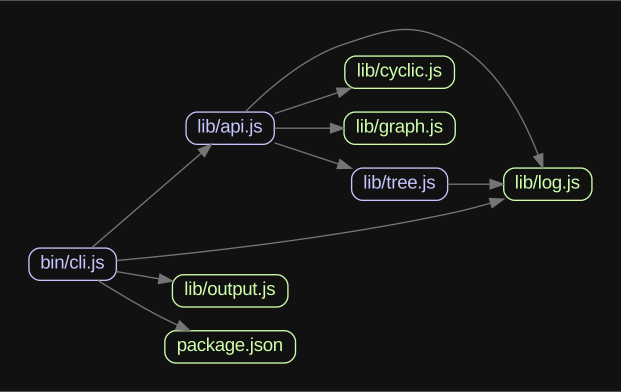
Graph generated from madge's own code and dependencies.
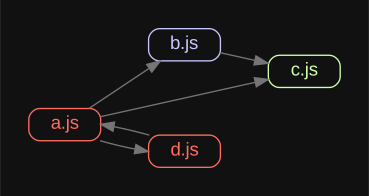
A graph with circular dependencies. Blue has dependencies, green has no dependencies, and red has circular dependencies.

$ npm -g install madgeOnly required if you want to generate the visual graphs using Graphviz.
$ brew install graphviz || port install graphviz$ apt-get install graphviz
pathis a single file or directory, or an array of files/directories to read. A predefined tree can also be passed in as an object.
configis optional and should be the configuration to use.
Returns a
Promiseresolved with the Madge instance object.
Returns an
Objectwith all dependencies.
const madge = require('madge');

madge('path/to/app.js').then((res) => {
	console.log(res.obj());
});Returns an
Objectof warnings.
const madge = require('madge');

madge('path/to/app.js').then((res) => {
	console.log(res.warnings());
});Returns an
Arrayof all modules that has circular dependencies.
const madge = require('madge');

madge('path/to/app.js').then((res) => {
	console.log(res.circular());
});Returns an
Arrayof all modules that depend on a given module.
const madge = require('madge');

madge('path/to/app.js').then((res) => {
	console.log(res.depends('lib/log.js'));
});Return an
Arrayof all modules that no one is depending on.
const madge = require('madge');

madge('path/to/app.js').then((res) => {
	console.log(res.orphans());
});Returns a
Promiseresolved with a DOT representation of the module dependency graph.
const madge = require('madge');

madge('path/to/app.js')
	.then((res) => res.dot())
	.then((output) => {
		console.log(output);
});Write the graph as an image to the given image path. The image format to use is determined from the file extension. Returns a
Promiseresolved with a full path to the written image.
const madge = require('madge');

madge('path/to/app.js')
	.then((res) => res.image('path/to/image.svg'))
	.then((writtenImagePath) => {
		console.log('Image written to ' + writtenImagePath);
});| Property | Type | Default | Description |
|---|---|---|---|
baseDir |
String | null | Base directory to use instead of the default |
includeNpm |
Boolean | false | If shallow NPM modules should be included |
fileExtensions |
Array | ['js'] | Valid file extensions used to find files in directories |
excludeRegExp |
Array | false | An array of RegExp for excluding modules |
requireConfig |
String | null | RequireJS config for resolving aliased modules |
webpackConfig |
String | null | Webpack config for resolving aliased modules |
layout |
String | dot | Layout to use in the graph |
fontName |
String | Arial | Font name to use in the graph |
fontSize |
String | 14px | Font size to use in the graph |
backgroundColor |
String | #000000 | Background color for the graph |
nodeColor |
String | #c6c5fe | Default node color to use in the graph |
noDependencyColor |
String | #cfffac | Color to use for nodes with no dependencies |
cyclicNodeColor |
String | #ff6c60 | Color to use for circular dependencies |
edgeColor |
String | #757575 | Edge color to use in the graph |
graphVizOptions |
Object | false | Custom GraphViz options |
graphVizPath |
String | null | Custom GraphViz path |
detectiveOptions |
Object | false | Custom detective options for dependency-tree |
dependencyFilter |
Function | false | Function called with a dependency filepath (exclude substree by returning false) |
Note that when running the CLI it's possible to use a runtime configuration file. The config should placed in
.madgercin your project or home folder. Look here for alternative locations for the file. Here's an example:
{
	"fontSize": "10px",
	"graphVizOptions": {
		"G": {
			"rankdir": "LR"
		}
	}
}List dependencies from a single file
$ madge path/src/app.jsList dependencies from multiple files
$ madge path/src/foo.js path/src/bar.jsList dependencies from all *.js files found in a directory
$ madge path/srcList dependencies from multiple directories
$ madge path/src/foo path/src/barList dependencies from all *.js and *.jsx files found in a directory
$ madge --extensions js,jsx path/srcFinding circular dependencies
$ madge --circular path/src/app.jsShow modules that depends on a given module
$ madge --depends wheels.js path/src/app.jsExcluding modules
$ madge --exclude '^(foo|bar)\.js$' path/src/app.jsSave graph as a SVG image (graphviz required)
$ madge --image graph.svg path/src/app.jsSave graph as a DOT file for further processing (graphviz required)
$ madge --dot path/src/app.js > graph.gvUsing pipe to transform tree (this example will uppercase all paths)
$ madge --json path/src/app.js | tr '[a-z]' '[A-Z]' | madge --stdinTo enable debugging output if you encounter problems, run madge with the
--debugoption then throw the result in a gist when creating issues on GitHub.
$ madge --debug path/src/app.js$ npm testIt could happen that the files you're not seeing have been skipped due to errors or that they can't be resolved. Run madge with the --warning option to see skipped files. If you need even more info run with the --debug option.
Ensure you have Graphviz installed. And if you're running Windows graphviz is not setting PATH variable during install. You should add the folder of gvpr.exe (typically %Graphviz_folder%/bin) to PATH variable.
Try running madge with a different layout, here's a list of the ones you can try:
-
dot "hierarchical" or layered drawings of directed graphs. This is the default tool to use if edges have directionality.
-
neato "spring model'' layouts. This is the default tool to use if the graph is not too large (about 100 nodes) and you don't know anything else about it. Neato attempts to minimize a global energy function, which is equivalent to statistical multi-dimensional scaling.
-
fdp "spring model'' layouts similar to those of neato, but does this by reducing forces rather than working with energy.
-
sfdp multiscale version of fdp for the layout of large graphs.
-
twopi radial layouts, after Graham Wills 97. Nodes are placed on concentric circles depending their distance from a given root node.
-
circo circular layout, after Six and Tollis 99, Kauffman and Wiese 02. This is suitable for certain diagrams of multiple cyclic structures, such as certain telecommunications networks.
MIT License