A Bash-based web file browser - allowing you to remotely browse, stream, view documents and save files via your web browser. Runs on Windows via WSL.
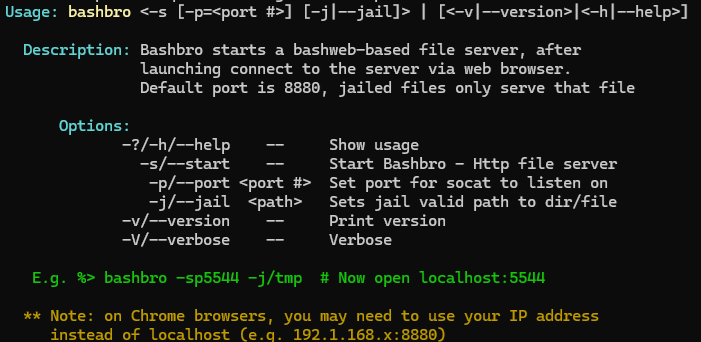
To start bashbro locally on port 5555:
$> bashbro -s -p 5555
   -or- (condensed syntax)
$> bashbro -sp5555

To start bashbro on a remote server:

 1. Copy bashbro to the remote server
E.g. scp bashbro <youruser>@<server name/ip>:

 2. Run bashbro
E.g. ssh <youruser>@<server name/ip> ./bashbro -s -p=<port>

(Open a browser to <server name/ip>:<port>)

Tip
To avoid downloading big images in assets branch, clone it like this:
git clone https://github.com/victrixsoft/bashbro.git --depth 1
You can also fetch and run bashbro directly (e.g. get/run on port 6556):
curl -O https://raw.githubusercontent.com/victrixsoft/bashbro/main/bashbro && chmod +x bashbro && ./bashbro -sp6556
wget -O bashbro https://raw.githubusercontent.com/victrixsoft/bashbro/main/bashbro && chmod +x bashbro && ./bashbro -sp6556
Tip
When using Chrome browser localhost may be blocked, in that case you can use your ip for instance 192.168.1.55:8880 - no tickets on this plz, it's a Windows/Chrome thing.