This Readme file serves as the final documentation of our project. As per the submission guidelines this document covers our original functional goals as stated our proposal, what we were able to accomoplish and implementation details. We also provide details about installation and user guide for our application. We conclude with key challenges we faced during the project and some future work.
In spite of the advent of many communication tools e.g. social media, slack etc., emails still continues to occupy an important position in one's communiation tool chest. The main goal of this project code names "Maximus", was to perform topic modelling on a user's Inbox (Gmail) and assign topics to each email. We belive this would help users in dealing with a deluge of emails they recieve every day/month by summarizing the main topics dicovered in their Inbox (e.s.p the unread emails) and help them focus on the most important emails that they are most interested.
We were able to build a basic WebApp (dockerized python based Flask application) that downloads emails from a user's Gmail Inbox and discovers the latent topics in the email corpus. We used the LDA implementation from Gensim package for topic modelling. We were also able to discover topic coverage for each email in the Inbox and were able to asociate topic label(s) to each email.
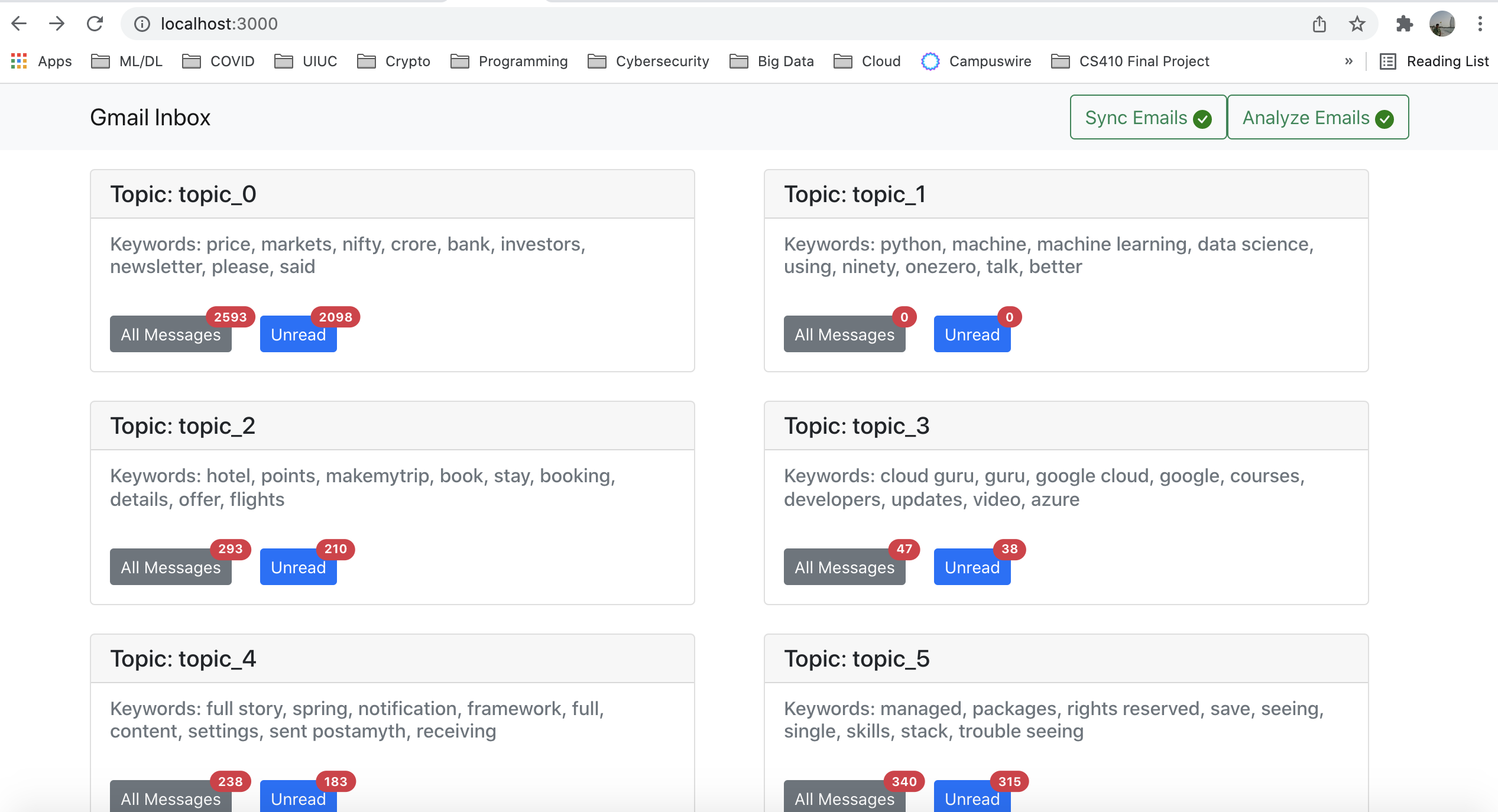
We built dashboard (using ReactJS) to display the topics and number of emails associated with each topic.
There are 2 ways to install and use the application.
- The application can be installed locally on your laptop/deskop (or a VM in the cloud).
- To install the application you will need Docker Desktop installed on your machine. If you don't have it already, it is fairly simple to install, please go here if you work on windows OS or here if you are a MacOS user.
- Clone this git repository
- cd into
source/folder and run the commanddocker-compose up. This should bring up the application. - The application can be accessed at url
http://localhost:8080
- If you do not want to run locally or have run into issues, you can choose to access the application hosted at
http://138.68.131.219:8080 - This instance is already configured with a test gmail account (amythcloud@gmail.com). See details in the below section.
- Now for the fun part. To discover latent topics in your Gmail Inbox (only Gmail for now) you will have to authorize the app to read emails from your Inbox. Don't panic! we are not going to read all your email :-). Instead, We ask you add a label called
cs410for emails that you are OK with app accessing it e.g. spam mail, promotions etc. We ONLY read emails taggedcs410from your inbox, if you have not tagged anything we read zero emails. - This is not much of an issue when running the app locally on our computer (data is in our computer, just like your any other desktop email client) as much as it is when using cloud instance.
- Note: Since our application has not gone through Google certification, we will need to explicitly add your gmail id in the app tester list. Please send your gmail id to ameetd2@illinois.edu to get your gmail id added as a tester for this app.
- If you want to play it absolutely safe (understandably so), you can use the "test" gmail account we have setup (mailID: amythcloud@gmail.com) with some pre-seeded emails. Since this is public repo, please email ameetd2@illinois.edu for the password for this test gmail account.
- Hitting the url first time will automatically direct you to Google to get your authorization for accessing your inbox.
- Once authorization is successful, you can hit the
Sync Emailsat the top right corner and hitSyncon the popped dialog and wait for spinner to stop. In case of error(s) a red badge appears on the button, click on the button to open the same dialog again to know the cause. The sync may take time depending on emails and network speed. The blue badge shows total cound of downloaded message. - Once
Sync Emailbutton show green tick mark, hit theAnalyzebutton to discover topics. Again wait still the spinner stops and a green tick mark appears on theAnalyze Emailsbutton. - Once you see a green tick mark on the
Analyze Emailsbutton, REFRESH the dashboard page to see all the topics discovered in our Inbox :-).
The following diagram depicts the key component of the application and the flow of data between these components.
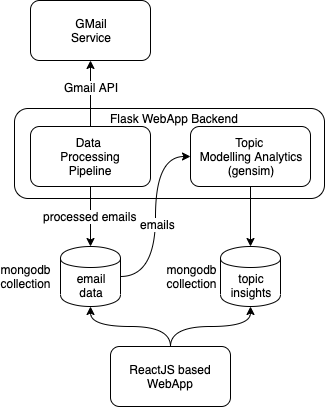
The major components of the application are as follows:
This component is responsible for bringing in emails from Gmail service, passing them through a pre-processor (see below) and storing them in MongoDB document collection called maximus.emails. The code for this mode can be found in datapipe.py. This module heavily uses with gmail_client.py to interact with gmail service.
This is one of key components of the application as the success of topic modeling depends heavily on the quality of data. The module is responsible for extracting text from emails of differen MIME types (using a package called BeautifulSoup), tokenizing, stemming and removing stop words. We also remove all tokens with non-ascii characters, purely numeric tokens etc. Most of the code for this module can be found in preprocessor.py.
This module is the heart of the application. It loads pre-processed emails from the MongoDB collection constructs a vocabulary followed by a TF-IDF transformation of each email and then trains a LDA model using Gensim python package. The parameters of the model like #topics, passes and iterations are fixed based on cross validation exercise that was done out-of-band inorder to reduce the topic discovery time. We also use the topic coherence metric as decribed here to select the topics whose constituent words are most coherent. Using the trained LDA model we then discover the topic coverage for each email and tag each email with a set of topic(s) with >=.30 coverage in the email. The code for this module can topic_model.py.
The code for this module is in the file "topic_model_per_email.py". In this module we go through all emails in batches of 10 and extract Topic insights for the emails. For each batch of 10 emails, we use NMF to discover 40 topics using unigrams, bigrams and trigrams. The intent is to have very high quality topics. After fitting the data and finding the topics, we pick the top 3 topics with the highest scores for each email. The reason we only do batches of 10, is that if we pick more emails, we would still want to maintain a 1:3 or 1:4 ratio of emails:topics to ensure we extract high quality topics. This would result in a huge sparse matrix and make the fit and transform very slow. We also tried TruncuatedSVD and LDA but found that NMF gave the best results after visual inspection.
This is the front end of the application build using ReactJS. The code is located in the source/webapp folder. The front end shows simple ReactJS cards, one for each topic discovered. Inside each card we should top10 words with highest probability mass. We also list of message that have a significant coverage of this topic >0.30) categorized as read vs. unread.
All code is in source directory. To build a fresh docker image of the application, first build the front end $cd webapp/; yarn build. Then run the ./build.sh script in the sourcefolder. After that docker-compose up should automatically run the new image.
There are 2 major challenges we ran into during this project.
- It took considerable time and effort to clean the email data (mostly due to various MIME type) and get the extracted text to a form that our topic modelling module could consume.
- It was difficult to evaluate the quality of topics that our LDA model generated due the unsupervised nature of the algorithm. Also paramters tuned for one Inbox did not generalize well for other Inbox. The idea of topic coherence was useful (but not sufficient) metric to select model parameters atleast for within the scope of a dataset (i.e Inbox).
- In order to produce meaningful results for each user's Inbox we believe the number of topics (and other model paramters) needs to be determined more dynamically as it can differ for each user's Inbox. This can be quite time consuming especially for large Inbox sizes.
- We believe we can use the topics assigned to each email can be useful/effective in clustering similar emails or help user find related emails easily.
- Use topic labels as additional input/features for spam vs. ham classification.
| Name | Email Address | Contributions |
|---|---|---|
| Ameet Deulgaonkar | ameetd2@illinois.edu |
|
| Praveen Purohit | purohit4@illinois.edu |
|