Thanks for contributing to the Blogifier. If you haven't already, please setup your environment and run the Blogifier locally.
Here is the list of things that you can contribute:
In the "/src/Blogifier.Shared/Resouces/" folder we keep all the resources files.
The Resource.resx is the main English language that you can copy and create another Resource file for any other languages.
For example, Resouce.es.resx is created for Spanish with es language code. So if your language is not in the Resources folder, copy the Resource.resx and rename it and add your language code at the end.
Visual studio has a built-in GUI for the .resx files which shows you the name and value. which you only edit/translate the value.
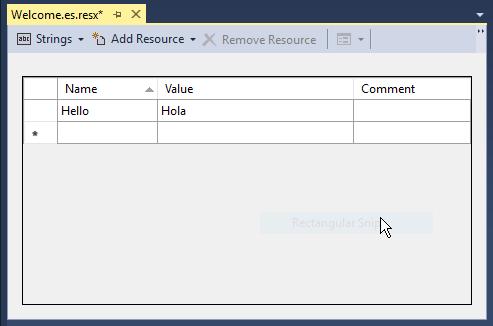
Open the .resx file and scroll down and you'll see lines like this:
<data name="general" xml:space="preserve">
    <value>General</value>
</data>
Basically, you just need to translate what's in the <value> tag.
- In Google Chrome or any other browser, go to the browser settings and add the language to the top of the list.
- Run the Blogifier with
dotnet watch runcommand on the/src/blogifier/. - login to the blogifier admin panel. and see the results as you are translating.
After It's done and ready, please give it a pull request and we review it and merge it with the main branch.
coming soon.