







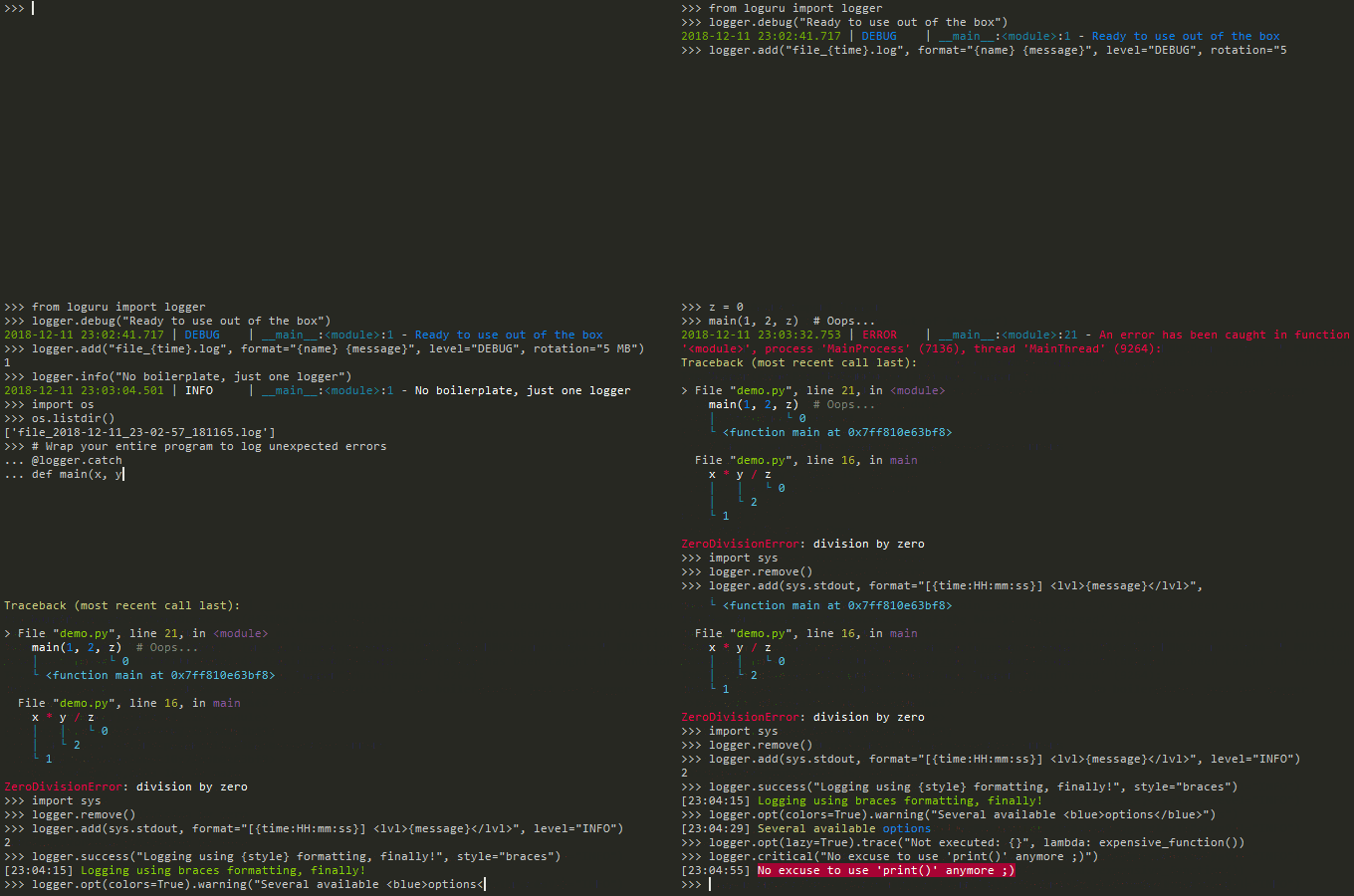
Loguru is a library which aims to bring enjoyable logging in Python.
Did you ever feel lazy about configuring a logger and used print() instead?... I did, yet logging is fundamental to every application and eases the process of debugging. Using Loguru you have no excuse not to use logging from the start, this is as simple as from loguru import logger.
Also, this library is intended to make Python logging less painful by adding a bunch of useful functionalities that solve caveats of the standard loggers. Using logs in your application should be an automatism, Loguru tries to make it both pleasant and powerful.
🎨 New in this version: Loguru now includes a beautiful template-based styling system with smart context recognition, advanced function tracing, and global exception hooks - all while maintaining 100% backward compatibility. Get gorgeous, informative logs with zero configuration!
pip install loguru
- Ready to use out of the box without boilerplate
- No Handler, no Formatter, no Filter: one function to rule them all
- Beautiful template-based styling system 🆕
- Smart context auto-styling and recognition 🆕
- Advanced function tracing and performance monitoring 🆕
- Global exception hook integration 🆕
- Easier file logging with rotation / retention / compression
- Modern string formatting using braces style
- Exceptions catching within threads or main
- Pretty logging with colors
- Asynchronous, Thread-safe, Multiprocess-safe
- Fully descriptive exceptions
- Structured logging as needed
- Lazy evaluation of expensive functions
- Customizable levels
- Better datetime handling
- Suitable for scripts and libraries
- Entirely compatible with standard logging
- Personalizable defaults through environment variables
- Convenient parser
- Exhaustive notifier
- Comprehensive log analysis toolkit 🆕
10x faster than built-in logging
The main concept of Loguru is that there is one and only one logger.
For convenience, it is pre-configured and outputs to stderr to begin with (but that's entirely configurable).
from loguru import logger

logger.debug("That's it, beautiful and simple logging!")
The logger is just an interface which dispatches log messages to configured handlers. Simple, right?
How to add a handler? How to set up logs formatting? How to filter messages? How to set level?
One answer: the add() function.
logger.add(sys.stderr, format="{time} {level} {message}", filter="my_module", level="INFO")This function should be used to register sinks which are responsible for managing log messages contextualized with a record dict. A sink can take many forms: a simple function, a string path, a file-like object, a coroutine function or a built-in Handler.
Note that you may also remove() a previously added handler by using the identifier returned while adding it. This is particularly useful if you want to supersede the default stderr handler: just call logger.remove() to make a fresh start.
Loguru now includes a powerful template-based styling system that provides beautiful, hierarchical output with zero configuration. The template system automatically enhances your logs with intelligent styling while maintaining full backward compatibility.
Simply use loguru as always, and get beautiful styled output automatically:
from loguru import logger

# Beautiful output by default
logger.info("Application started")
logger.bind(user="alice", action="login").info("User logged in")
logger.error("Database connection failed")Use the new configure_style() method for quick template-based setup:
# Use built-in templates: "beautiful", "minimal", "classic"
logger.configure_style("beautiful")

# Console and file with different templates
logger.configure_style(
    "beautiful",
    file_path="app.log",
    console_level="INFO",
    file_level="DEBUG"
)Set up dual-stream logging with different templates for each output:
logger.configure_streams(
    console=dict(template="beautiful", level="INFO"),
    file=dict(sink="app.log", template="minimal", level="DEBUG"),
    json=dict(sink="data.jsonl", serialize=True)
)Switch templates dynamically at runtime:
# Per-message template override
logger.bind(template="minimal").info("Simple output")

# Change default template
handler_id = logger.add(sys.stderr, format="{time} | {level} | {message}")
logger.set_template(handler_id, "beautiful")Loguru's smart context engine automatically detects and styles different types of content in your log messages, making important information stand out without any configuration.
The system recognizes 15+ context types and applies appropriate styling:
logger.info("User john@example.com logged in from 192.168.1.1")
# Automatically styles: email addresses, IP addresses

logger.info("Processing order #12345 for $1,234.56")
# Automatically styles: order numbers, currency amounts

logger.info("GET /api/users/123 returned 404")
# Automatically styles: HTTP methods, API endpoints, status codes

logger.info("Error in /home/user/app.py at line 42")
# Automatically styles: file paths, line numbersUse context binding to provide rich, styled information:
logger.bind(
    user="alice",
    ip="10.0.1.100",
    action="purchase",
    amount="$99.99"
).info("Transaction completed successfully")

# Smart styling automatically applied to context valuesThe context engine learns from your usage patterns and improves recognition over time:
from loguru._context_styling import AdaptiveContextEngine

# Engine adapts to your application's specific patterns
engine = AdaptiveContextEngine()
# Learns domain-specific terms and improves styling accuracyLoguru provides sophisticated function tracing with pattern matching, performance monitoring, and configurable behavior - perfect for debugging and performance analysis.
Trace function execution with beautiful, template-styled output:
from loguru._tracing import FunctionTracer

tracer = FunctionTracer(logger, "beautiful")

@tracer.trace
def process_order(order_id, customer_id):
    # Function entry/exit automatically logged with arguments
    return f"Order {order_id} processed for customer {customer_id}"

result = process_order("12345", "alice")Configure tracing behavior based on function name patterns:
tracer = FunctionTracer(logger)

# Trace all test functions with full details
tracer.add_rule(
    pattern=r"^test_.*",
    log_args=True,
    log_result=True,
    log_duration=True,
    level="DEBUG"
)

# Disable tracing for private functions
tracer.add_rule(pattern=r"^_.*", enabled=False)

@tracer.trace
def test_user_login():  # Will be traced with full details
    return authenticate_user("alice")

@tracer.trace
def _helper_function():  # Will not be traced
return "internal logic"Monitor function performance with automatic threshold alerts:
from loguru._tracing import PerformanceTracer

perf_tracer = PerformanceTracer(logger)

@perf_tracer.trace_performance(threshold_ms=500)
def slow_database_query():
    # Automatic performance alert if takes > 500ms
    time.sleep(0.6)  # Simulated slow operation
    return "query results"

# Get performance statistics
stats = perf_tracer.get_performance_stats("slow_database_query")
print(f"Average: {stats['avg_ms']}ms, Max: {stats['max_ms']}ms")Use development and production optimized tracers:
from loguru._tracing import create_development_tracer, create_production_tracer

# Development: verbose tracing with full details
dev_tracer = create_development_tracer(logger)

# Production: minimal tracing, performance focused
prod_tracer = create_production_tracer(logger)Loguru can automatically capture and beautifully format all unhandled exceptions in your application, including those in threads, with template-based styling.
Install a global exception hook for beautiful error reporting:
from loguru._exception_hook import install_exception_hook

# Install global exception hook with template styling
hook = install_exception_hook(logger, template="beautiful")

# Now all unhandled exceptions are beautifully formatted
def risky_function():
    return 1 / 0  # This will be caught and styled

risky_function() # Beautiful exception output with contextUse exception hooks temporarily for specific code blocks:
from loguru._exception_hook import ExceptionContext

with ExceptionContext(logger, "beautiful") as ctx:
    # Any unhandled exception in this block gets beautiful formatting
    risky_operation()
    another_risky_operation()
# Hook automatically removed when exiting contextUse advanced exception hooks with filtering and context extraction:
from loguru._exception_hook import create_development_hook

# Development hook with enhanced context extraction
dev_hook = create_development_hook(logger)
dev_hook.install()

# Captures local variables and provides rich debugging contextThe exception hook system automatically handles both main thread and background thread exceptions:
import threading

# Hook captures exceptions from all threads
hook = install_exception_hook(logger, "beautiful")

def background_task():
    raise ValueError("Background thread error")  # Also captured!

thread = threading.Thread(target=background_task)
thread.start()
thread.join()If you want to send logged messages to a file, you just have to use a string path as the sink. It can be automatically timed too for convenience:
logger.add("file_{time}.log")It is also easily configurable if you need rotating logger, if you want to remove older logs, or if you wish to compress your files at closure.
logger.add("file_1.log", rotation="500 MB")    # Automatically rotate too big file
logger.add("file_2.log", rotation="12:00")     # New file is created each day at noon
logger.add("file_3.log", rotation="1 week")    # Once the file is too old, it's rotated

logger.add("file_X.log", retention="10 days")  # Cleanup after some time

logger.add("file_Y.log", compression="zip") # Save some loved spaceLoguru favors the much more elegant and powerful {} formatting over %, logging functions are actually equivalent to str.format().
logger.info("If you're using Python {}, prefer {feature} of course!", 3.6, feature="f-strings")Have you ever seen your program crashing unexpectedly without seeing anything in the log file? Did you ever notice that exceptions occurring in threads were not logged? This can be solved using the catch() decorator / context manager which ensures that any error is correctly propagated to the logger.
@logger.catch
def my_function(x, y, z):
    # An error? It's caught anyway!
return 1 / (x + y + z)Loguru automatically adds colors to your logs if your terminal is compatible. You can define your favorite style by using markup tags in the sink format.
logger.add(sys.stdout, colorize=True, format="<green>{time}</green> <level>{message}</level>")All sinks added to the logger are thread-safe by default. They are not multiprocess-safe, but you can enqueue the messages to ensure logs integrity. This same argument can also be used if you want async logging.
logger.add("somefile.log", enqueue=True)Coroutine functions used as sinks are also supported and should be awaited with complete().
Logging exceptions that occur in your code is important to track bugs, but it's quite useless if you don't know why it failed. Loguru helps you identify problems by allowing the entire stack trace to be displayed, including values of variables (thanks better_exceptions for this!).
The code:
# Caution, "diagnose=True" is the default and may leak sensitive data in prod
logger.add("out.log", backtrace=True, diagnose=True)

def func(a, b):
    return a / b

def nested(c):
    try:
        func(5, c)
    except ZeroDivisionError:
        logger.exception("What?!")

nested(0)
Would result in:
2018-07-17 01:38:43.975 | ERROR    | __main__:nested:10 - What?!
Traceback (most recent call last):

  File "test.py", line 12, in <module>
    nested(0)
    └ <function nested at 0x7f5c755322f0>

> File "test.py", line 8, in nested
    func(5, c)
    │       └ 0
    └ <function func at 0x7f5c79fc2e18>

  File "test.py", line 4, in func
    return a / b
           │   └ 0
           └ 5

ZeroDivisionError: division by zero
Note that this feature won't work on default Python REPL due to unavailable frame data.
See also: Security considerations when using Loguru.
Want your logs to be serialized for easier parsing or to pass them around? Using the serialize argument, each log message will be converted to a JSON string before being sent to the configured sink.
logger.add(custom_sink_function, serialize=True)Using bind() you can contextualize your logger messages by modifying the extra record attribute.
logger.add("file.log", format="{extra[ip]} {extra[user]} {message}")
context_logger = logger.bind(ip="192.168.0.1", user="someone")
context_logger.info("Contextualize your logger easily")
context_logger.bind(user="someone_else").info("Inline binding of extra attribute")
context_logger.info("Use kwargs to add context during formatting: {user}", user="anybody")
It is possible to modify a context-local state temporarily with contextualize():
with logger.contextualize(task=task_id):
    do_something()
    logger.info("End of task")
You can also have more fine-grained control over your logs by combining bind() and filter:
logger.add("special.log", filter=lambda record: "special" in record["extra"])
logger.debug("This message is not logged to the file")
logger.bind(special=True).info("This message, though, is logged to the file!")
Finally, the patch() method allows dynamic values to be attached to the record dict of each new message:
logger.add(sys.stderr, format="{extra[utc]} {message}")
logger = logger.patch(lambda record: record["extra"].update(utc=datetime.utcnow()))Sometime you would like to log verbose information without performance penalty in production, you can use the opt() method to achieve this.
logger.opt(lazy=True).debug("If sink level <= DEBUG: {x}", x=lambda: expensive_function(2**64))

# By the way, "opt()" serves many usages
logger.opt(exception=True).info("Error stacktrace added to the log message (tuple accepted too)")
logger.opt(colors=True).info("Per message <blue>colors</blue>")
logger.opt(record=True).info("Display values from the record (eg. {record[thread]})")
logger.opt(raw=True).info("Bypass sink formatting\n")
logger.opt(depth=1).info("Use parent stack context (useful within wrapped functions)")
logger.opt(capture=False).info("Keyword arguments not added to {dest} dict", dest="extra")Loguru comes with all standard logging levels to which trace() and success() are added. Do you need more? Then, just create it by using the level() function.
new_level = logger.level("SNAKY", no=38, color="<yellow>", icon="🐍")

logger.log("SNAKY", "Here we go!")The standard logging is bloated with arguments like datefmt or msecs, %(asctime)s and %(created)s, naive datetimes without timezone information, not intuitive formatting, etc. Loguru fixes it:
logger.add("file.log", format="{time:YYYY-MM-DD at HH:mm:ss} | {level} | {message}")Using the logger in your scripts is easy, and you can configure() it at start. To use Loguru from inside a library, remember to never call add() but use disable() instead so logging functions become no-op. If a developer wishes to see your library's logs, they can enable() it again.
# For scripts
config = {
    "handlers": [
        {"sink": sys.stdout, "format": "{time} - {message}"},
        {"sink": "file.log", "serialize": True},
    ],
    "extra": {"user": "someone"}
}
logger.configure(**config)

# For libraries, should be your library's `__name__`
logger.disable("my_library")
logger.info("No matter added sinks, this message is not displayed")

# In your application, enable the logger in the library
logger.enable("my_library")
logger.info("This message however is propagated to the sinks")
For additional convenience, you can also use the loguru-config library to setup the logger directly from a configuration file.
Wish to use built-in logging Handler as a Loguru sink?
handler = logging.handlers.SysLogHandler(address=('localhost', 514))
logger.add(handler)
Need to propagate Loguru messages to standard logging?
class PropagateHandler(logging.Handler):
    def emit(self, record: logging.LogRecord) -> None:
        logging.getLogger(record.name).handle(record)

logger.add(PropagateHandler(), format="{message}")
Want to intercept standard logging messages toward your Loguru sinks?
class InterceptHandler(logging.Handler):
    def emit(self, record: logging.LogRecord) -> None:
        # Get corresponding Loguru level if it exists.
        try:
            level: str | int = logger.level(record.levelname).name
        except ValueError:
            level = record.levelno

        # Find caller from where originated the logged message.
        frame, depth = inspect.currentframe(), 0
        while frame:
            filename = frame.f_code.co_filename
            is_logging = filename == logging.__file__
            is_frozen = "importlib" in filename and "_bootstrap" in filename
            if depth > 0 and not (is_logging or is_frozen):
                break
            frame = frame.f_back
            depth += 1

        logger.opt(depth=depth, exception=record.exc_info).log(level, record.getMessage())

logging.basicConfig(handlers=[InterceptHandler()], level=0, force=True)Don't like the default logger formatting? Would prefer another DEBUG color? No problem:
# Linux / OSX
export LOGURU_FORMAT="{time} | <lvl>{message}</lvl>"

# Windows

#### Format String Recursion Depth

Loguru's format string colorizer uses recursion to parse complex format specifications. If you encounter "Max string recursion exceeded" errors when logging deeply nested data structures or very deep exception tracebacks, you can increase the recursion depth:

```bash
# Linux / OSX
export LOGURU_FORMAT_RECURSION_DEPTH=500

# Windows
setx LOGURU_FORMAT_RECURSION_DEPTH 500
Or configure in Python before importing loguru:
import os
os.environ['LOGURU_FORMAT_RECURSION_DEPTH'] = '500'

from loguru import logger
Default: 200 (handles most cases including deep exception tracebacks and recursive algorithms)
When to increase:
- Logging recursive search/sort algorithms on large datasets
- Very deep exception tracebacks (100+ stack frames)
- Highly nested structured logging context
For more details, see RECURSION_DEPTH_CONFIG.md.
setx LOGURU_DEBUG_COLOR ""
### Comprehensive log analysis toolkit

Loguru includes a powerful log analysis toolkit that works with both JSON-serialized logs and standard text logs, providing enterprise-grade analysis capabilities for debugging, monitoring, and performance optimization.

#### Quick analysis with built-in functions

Analyze your log files instantly using Loguru's built-in analysis functions:

```python
from loguru import logger, analyze_log_file, quick_stats, check_health

# Quick overview of any log file
stats = quick_stats("application.log")
print(stats)  # "Total: 1,234 | Error Rate: 2.3% | Time Range: ... | Top Module: auth"

# Comprehensive health check
health = check_health("application.log")
print(f"Health Score: {health['health_score']}/100 ({health['status']})")

if health['issues']:
    print("Issues found:")
    for issue in health['issues']:
        print(f"- {issue}")

# Detailed analysis
results = analyze_log_file("application.log")
print(f"Total entries: {results['total_entries']:,}")
print(f"Error rate: {results['error_rate']:.1f}%")
print(f"Performance: {results['performance']['avg_duration']:.3f}s avg")
Target specific aspects of your logs with specialized analysis:
from loguru import get_error_summary, get_performance_summary, find_log_patterns

# Error-focused analysis
errors = get_error_summary("application.log")
print(f"Errors: {errors['error_count']}, Rate: {errors['error_rate']:.1f}%")
print("Top error patterns:", errors['top_error_patterns'])

# Performance analysis
perf = get_performance_summary("application.log")
print(f"Avg duration: {perf['avg_duration']:.3f}s")
print(f"Slow operations: {perf['slow_operations']}")

# Pattern matching with regex
database_errors = find_log_patterns("application.log", r"database.*error")
for error in database_errors[-5:]:  # Last 5 database errors
print(f"{error['timestamp']} - {error['message']}")Analyze logs directly from the command line with the included CLI tool:
# Basic analysis
python analyze_logs.py application.log

# Filter by error level
python analyze_logs.py --level ERROR application.log

# Search for patterns
python analyze_logs.py --pattern "database.*failed" application.log

# Generate comprehensive reports
python analyze_logs.py --all-reports application.log

# Save analysis to file
python analyze_logs.py --summary -o report.txt application.log

# Analyze multiple files together
python analyze_logs.py app.log background.log api.logThe analysis toolkit works seamlessly with different log formats:
# JSON-serialized logs (recommended for structured analysis)
logger.add("structured.log", serialize=True)
results = analyze_log_file("structured.log")  # Rich metadata available

# Standard text logs (human-readable format)
logger.add("readable.log", format="{time} | {level} | {message}")
results = analyze_log_file("readable.log")  # Basic analysis available

# Mixed analysis across formats
from loguru import analyze_log_files
combined = analyze_log_files(["structured.log", "readable.log"])Generate detailed reports for stakeholders and documentation:
from loguru import generate_report

# Different report types
summary = generate_report("app.log", "summary")
time_analysis = generate_report("app.log", "time")
error_analysis = generate_report("app.log", "error")
context_analysis = generate_report("app.log", "context")

# Save comprehensive report
comprehensive = generate_report("app.log", "all", "full_analysis.txt")Integrate log analysis with your monitoring systems:
import schedule
from loguru import check_health, get_error_summary

def daily_log_health_check():
    health = check_health("production.log")
    errors = get_error_summary("production.log")

    if health['status'] == 'critical':
        send_alert(f"Critical log issues: {health['issues']}")
    elif errors['error_rate'] > 5.0:
        send_warning(f"High error rate: {errors['error_rate']:.1f}%")

schedule.every().day.at("09:00").do(daily_log_health_check)
The analysis toolkit supports both development debugging and production monitoring scenarios, with automatic pattern detection, performance analysis, and health scoring systems that help you understand what your logs are telling you.
It is often useful to extract specific information from generated logs, this is why Loguru provides a parse() method which helps to deal with logs and regexes.
pattern = r"(?P<time>.*) - (?P<level>[0-9]+) - (?P<message>.*)"  # Regex with named groups
caster_dict = dict(time=dateutil.parser.parse, level=int)        # Transform matching groups

for groups in logger.parse("file.log", pattern, cast=caster_dict):
    print("Parsed:", groups)
# {"level": 30, "message": "Log example", "time": datetime(2018, 12, 09, 11, 23, 55)}Loguru can easily be combined with the great apprise library (must be installed separately) to receive an e-mail when your program fail unexpectedly or to send many other kind of notifications.
import apprise

# Define the configuration constants.
WEBHOOK_ID = "123456790"
WEBHOOK_TOKEN = "abc123def456"

# Prepare the object to send Discord notifications.
notifier = apprise.Apprise()
notifier.add(f"discord://{WEBHOOK_ID}/{WEBHOOK_TOKEN}")

# Install a handler to be alerted on each error.
# You can filter out logs from "apprise" itself to avoid recursive calls.
logger.add(notifier.notify, level="ERROR", filter={"apprise": False})
This can be seamlessly integrated using the logprise library.
Although logging impact on performances is in most cases negligible, a zero-cost logger would allow to use it anywhere without much concern. In an upcoming release, Loguru's critical functions will be implemented in C for maximum speed.
The new template system is 100% backward compatible - all existing loguru code continues to work unchanged. You can gradually adopt the new features:
# Your existing code works unchanged
from loguru import logger
logger.info("This still works exactly as before")

# But now gets beautiful styling automatically with templates enabled
logger.configure_style("beautiful")
logger.info("This now has beautiful styled output!")beautiful: Elegant hierarchical styling with rich colors and Unicode symbolsminimal: Clean, minimal styling for production environmentsclassic: Traditional logging appearance with basic styling
The template system adds three new optional methods to the Logger class:
configure_style(template, file_path=None, console_level="INFO", file_level="DEBUG"): Quick setup with template stylingconfigure_streams(**streams): Configure multiple output streams with different templatesset_template(handler_id, template_name): Change template for an existing handler
The template system is highly optimized with:
- Caching: Template results cached to reduce repeated computation
- Pre-compilation: Regex patterns compiled once and reused
- Smart detection: Minimal overhead when templates are disabled
- Backward compatibility: Zero overhead for existing code
- API Reference
- Template System Guide 🆕
- Function Tracing Guide 🆕
- Exception Hook Guide 🆕
- Log Analysis Toolkit Guide 🆕
- Help & Guides
- Type hints
- Contributing
- License
- Changelog
The following analysis functions are available directly from the loguru package:
Comprehensive analysis of a single log file, supporting both JSON and text formats.
Returns:
total_entries: Total number of log entrieslevel_counts: Count of each log levelerror_rate: Percentage of ERROR/CRITICAL entriestime_range: Start time, end time, and durationtop_modules: Most active modulestop_functions: Most frequently logged functionsperformance: Timing statistics if availablehourly_distribution: Entry counts by hourdaily_distribution: Entry counts by day
Combined analysis across multiple log files with aggregated metrics.
Returns essential statistics as a formatted one-line string.
Performs health assessment with scoring and issue identification.
Returns:
health_score: Score from 0-100status: 'healthy', 'warning', or 'critical'issues: List of identified problemserror_rate: Current error percentageavg_performance: Average execution time
Error-focused analysis including patterns and exception types.
Performance metrics including timing statistics and thresholds.
Search for entries matching a regex pattern.
Time-based distribution analysis ('hour', 'day', 'minute').
Generate formatted analysis reports.
Report Types:
'summary': Overview with key metrics'time': Time-based analysis'error': Error-focused analysis'context': Context field analysis'all': Combined comprehensive report
from loguru import logger, analyze_log_file, check_health, quick_stats

# Quick analysis
print(quick_stats("app.log"))

# Health monitoring
health = check_health("app.log")
if health['status'] != 'healthy':
    print(f"Issues: {health['issues']}")

# Detailed analysis
results = analyze_log_file("app.log")
print(f"Entries: {results['total_entries']}")
print(f"Error rate: {results['error_rate']:.1f}%")

# Error investigation
from loguru import get_error_summary, find_log_patterns
errors = get_error_summary("app.log")
db_errors = find_log_patterns("app.log", r"database.*error")