PromptVisionAI is an intelligent image processing agent that combines the power of Large Language Models (LLMs) with state-of-the-art computer vision models to perform complex visual tasks through natural language instructions.
- Object Detection with Grounding DINO
- Instance Segmentation with Segment Anything Model (SAM)
- Image Inpainting/Editing with Stable Diffusion XL
- OCR for text extraction from images
- Image Captioning with Florence2 for understanding image content
- Black & White Conversion for simple image transformations
- Context-aware processing that maintains conversation history
- Chained operations automatically triggered by the LLM agent
The agent architecture dynamically chains tools together based on user requests:
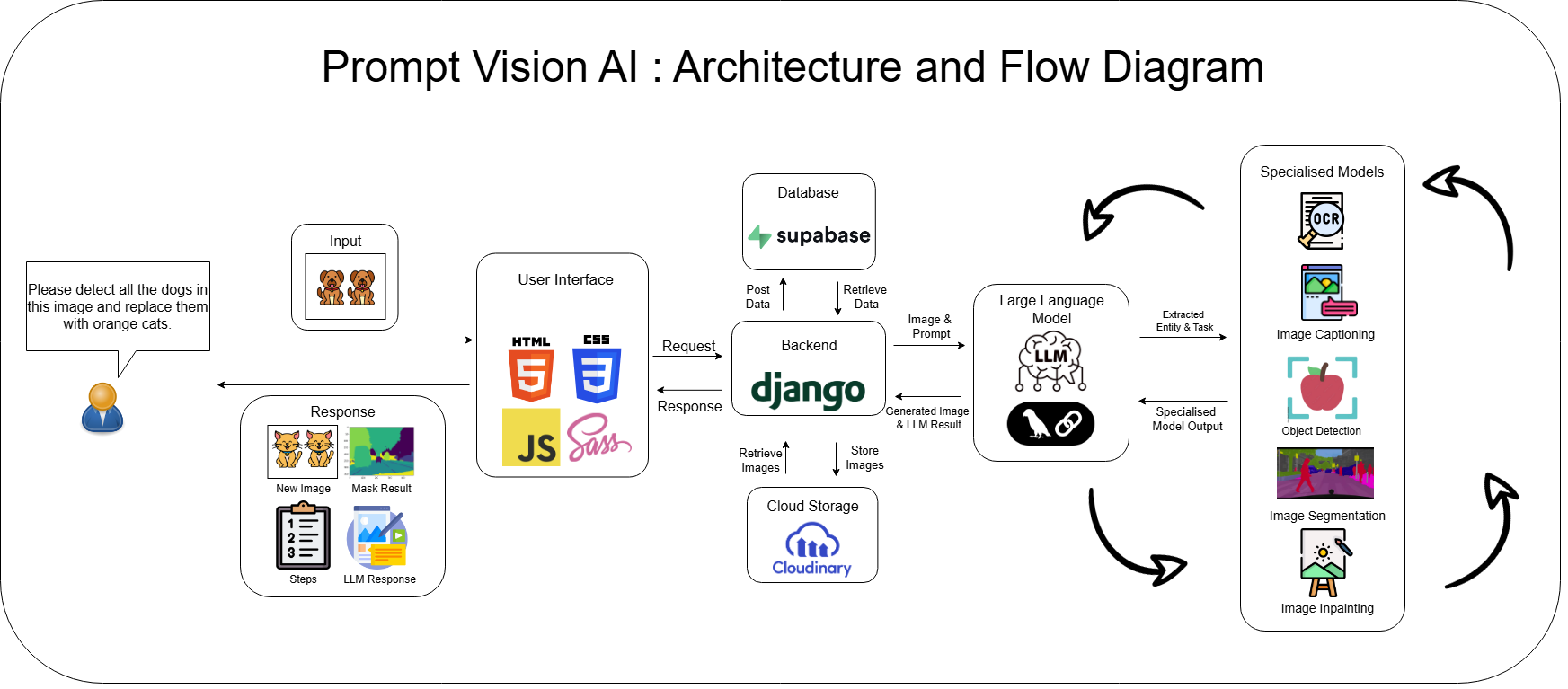
The LLM agent serves as the orchestrator, determining which tools to use and in what sequence based on the user's natural language request. This allows for complex workflows to be executed through simple conversational instructions.
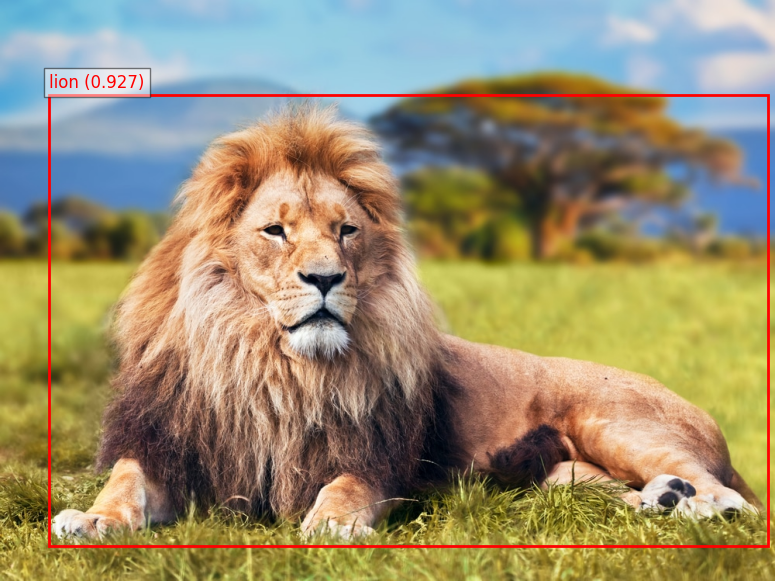
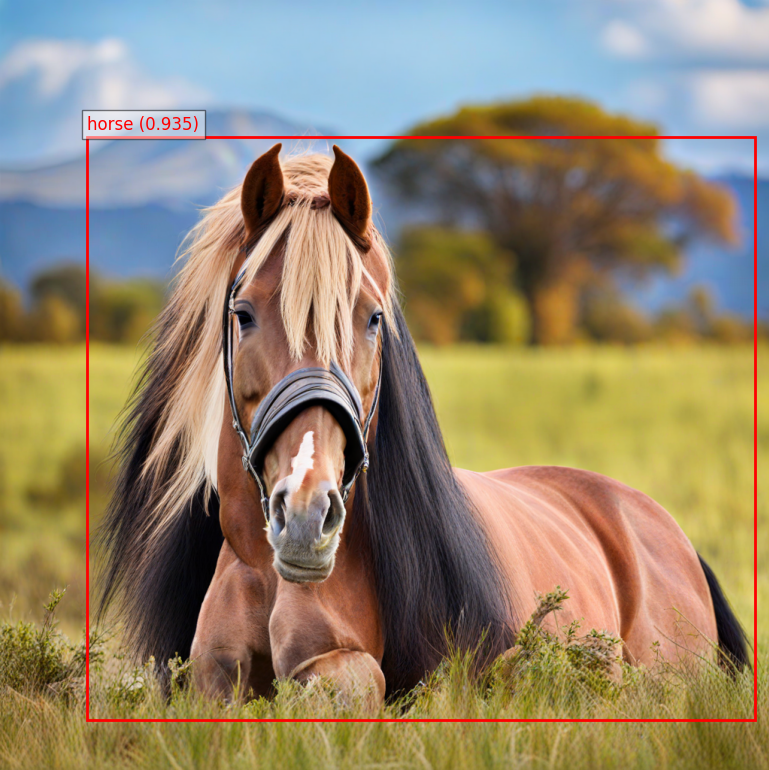
The agent uses Grounding DINO for zero-shot object detection based on text prompts.
Model: Grounding DINO Base
- Architecture: Transformer-based zero-shot detection model
- Framework: HuggingFace Transformers
- Model Path:
tools/grounding_dino/grounding_dino_base
Model Description
Grounding DINO Base is a moderately heavy model (~1.2 GB) that offers excellent accuracy for zero-shot object-detection tasks. It leverages pretrained weights from the DINO (DIstillation with NO labels) framework, trained on a mixture of Object365, GoldG and COCO datasets. The model excels at locating objects described by natural-language prompts without category-specific training, achieving 56.7 % AP on COCO validation data.
Performance Metrics
- mAP (COCO val2017): 56.7 % [Grounding DINO v0.1.0-alpha2 release]
Why We Selected This Model
Grounding DINO was chosen over detectors such as DETR, YOLOv8 or Faster R-CNN because of its ability to perform zero-shot detection from text alone. Our system must answer arbitrary user requests, so a fixed-class model like YOLOv8 (80 categories) would require continual re-training. Grounding DINO can interpret and locate virtually any object described in plain language with state-of-the-art accuracy, giving us the flexibility we need while keeping fine-tuning requirements to a minimum.
Technical Implementation:
-
Preprocessing:
- Input image is loaded, converted to RGB format
- Text prompts are formatted as nested lists for model input
- Inputs are processed using a specialized
AutoProcessorfrom Transformers
-
Detection Process:
- Tokenized inputs pass through the model architecture
- Grounding DINO performs object-text alignment and localization
- A post-processing step applies threshold filtering (box_threshold=0.45, text_threshold=0.3)
- Bounding boxes are normalized to the original image dimensions
-
Postprocessing:
- Extracted boxes are converted to [x1, y1, x2, y2] format
- Centroids are calculated as the center points of each bounding box
- Confidence scores are rounded to 3 decimal places
- Matplotlib visualizes boxes on the original image with labels and scores
- Annotated image is saved as PNG and uploaded to Cloudinary
Input:
{
  "image_url": "https://example.com/lion.jpg",
  "prompt": "lion"
}
Output:
{
  "success": true,
  "prompt": "lion",
  "original_image_url": "https://example.com/lion.jpg",
  "bounding_boxes": [[100, 150, 400, 500]],
  "centroids": [[250, 325]],
  "labels": ["lion"],
  "annotated_image_url": "https://res.cloudinary.com/example/annotated_lion.jpg"
}
Example:
Original Image:

Object Detection (Bounding Box):
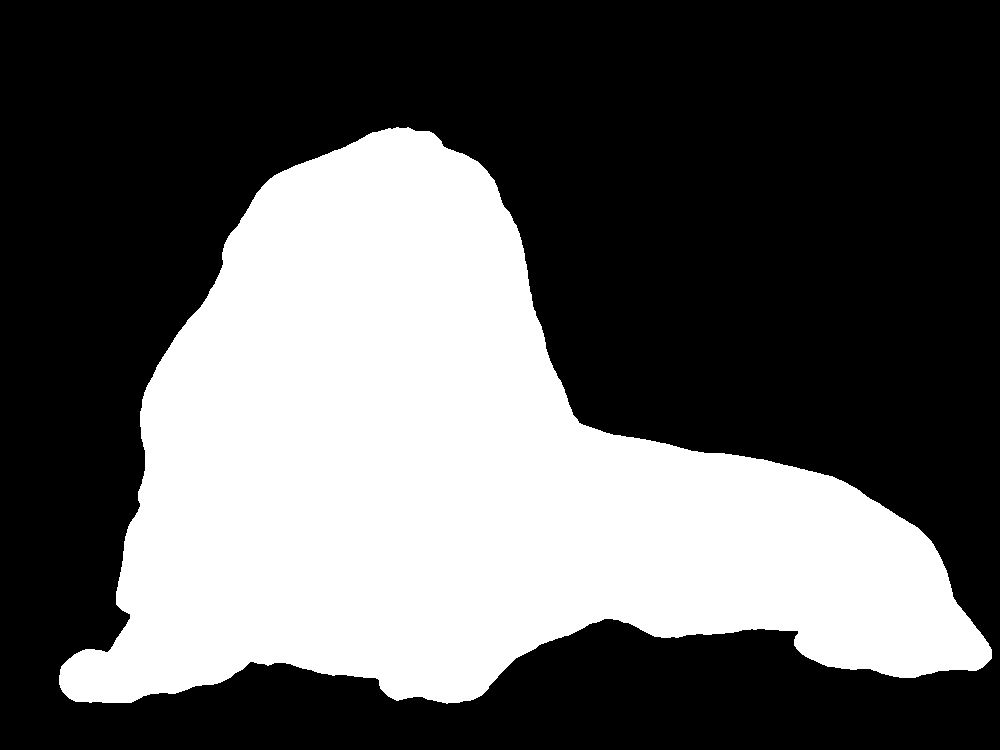
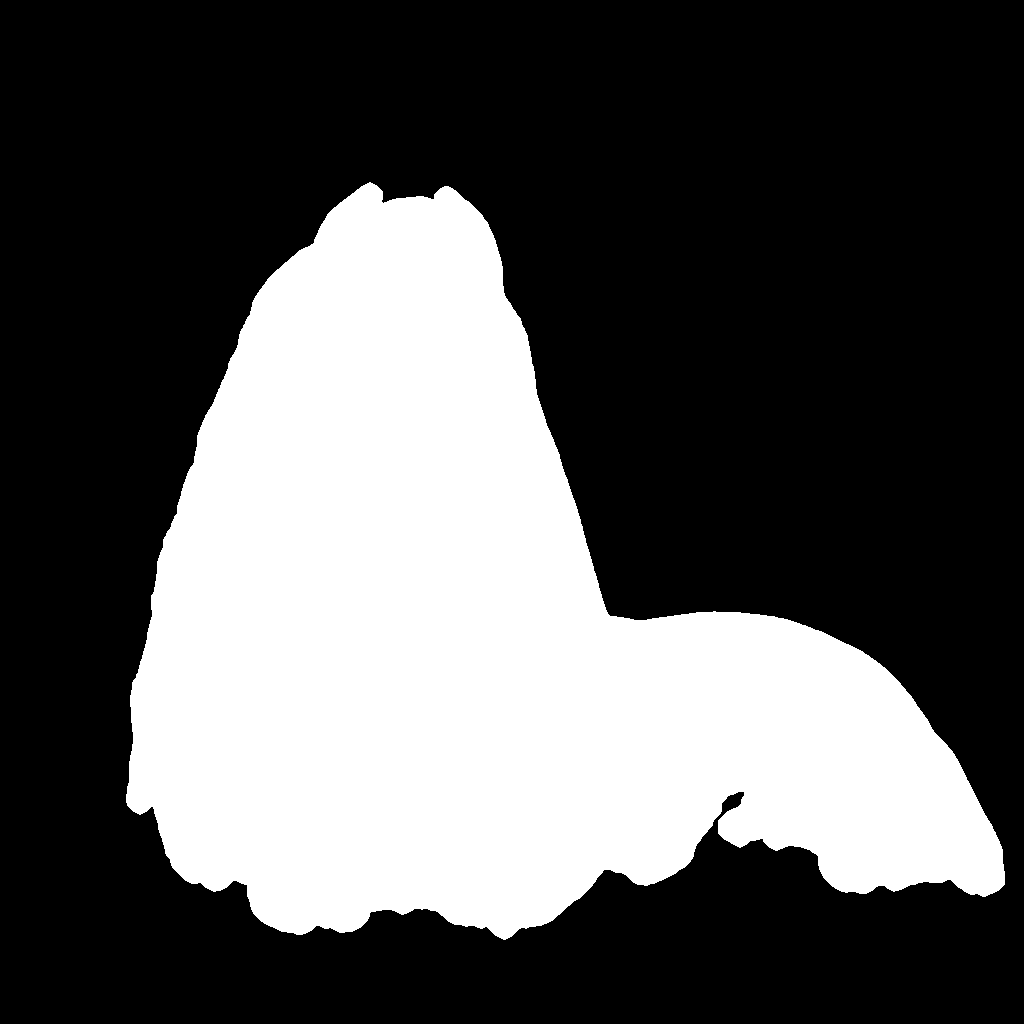
The Segment Anything Model (SAM) creates precise masks for objects detected in the previous step.
Model: SAM (Segment Anything Model) v2.1 Large
- Architecture: Mask decoder architecture
- Framework: Ultralytics SAM implementation
- Model Path:
tools/sam/sam2.1_l.pt
Model Description
SAM v2.1 Large (~2.5 GB) is Meta AI’s flagship promptable segmentation model, pretrained on the 1 B-mask SA-1B dataset (11 M images). It delivers state-of-the-art mask quality and excels at prompt-guided, zero-shot segmentation without task-specific finetuning, reaching 79.5 % mIoU on high-quality COCO-style benchmarks.
Performance Metrics
| Metric | Value | Dataset / Setting | Source |
|---|---|---|---|
| Boundary AP | 28.2 APB | COCO val (ViT-B backbone) | “Segment Anything in High Quality” |
| mIoU | 79.5 % | Four HQ datasets (zero-shot, ViT-L) | “Segment Anything in High Quality” |
| Zero-shot mIoU | 70.6 % | Four HQ datasets (ViT-B) | “Segment Anything in High Quality” |
Why We Selected This Model
SAM outperformed alternatives like Florence 2 in both boundary quality (28.2 APB) and overall mask accuracy (79.5 mIoU). Its prompt-guided zero-shot segmentation removes the need for retraining when users ask to segment new objects, a flexibility other models lack. This high-quality, “segment-anything” capability is essential for our pipeline, where precise masks feed directly into downstream in-painting editing tasks.
Technical Implementation:
-
Preprocessing:
- Input image is downloaded and stored as a temporary file
- Bounding boxes from Grounding DINO are passed directly to SAM
-
Segmentation Process:
- SAM model inference runs on the image with provided bounding boxes
- The model generates binary mask predictions for each bounding box
-
Postprocessing:
- Multiple masks (if detected) are merged into a single binary mask using logical OR
- Advanced morphological operations enhance mask quality:
- Opening operation (erosion then dilation) removes noise
- Closing operation (dilation then erosion) fills holes
- Small isolated regions (<20 pixels) are removed
- Final dilation expands the mask slightly
- Gaussian blur with thresholding smooths edges
- Processed mask is converted to a PNG image and uploaded to Cloudinary
Input:
{
  "image_url": "https://example.com/lion.jpg",
  "bounding_boxes": [[100, 150, 400, 500]]
}
Output:
{
  "success": true,
  "original_image_url": "https://example.com/lion.jpg",
  "merged_mask_url": "https://res.cloudinary.com/example/lion_mask.jpg"
}
Example:
Segmentation Mask:
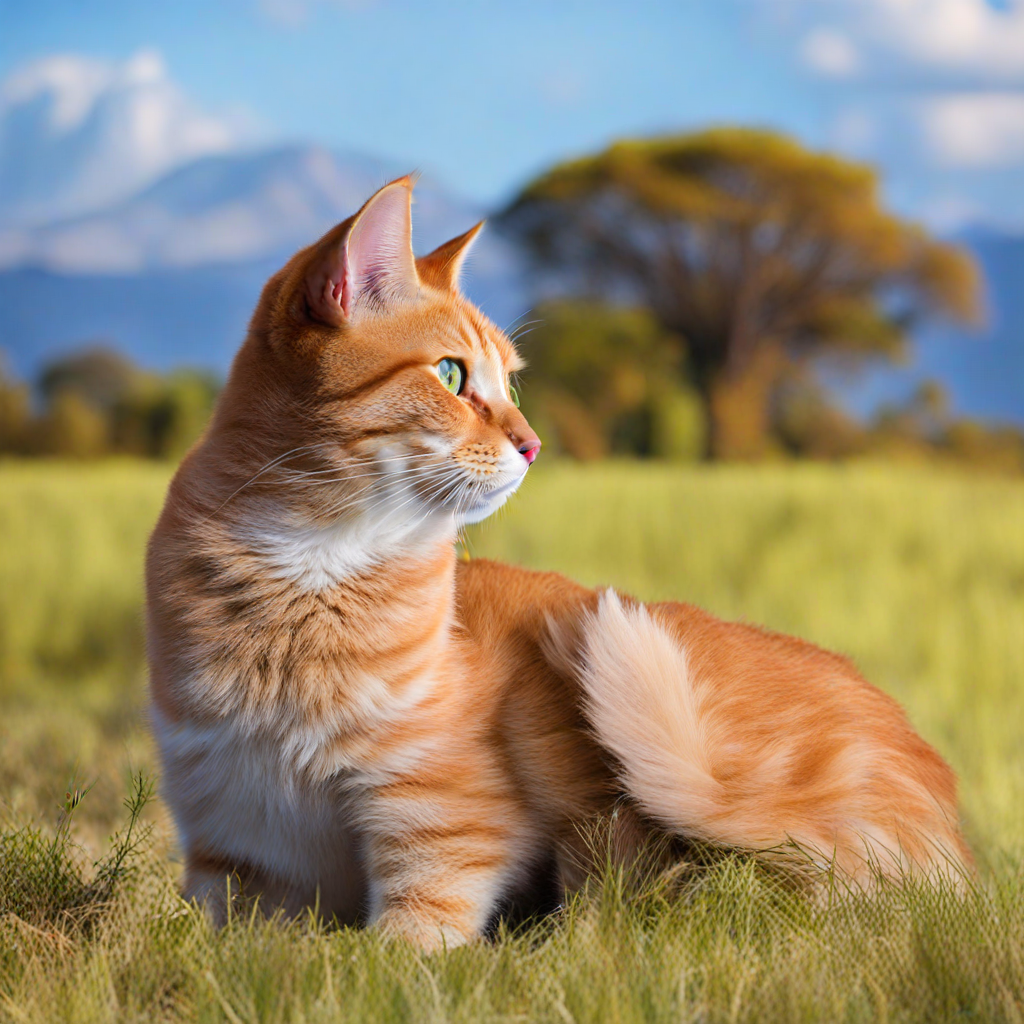
The agent uses Stable Diffusion XL for high-quality inpainting to modify objects based on text prompts. The implementation is a two-stage process:
Models:
-
Base Model: Stable Diffusion XL Inpainting
- Architecture: Latent diffusion model with U-Net backbone
- Framework: HuggingFace Diffusers
- Model Path:
tools/diffusion/LatentDiffusion/sdxl_inpaint_base_local
-
Refiner Model: Stable Diffusion XL Img2Img
- Architecture: Latent diffusion model specialized for refinement
- Framework: HuggingFace Diffusers
- Model Path:
tools/diffusion/LatentDiffusion/sdxl_refiner_local
Model Description
The SDXL inpainting pipeline is resource-intensive, with the Base + Refiner checkpoints occupying ≈ 10 GB of disk and needing 10 GB + of VRAM for best results. Both networks inherit the pretrained weights from Stability AI’s SDXL-1.0 (trained on billions of LAION-5B image–text pairs and several curated high-quality subsets). The two-stage design first produces a coarse image (Base) and then sharpens details and global lighting (Refiner), yielding photorealistic, seamless edits that rival closed-source systems.
Performance Metrics
- FID ≈ 23.5 (lower is better, indicates high visual quality) [MLCommons blog, Aug 28 2024] |
- CLIP Score ≈ 31.75 (higher is better, measures text-image alignment) [MLCommons blog, Aug 28 2024] |
Why We Selected This Model
We benchmarked several open-source inpainting solutions (e.g., Stable Diffusion 1.5 Inpaint, Kandinsky 2.2, Paint-by-Example) and found SDXL’s two-stage approach consistently produced more coherent lighting and texture transitions while maintaining strong prompt fidelity. Although SDXL demands more VRAM than single-stage models, its near-state-of-the-art FID and CLIP scores—and, more importantly, visibly cleaner boundaries—made it the best fit for our editing use-case.
Technical Implementation:
-
Base Inpainting Model (SDXL Inpaint):
- Takes the original image, a mask, and a text prompt
- Performs initial inpainting up to a defined denoising threshold (0.8)
- Outputs latent representations rather than a final image
- Uses 28 inference steps with DPMSolverMultistepScheduler
- Applies a default negative prompt to avoid unwanted artifacts: "blurry, low quality, distortion, mutation, watermark, signature, text, words"
-
Refiner Model (SDXL Img2Img):
- Takes the latents from the base model
- Continues the denoising process from where the base model stopped (denoising_start=0.8)
- Uses 15 inference steps to refine details and add photorealism
- Outputs the final high-quality image
-
Memory Optimization:
- Implements VRAM management between stages
- Moves the base model to CPU after first stage
- Uses model CPU offloading
- Enables xformers for memory-efficient attention
- Implements VAE tiling for processing larger images
- Uses garbage collection and CUDA cache clearing
-
Preprocessing:
- Image dimensions are verified/adjusted to multiples of 8 (required by VAE)
- Images larger than VAE thresholds are resized
- Mask is prepared with Gaussian blur (sigmaX=3, sigmaY=3) and thresholding (127)
- Handles resolution consistency between image and mask using PIL.Image.resize
Input:
{
  "image_url": "https://example.com/lion.jpg",
  "mask_url": "https://example.com/lion_mask.jpg",
  "prompt": "orange cat"
}
Output:
{
  "success": true,
  "inpainted_image_url": "https://res.cloudinary.com/example/lion_to_cat.jpg",
  "original_image_url": "https://example.com/lion.jpg"
}
Example:
Inpainted Image (Lion to Cat):
The image captioning tool uses Florence2 to generate descriptive captions for images, providing context for further processing.
Model: Florence2 Vision-Language Model
- Architecture: Multimodal transformer with vision and language capabilities
- Framework: Custom API hosted service
- API Endpoint: External Florence API
Model Description
Florence 2 Large (≈ 0.77 B parameters) is Microsoft’s state-of-the-art vision–language foundation model. We deploy it behind an internal API, so it introduces no local GPU overhead. Pre-trained on the 5-billion-annotation FLD-5B corpus and then optionally fine-tuned on public captioning data, Florence 2 excels at producing detailed, context-rich descriptions of images.
Performance Metrics
- CIDEr = 135.6 (COCO Karpathy test split, zero-shot) [Florence-2: Advancing a Unified Representation for a Variety of Vision Tasks]
- CIDEr = 143.3 (COCO Karpathy test split, fine-tuned generalist model) [Florence-2: Advancing a Unified Representation for a Variety of Vision Tasks]
Why We Selected This Model
In our internal benchmarks Florence 2 produced more accurate, attribute-aware captions than other alternatives, while using fewer parameters than most other models. Its high CIDEr scores translate into captions that faithfully capture subtle details—crucial for downstream decision-making in our pipeline.
Technical Implementation:
-
Preprocessing:
- Input image is downloaded from provided URL
- Image format is determined and preserved for API request
- A temporary filename with appropriate extension is generated
-
API Interaction:
- Image is sent to the Florence API endpoint as a multipart/form-data request
- API does the heavy lifting of running the Florence2 model
- Response includes the generated detailed caption
-
Note:
- The Florence2 capabilities are made available through a custom API (Florence API)
- Processing is done on the server-side, reducing client-side compute requirements
Input:
{
  "image_url": "https://example.com/lion.jpg"
}
Output:
{
  "success": true,
  "caption": "A lion lying in the grass with trees in the background on the savanna.",
  "original_image_url": "https://example.com/lion.jpg"
}The OCR tool extracts text from images, useful for reading signs, documents, or any text content in visual materials.
Model: Tesseract OCR
- Architecture: LSTM-based OCR engine
- Framework: pytesseract (Python wrapper for Tesseract)
- Version: Tesseract 4.x
Model Description
Tesseract OCR v4.x is Google-maintained, LSTM-based open-source software that weighs in at only ≈ 30 MB. Trained on a mixture of public-domain texts and synthetic data, it delivers reliable recognition on clean, printed documents while supporting 100 + languages out of the box.
Performance Metrics
| Metric | Value | Evaluation Setup | Source |
|---|---|---|---|
| Character-level accuracy | 95 – 98 % | Clean, printed text | ML Journey – “TrOCR vs. Tesseract” (2024-11-23) |
| Word-level accuracy | 94 – 98 % | UNLV dataset, clean docs | GdPicture Blog – “Best C# OCR libraries: 2025 Guide” (2025-03-25) |
| Language support | 100 + languages | Official README | tesseract-ocr/tesseract GitHub README |
Why We Selected This Model
Tesseract’s 95 – 98 % character accuracy on clean documents, broad language coverage, and zero licensing cost made it the best fit for our signage-and-label OCR component. Its tight integration with pytesseract lets us embed recognition in our pipeline with minimal dependencies, and its small footprint keeps resource usage low compared to heavier Transformer-based OCR models.
Technical Implementation:
-
Preprocessing:
- Input image is downloaded from provided URL
- Image is loaded using PIL's Image module
-
Text Extraction:
- Pytesseract's
image_to_stringfunction processes the image - No specialized preprocessing is applied to the image
- Extracted text is stripped of leading/trailing whitespace
- Pytesseract's
-
Postprocessing:
- Simple validation checks if any text was found
- Returns a message if no text could be extracted
Input:
{
  "image_url": "https://example.com/sign.jpg"
}
Output:
{
  "success": true,
  "extracted_text": "NO PARKING\nVIOLATORS WILL BE TOWED",
  "original_image_url": "https://example.com/sign.jpg"
}A simple image transformation tool that converts colored images to black and white.
Technical Implementation:
-
Preprocessing:
- Input image is downloaded from the provided URL
- Image is loaded into memory using PIL
-
Conversion Process:
- PIL's
convert("L")method transforms the image to grayscale - This creates an 8-bit single channel image where each pixel has a value from 0 (black) to 255 (white)
- PIL's
-
Postprocessing:
- Converted image is saved to a temporary file as PNG
- Image is uploaded to Cloudinary for storage
- Temporary local file is deleted after upload
Input:
{
  "image_url": "https://example.com/colorful_image.jpg"
}
Output:
{
  "success": true,
  "original_image_url": "https://example.com/colorful_image.jpg",
  "bw_image_url": "https://res.cloudinary.com/example/bw_image.jpg"
}The LLM agent can dynamically chain different tools together based on the task. Here are some example workflows:
- User Query: "Change this lion to orange cat"
- LLM Agent: Recognizes this as an inpainting task requiring detection and segmentation first
- Object Detection: Identifies and localizes lion with bounding box
- Segmentation: Creates precise mask of the lion
- Inpainting: Replaces lion with orange cat based on mask
Result:
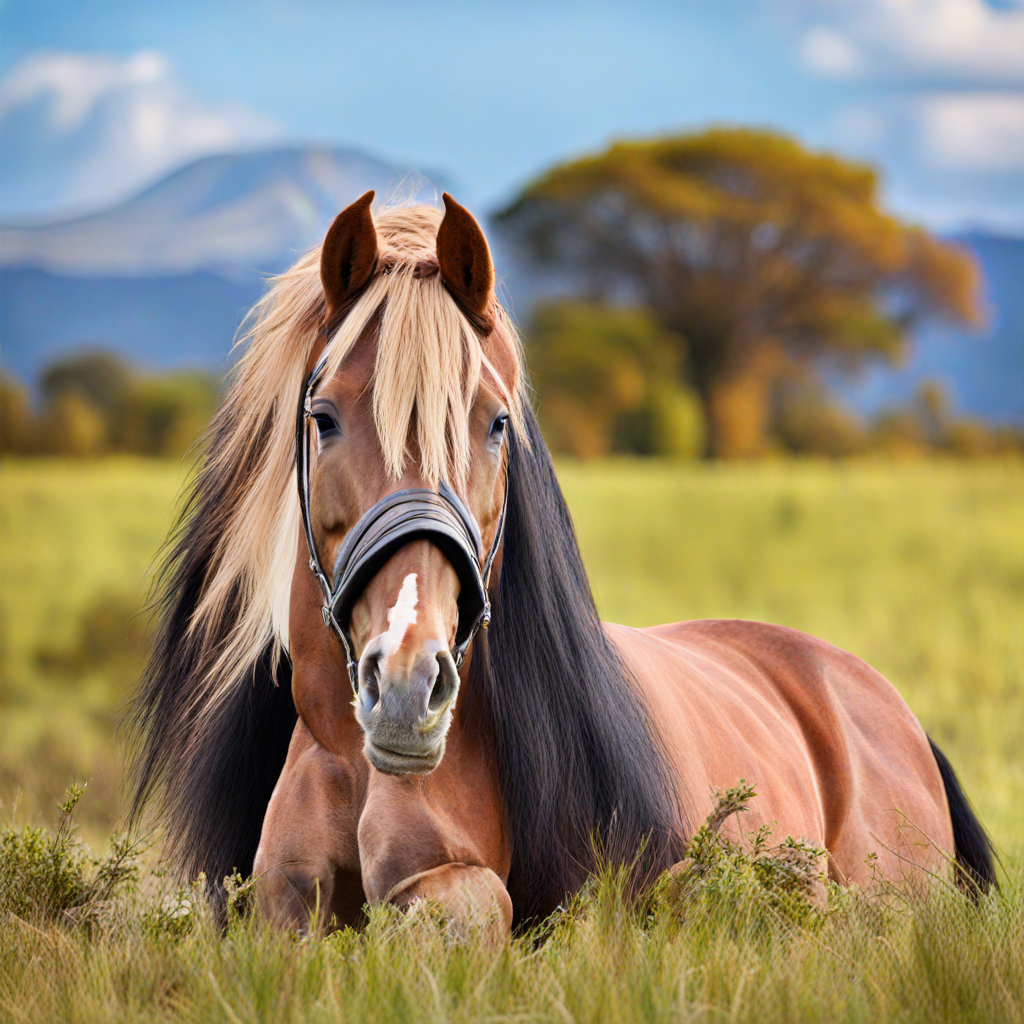
The agent maintains context of the conversation and can work with previously modified images:
-
User Query: "Change the lion to a horse"
- Agent performs detection → segmentation → inpainting
Result:
-
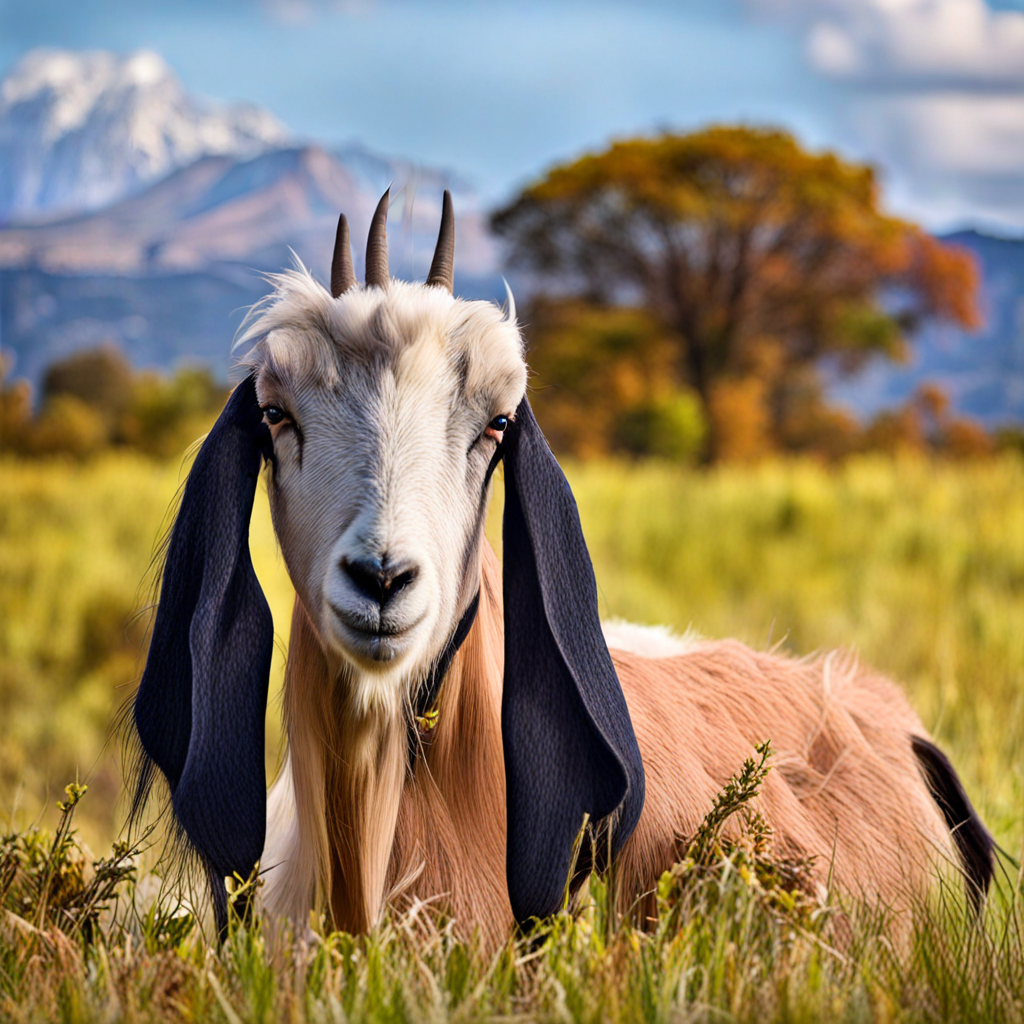
User Query: "Change this horse to a goat"
- Agent performs new detection → segmentation → inpainting on the horse image
Object Detection:
Segmentation:
Final Result:
- User Query: "What does this sign say?"
- LLM Agent: Recognizes this requires text extraction
- Image Captioning: Identifies that there's text in the image
- OCR: Extracts the text content from the image
- LLM Response: Provides the extracted text with context
- User Query: "Tell me what's in this image"
- LLM Agent: Recognizes this requires image understanding
- Image Captioning: Generates a general description of the image
- Object Detection: Identifies specific objects if needed for more detail
- LLM Response: Combines the caption and detection results to provide a comprehensive description
PromptVisionAI employs a function-calling agent architecture powered by Llama-3.3-70b (accessed via Groq's API). This high-parameter model serves as the central orchestrator, providing both the reasoning capabilities and the user interface for the entire system.
The agent follows a structured function-calling pattern where:
-
Initialization: On startup, the agent loads tool definitions, system prompts, and establishes connections to external services (Cloudinary for image hosting and Supabase for persistence).
-
Execution Model: The agent operates in a predict-execute-observe loop:
- Predict: The LLM determines which tools to call based on user input
- Execute: The system runs the selected tools with specified parameters
- Observe: Results are collected and fed back to the LLM for next steps
-
Routing Logic: All user messages are passed through the primary LLM interface, which dynamically decides whether to handle the request directly or delegate to specialized tools.
The system leverages the LLM's inherent chain-of-thought capabilities to:
- Parse Intent: Extract the user's primary goal from natural language
- Decompose Tasks: Break complex operations into sequential tool executions
- Plan Execution: Determine which tools must be used in which order
- Interpret Results: Evaluate tool outputs to decide on next steps
- Generate Responses: Convert technical results into user-friendly language
For example, when a user requests "Change this lion to an orange cat," the agent internally reasons: "I need to (1) detect the lion, (2) create a precise mask, (3) use inpainting to replace it with a cat, and (4) return the result with an explanation."
The system prompt is carefully designed with several components:
- Role Definition: Establishes the agent as an image processing assistant
- Tool Documentation: Detailed descriptions of each tool's capabilities and limitations
- Decision Guidelines: Rules for determining which tools to use for which tasks
- Response Formatting: Instructions on how to present results to users
- Error Handling: Procedures for gracefully managing failures
The prompt instructs the agent to think step-by-step, consider context from prior conversation turns, and prioritize user intent over literal command interpretation.
The agent's tool selection process follows these principles:
- Context Analysis: Examines both the immediate request and conversation history
- Task Classification: Categorizes the request into high-level tasks (detection, editing, etc.)
- Tool Matching: Maps tasks to appropriate tools based on capability alignment
- Dependency Resolution: Identifies prerequisites (e.g., detection before segmentation)
- Parameter Extraction: Determines required inputs for each tool from the user request
This process allows the agent to automatically build complex workflows like the detection → segmentation → inpainting chain demonstrated in the examples.
The system implements a persistent memory architecture:
- Storage Backend: Supabase database maintains conversation history with table schemas optimized for quick retrieval
- Context Window: Recent conversation turns are included in each LLM prompt
- Image References: Prior image URLs are tracked to enable chained operations
- Tool Call History: Previous tool executions are recorded to inform future decisions
This memory system enables the contextual awareness demonstrated in Example 2, where the agent recognizes that "this horse" refers to the previously modified image.
The execution engine coordinates the workflow between tools:
- Resource Management: GPU memory is carefully allocated between different models
- Error Recovery: Failed operations trigger fallback strategies when possible
- Result Caching: Processed images and intermediate results are cached to avoid redundant computation
- State Tracking: The execution state is monitored to ensure proper tool sequencing
The system integrates six specialized tools (detailed in previous sections):
- Object Detection (Grounding DINO): Zero-shot object localization from text prompts
- Segmentation (SAM): Precise mask generation for detected objects
- Inpainting (Stable Diffusion XL): Two-stage image editing with base and refiner models
- Image Captioning (Florence2): Generates descriptive text from image content
- OCR: Extracts text from images using Tesseract
- Black & White Conversion: Simple grayscale transformation
The agent dynamically chains these tools together based on task requirements, creating a flexible system capable of handling a wide range of image processing requests through natural language instructions.
- Python 3.10+
- CUDA-compatible GPU for optimal performance (CPU mode is also supported)
- 10+ GB of disk space for model weights
-
Clone the repository:
git clone https://github.com/PromptVision-AI/llm-chatbot.git cd llm-chatbot -
Install dependencies:
pip install -r requirements.txt
-
Download required model weights:
-
Grounding DINO:
mkdir -p tools/grounding_dino/grounding_dino_base
# Download model files from huggingface.co/IDEA-Research/grounding-dino-base
# Place model files in tools/grounding_dino/grounding_dino_base directory
-
SAM (Segment Anything Model):
mkdir -p tools/sam
# Download SAM weights from Facebook Research
# Place sam2.1_l.pt in the tools/sam directory
-
Stable Diffusion XL:
mkdir -p tools/diffusion/LatentDiffusion/sdxl_inpaint_base_local
mkdir -p tools/diffusion/LatentDiffusion/sdxl_refiner_local
# Download SDXL base inpainting model and refiner model
# Place in their respective directories
-
-
Configure environment variables:
Create a
.envfile in the project root with the following required variables:# LLM API (Groq) GROQ_API_KEY=your_groq_api_key LLM_NAME=llama-3.3-70b-versatile # Cloudinary for image hosting CLOUDINARY_NAME=your_cloudinary_cloud_name CLOUDINARY_API_KEY=your_cloudinary_api_key CLOUDINARY_API_SECRET=your_cloudinary_api_secret # Supabase for chat history SUPABASE_URL=your_supabase_project_url SUPABASE_KEY=your_supabase_anon_key -
Set up Supabase:
- Create a new project in Supabase
- Run the SQL setup script to create the required tables (see below)
-
Start the server:
python main.py
The server will start on port 5000 by default.
POST /chat
Parameters (JSON):
user_id: User identifierprompt_id: Prompt identifierprompt: User's message/instructionconversation_id: Conversation identifierinput_image_url: URL for image (optional)
Response:
{
  "text_response": "I've changed the lion to an orange cat.",
  "image_url": "https://res.cloudinary.com/example/original_lion.jpg",
  "inpainted_image_url": "https://res.cloudinary.com/example/lion_to_cat.jpg"
}