
Extracting relevant information from faculty bios (2.2)
This repository contains the source code, data, and documentation for Keon (Isaac) Park's final project for CS 410 Fall 2020 at UIUC. This project is an extension/spin-off of the ExpertSearch system that seeks to build upon ExpertSearch's NLP features by extracting not only names and emails from faculty pages but also keywords, named entities, and topics in order to provide users with a more comprehensive overview without having to manually visit the page.
This project was an individual effort by Keon (Isaac) Park.
Software Usage Tutorial Video
The link to the tutorial video for this project is here. The video is a brief explanation of how to locally install/run and use the project code, including a example use case. The rest of this README document also provides details regarding this software's functionality and implementation.
As previously mentioned, this project is a standalone extension of the ExpertSearch system that provides improved NLP features to better analyze text in faculty web pages. In its current implementation, ExpertSearch only extracts the name and email of the faculty member from the page, limiting its use as a tool for users seeking more in-depth overviews of faculty members and their biographies. As a result, this project was developed with more advanced text retrieval and mining features to automatically provide users with a useful "snapshot" of faculty page content.
It accomplishes this by scraping, processing, and analyzing text data from faculty pages via URLs entered by the user using BeautifulSoup, spaCy, scikit-learn, and pre-trained TF-IDF and LDA models (available as .pkl files in the server/data directory) to automatically extract/calculate relevant keywords, named entities, and topics. For example, here is a screenshot of the system's results for UIUC Professor Tarek Abdelzaher:
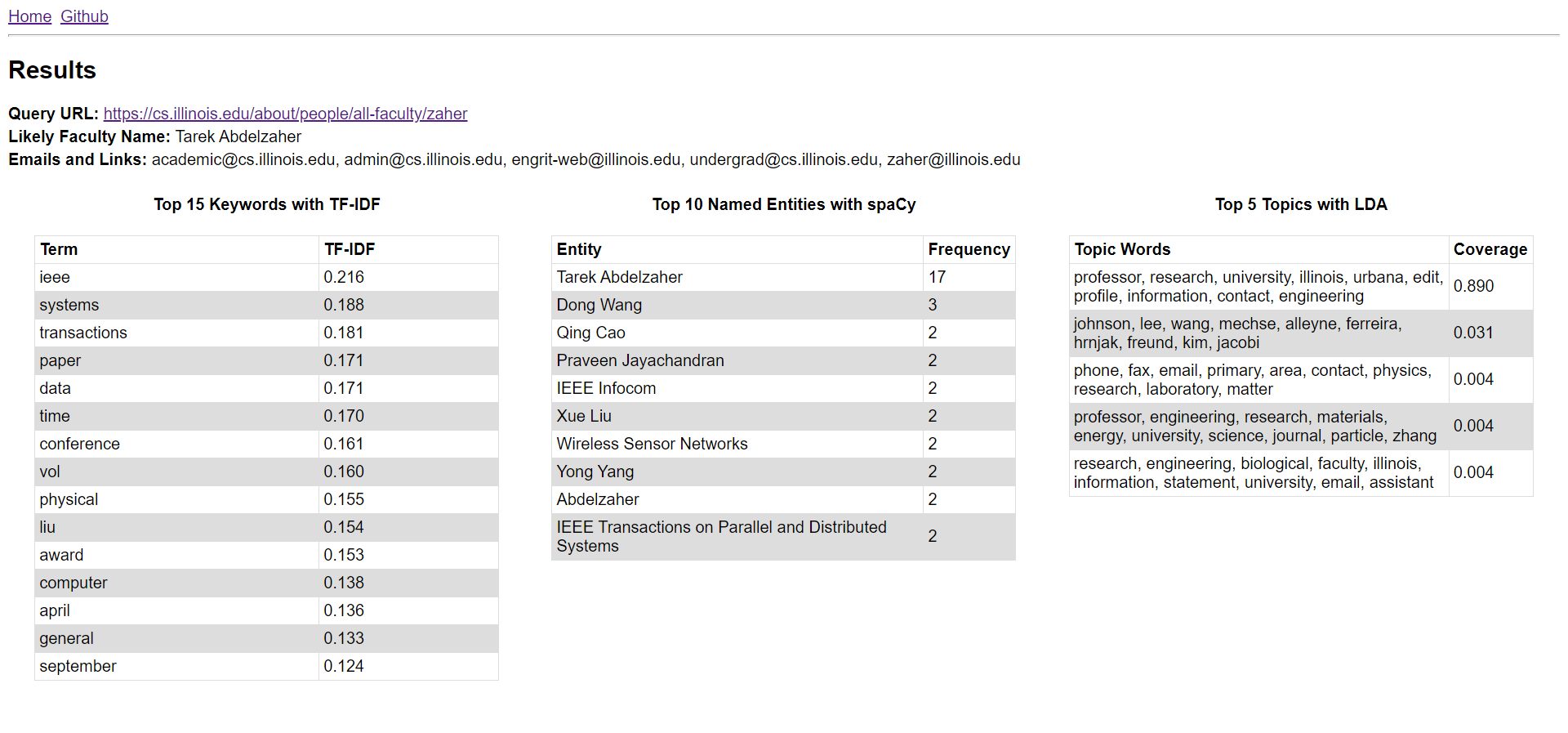
As shown above, this software, like ExpertSearch includes the likely name and emails of the faculty member. It also provides detailed overviews of the system's calculated keywords, named entities, and topics with specific numbers to provide users with an effective "snapshot" of the page without visting it manually. For example, the user can deduce that Professor Abdelzaher is likely to be an engineering (likely CS or CompE, due to keywords like system, transactions, and data) research professor involved/related with the Institute of Electrical and Electronics Engineers (IEEE).
The current pipeline of this sytem for retrieving, processing, and analyzing text data via user-provided URLs is as follows:
- User enters a URL of a faculty web page
- Web-scrape the URL and retrieve HTML source of the page
- Retrieve text from "relevant" HTML tags containing useful information (match CSS classes of HTML tags;
nlp/html_parser.py) - Perform NER to find names/organizations and find emails/links from text data using
spaCy - Tokenize text data into unigrams using
spaCy, keeping only alphabetic, non-stopword, noun/verb/adj tokens - Use tokenized documents for pre-trained
scikit-learnTF-IDF vectorizer (trained on ~600 UIUC faculty bios) to find keywords - Use TF-IDF weights of document to calculate its topic coverage using pre-trained
scikit-learnLDA model and topic distributions - Compile results into dataframes, which are then converted into html and rendered in the results page.
The code for this pipeline can be roughly traced in the query() route handler function in app.py.
This project/system is implemented as a Flask web application with a Python backend and HTML/CSS frontend. The code is organized like a standard Flask application, in the following directory structure (not all files shown):
CourseProject/
│   README.md
│   .gitignore
|   ...
└───server/
    │   app.py
    │   train.py
    │   config.py
    │   requirements.txt
    └───data/
    │      tfidf.pkl
    |      uiuc_bios.txt
    |      ...
    └───nlp/
    │      scraper.py
    |      html_parser.py
    |      tfidf_lda.py
    |      ...
    └───static/
    │      main.css
    └───templates/
           base.html
           ...
app.py houses the Python code directly responsible for running the Flask web application, including route handlers for the home and results pages. When the user enters and submits a URL through the form in the home page, the Flask app redirects the user to the /query endpoint with the provided URL to invoke the corresponding route handler query() that is responsible for running the text retrieval and mining pipeline of the application. Thus, most future changes/tweaks to this system's NLP pipeline will originate in this function (query()).
train.py contains the Python code necessary to train and save TF-IDF and LDA models using the UIUC faculty bios text data in the data directory; the model files generated by train.py are used by the Flask application.
config.py contains all of the constants used by both the Flask application and train.py as configuration for various parameters during text retrieval and mining. For example, this file can be customized to tweak max_df and min_df used by the TF-IDF vectorizer.
The nlp directory contains all of the NLP-related code of the system, divided into individual modules/files that is used to perform scraping, tokenization, NER, keyword extraction, and topic mining. The functions in this package implement and use various NLP and data libraries, such as: BeautifulSoup (for web-scraping), spaCy (for tokenization and NER), scikit-learn (for TF-IDF and LDA), and pandas (for compiling results into dataframes). Thus, most future changes to the specific NLP techniques used by this project will originate in this package and its specific modules.
The data directory contains the trained TF-IDF vectorizer and LDA models as pickle files that are loaded in by the Flask application when calculating TF-IDF weights of keywords and topic coverages for the faculty page provided by the user. This directory also contains text files of UIUC faculty bios and urls compiled from the MP2.3 dataset; these data files are used by train.py to generate the .pkl files for the trained models.
The static and template directories contain HTML/CSS code for the Flask frontend. Flask uses Jinja2 templates.
These instructions assume the user is already knowledgeable of git and Python environments and has Python 3 (note: 3.7 was used during development) with pip installed.
- Clone this repository
git clone https://github.com/Parkkeo1/CourseProject.git
cd CourseProject- Create a new Python venv and install dependencies
python -m venv venv
source venv/Scripts/activate
pip install -r server/requirements.txt
python -m spacy download en_core_web_lg- Launch the software.
cd server
python train.py           // if you want to to newly train and save a TF-IDF and LDA model based on data/uiuc_bios.txt to be later used by the Flask app.
python app.py             // if you want to launch the project's main application, the Flask app.
If you launched the Flask app, navigate to localhost:5000 in your web browser to view and use the Flask app.